How to Build a Fully Booked Website for Your Service Business
Learn how to turn your website from a passive online brochure into your most effective, automated client-getter. This guide covers everything from building trust to seamless booking and local SEO.
Josh · Dec 30, 2025 · 16 min read
- fully booked website
- online booking
- local SEO
- client management
- service business
Let's get one thing straight: having a "fully booked" website isn't about some secret marketing hack. It’s about one thing: making the journey from a curious visitor to a confirmed client as smooth and obvious as possible.
Your goal is to turn your website from a passive online brochure into your most effective, automated client-getter. It’s about building a digital experience that anticipates a potential client's needs, answers their questions before they even ask, and gently guides them right to your calendar.
Building a Website That Actually Converts Visitors into Clients
Before anyone clicks "book now," your website has a crucial job to do: convince visitors that you are the person to solve their problem. This isn't just about pretty design; it’s about creating an immediate sense of clarity and trust.
Think of your homepage as your digital storefront. Is it welcoming? Does it immediately tell people they're in the right place? The single most important question you need to answer, right up front, is "Why should I choose you?"
Crafting a Value Proposition That Clicks
Your value proposition is your promise. It's a short, punchy statement that should be impossible to miss on your homepage, and it needs to communicate the unique outcome you deliver.
A weak value proposition just lists what you do. For example, "I offer massage therapy." A strong one speaks to the client's deepest need: "Relieve chronic back pain and reclaim your mobility in 60 minutes." See the difference? The second one isn't about the service; it's about the transformation. It hits the pain point and offers a tangible result. That's what grabs attention.
This same logic applies to all your service descriptions. Frame everything around the client’s world, not yours.
- Focus on the "After": What will their life look like once you've helped them? Talk about that.
- Speak Their Language: Ditch the industry jargon. Use the exact words and phrases your clients use to describe their frustrations.
- Connect the Dots: Don't just list a feature; explain why it matters to them. How does that specific technique or tool get them closer to their goal?
Weaving in Trust and Authority
In a service business, trust is everything. A visitor might be interested, but they won't pull out their credit card if they don't trust you. You have to build that confidence right on your site.
It's not just a hunch—a study found that 73% of consumers trust a local business more after reading positive reviews. Social proof isn't a "nice-to-have"; it's a non-negotiable part of the booking process.
So, how do you do it? Start with client testimonials that tell a story. A generic "Great service!" is forgettable. A quote like, "After just three sessions, my shoulder pain is gone for the first time in years" is powerful because it paints a picture of a real outcome.
Then, back it up with visuals. Use professional, high-quality photos of you, your workspace, and you with happy clients (with their permission, of course). Real-life photos create a human connection that slick stock images never will. Every testimonial and every photo should work together to make the decision to book with you feel like the most logical, obvious choice they could possibly make.
2. Implement a Seamless Online Booking System
A clunky, confusing booking process is the fastest way to kill a motivated client's interest. This is where we build the real engine of your business: an intuitive, self-serve scheduling system that lets clients book with you 24/7—no more frustrating phone tag or endless DM chains.
Your goal is to turn your website from a static digital brochure into an automated appointment-setter that works for you around the clock. By making the booking experience ridiculously easy, you remove all friction and capture that client the very moment they decide to hire you.
This simple journey is what we're aiming for. Once a potential client trusts you and sees you as the solution, the final step needs to be effortless.
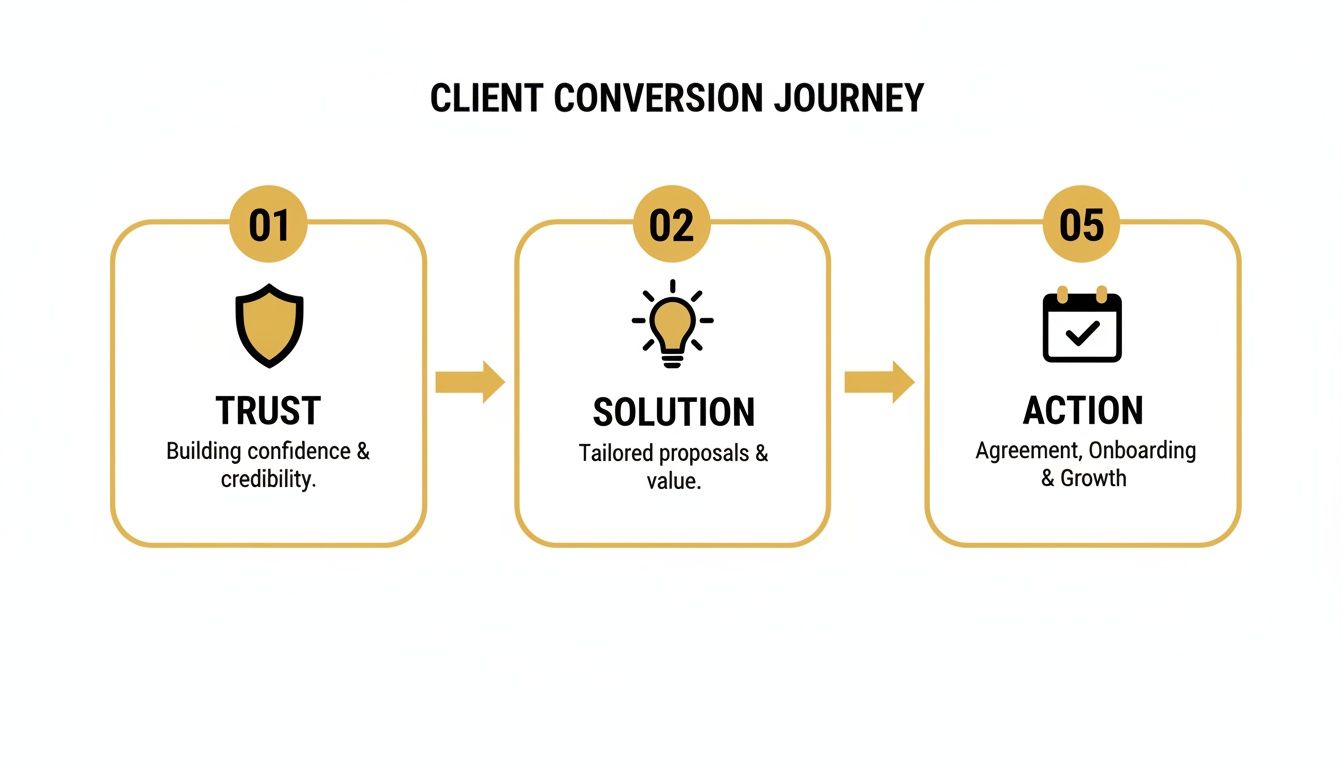
As the visual shows, that final step is a frictionless action—your booking calendar.
The Heart of a Modern Booking System
The core of any effective system is a smart calendar that syncs in real time. I’m talking about a calendar that instantly reflects your true availability across all your devices, because there’s nothing worse than the ultimate client-killer: the double booking.
When a client sees an open slot, they need 100% confidence that it's genuinely available. This two-way sync isn't just a nice-to-have; it's a non-negotiable part of running a professional service. It gives clients the power to book on their own terms, knowing the schedule they see is the schedule you keep.
The client journey is everything. From their first email to the final thank you, your entire process should feel seamless and professional. Happy clients don't just come back; they tell their friends.
This is a foundational principle for platforms like Kejoola, which are designed to keep your Google Calendar, phone, and website perfectly aligned. If you want to get into the nitty-gritty of setting this up, our comprehensive guide to a tab booking system breaks down the entire workflow for maximum efficiency.
Automate Your Confirmations and Reminders
Once a client clicks "book," your job isn't done. The communication needs to continue, and automation is your best friend here. Automated confirmations and reminders are incredibly powerful tools for slashing your no-show rate.
An immediate confirmation email does more than just confirm a time—it reassures the client that their booking is locked in and that you're on top of your game. Then, a timely SMS reminder a day or two before the appointment acts as a gentle nudge, keeping you top-of-mind during their busy week. In fact, businesses have been shown to cut no-shows by as much as 40% just by adding automated text reminders.
The difference this makes to your day-to-day operations is massive. Just look at the comparison.
Comparing Manual vs Automated Booking Workflows
This table highlights just how much time and energy you reclaim when you shift from manual back-and-forth to an integrated, automated system.
| Task | Manual Process (Emails, DMs, Spreadsheets) | Automated Website Process |
|---|---|---|
| Availability Check | Client messages you, you check your calendar, you reply with options. | Client sees your real-time availability online and picks a slot. |
| Booking Confirmation | You manually type and send a confirmation email after finalizing a time. | The system instantly sends a branded, professional confirmation email. |
| Appointment Reminder | You have to remember to text the client a day before (or you forget). | The system automatically sends an SMS reminder 24-48 hours beforehand. |
| Rescheduling | The client contacts you, you negotiate a new time, and update everything. | The client uses a link to reschedule, and the calendar updates instantly. |
This isn't just about saving a few hours a week. It's about projecting a polished, professional image. It tells your clients you're organized and you value their time, building trust long before they even walk through your door.
Mastering Local SEO to Attract Ready-to-Book Clients
Your perfect booking system doesn’t mean a thing if local customers can’t find you. If you want a truly booked-solid calendar, you have to show up the moment a potential client in your area searches for what you offer. This is where mastering local search engine optimization (SEO) becomes a total game-changer.
Local SEO is all about making your business pop in local search results on Google. It’s how you get found for those high-intent searches like "esthetician in Austin" or "massage therapist near me." These aren't just people browsing; they're actively looking for a solution right now, and you need to be the one they find.

Think of it as the bridge connecting your available slots with the people who need them most.
Optimize Your Digital Storefront with Google Business Profile
Your Google Business Profile (GBP) is essentially your digital storefront. It’s often the very first impression a potential client gets, so it needs to be detailed, accurate, and inviting. A well-tended GBP is one of the most powerful tools you have for pulling in local bookings straight from search results.
Take the time to fill out every single section:
- Services: Don't just list them; add clear, compelling descriptions for everything you offer.
- Photos: Show off your space, your best work, and even a friendly photo of yourself. People buy from people.
- Q&A: Get ahead of the game by answering common questions before they’re even asked.
- Contact Info: This is critical. Make sure your business name, address, and phone number (NAP) are 100% consistent everywhere—on your website, social media, and any other online directory.
Even a small inconsistency in your NAP can confuse search engines and tank your local ranking. Consistency signals to Google that you’re a legitimate, trustworthy business.
Leverage Schema Markup to Speak Google's Language
Beyond your GBP, you can feed Google even clearer signals about your business using something called schema markup. It's basically a snippet of code you add to your website that helps search engines understand exactly what your information means—the services you offer, your physical location, and your hours.
Schema markup is like a secret translator between your website and a search engine. It organizes your data in a way Google can digest instantly, which can earn you eye-catching search features like rich snippets.
For a service business, a few types of schema are non-negotiable:
- LocalBusiness Schema: This tells Google you're a real business with a physical address.
- Service Schema: This defines the specific services you provide in a way search engines understand.
- Review Schema: This is what allows your star ratings to show up right in the search results, building instant trust.
If that sounds too technical, don't worry. Platforms like Kejoola are designed for service pros and automatically build this structured data into your website from the get-go. It handles the technical side so you can stay focused on your clients.
Build Trust with a Consistent Review Strategy
At the end of the day, social proof is king in local SEO. Positive reviews don't just persuade potential clients to book with you; they send powerful signals to Google that you're a reputable, high-quality provider. This is why consistently getting new reviews is so important.
Create a simple, repeatable process for asking for feedback. A quick follow-up email or text after an appointment with a direct link to your GBP review page makes it incredibly easy for happy clients to share their experience. And be sure to respond to every review, good or bad. It shows you care and reinforces that trust for everyone to see.
Using Smart Pricing and Scarcity to Drive Bookings
How you frame your services and availability can mean the difference between a visitor booking on the spot or clicking away for good. This isn't about being pushy; it’s about communicating value in a way that respects both your time and the client’s. Tapping into the psychology of pricing and urgency is a powerful way to keep your calendar full.
The whole thing starts with transparent pricing. If a potential client has to jump through hoops and "inquire for a quote" just to find out what a standard service costs, you're creating friction. Laying your prices out clearly builds instant trust and helps them make a confident, informed decision right then and there.
Creating Authentic Urgency
While clear pricing builds confidence, a bit of genuine urgency is what gets people to act. I'm not talking about cheesy, high-pressure sales tactics. It's simply about being honest about your limited availability, which naturally underscores how valuable your services are.
Here are a few ways I’ve seen this work really well:
- Highlight Limited Slots: Your booking calendar itself can be a powerful tool. When it visually shows you’re nearly full, a simple message like "Only 2 spots left this week!" can be just the nudge a decisive client needs to lock in their spot.
- Incentivize Off-Peak Times: Are Tuesdays always a bit slow? Try offering a small, exclusive discount for those slots. It's a win-win: you fill your schedule, and clients feel like they snagged a great deal.
- Showcase Popularity: Don't be shy about what's popular. Using a simple tag like "Our most booked package" helps guide new clients and subtly reinforces that you know what you're doing.
This shifts your availability from being just a schedule to a dynamic signal of your expertise and demand. Of course, as your demand grows, you'll need to adjust your rates. When that time comes, it's all about communication—our guide on handling a price increase announcement walks you through how to do it without losing clients.
The Power of a Waitlist
So, what do you do when you’re completely booked out? A waitlist is your best friend. Instead of just turning people away, a waitlist captures their interest and flips a negative ("Sorry, I'm unavailable") into a huge positive ("I'm in high demand, but you can be next in line").
A waitlist does more than just organize future clients; it acts as powerful social proof. It visibly demonstrates that your service is worth waiting for, which can increase its perceived value to new visitors.
Putting a waitlist in place is a seriously smart move. A platform like Kejoola can automate the whole process, pinging clients the second a spot opens up. This keeps your schedule packed, minimizes the financial hit from last-minute cancellations, and builds a pipeline of motivated clients who are ready to go. It’s the ultimate tool for managing a thriving business without all the administrative headaches.
Automating the Client Experience Beyond the First Booking
Getting that first booking feels great, but it’s just the starting line. A website that keeps you consistently booked doesn't just attract new clients; it turns existing ones into repeat customers who wouldn't dream of going elsewhere. This is where your post-booking automation really starts to shine.
The idea is to build a client experience that continues long after their initial appointment. When you automate the right touchpoints, you make clients feel genuinely looked after, all while clawing back hours of your own time from tedious admin work.
This is how one-time buyers become your biggest fans.
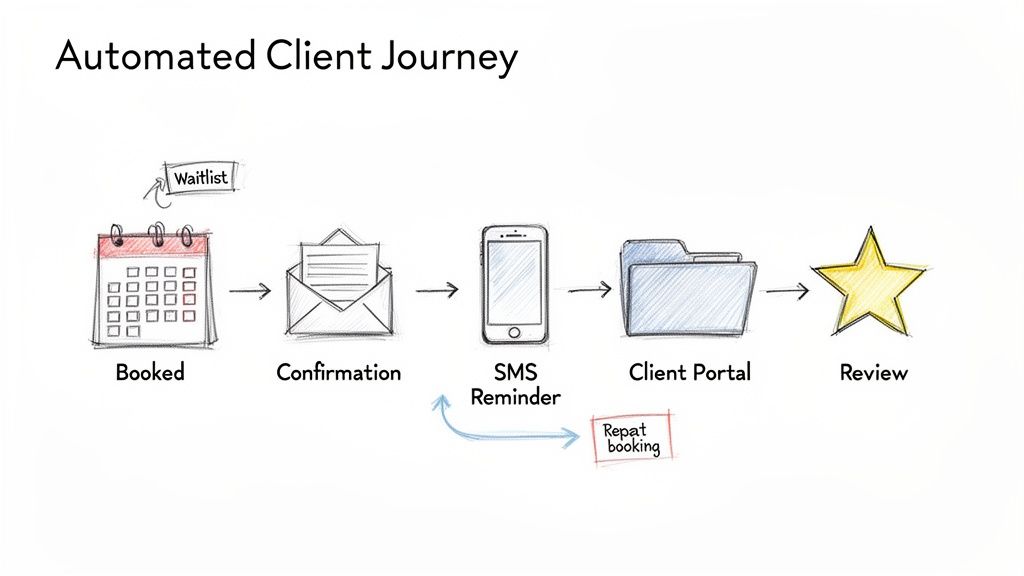
Centralize Communication with a Client Portal
Are you tired of digging through a chaotic mess of DMs, texts, and email chains just to find a simple piece of client information? A professional client portal is your answer. Think of it as a secure, private hub where each client can manage everything related to your work together.
A dedicated portal immediately elevates the entire experience. It hands control back to your clients, allowing them to:
- See their full appointment history and any upcoming bookings at a glance.
- Reschedule appointments themselves based on your real-time availability.
- Access any shared files, notes, or personalized recommendations you’ve left for them.
- Securely update their own contact and payment details.
This self-serve approach is a game-changer. It empowers your clients and slashes the time you spend on back-and-forth communication. Instead of you being the gatekeeper, clients have everything they need, 24/7.
A seamless client journey is everything. From their initial inquiry to the final gallery delivery, your entire process should feel professional and effortless. Happy clients don't just come back; they tell their friends.
Platforms like Kejoola integrate this functionality right into your website, creating one branded, professional space for every client interaction. It signals that you’re organized and serious about your business, which builds incredible trust.
Implement Automated Follow-Up Sequences
The time immediately after a service is a huge, often missed, opportunity to build on your relationship. Automated follow-ups are a simple but powerful way to get feedback and encourage future bookings without you lifting a finger.
First, set up a feedback request. An email that goes out a day or two after their appointment asking for a review does two things: it shows you care about their opinion and gives you fresh testimonials for your website. It’s a win-win.
Next, get a re-booking reminder in place. Think about your typical service cycle—is it six weeks for a haircut or three months for a deep-clean? Schedule an automated email that gently nudges them when it’s about time to book again. Make it ridiculously easy by including a direct link to your booking calendar. If you're managing multiple calendars, our guide on how to sync Google Calendar with an iPhone might be helpful.
These little automations work tirelessly in the background, keeping you top-of-mind and proactively filling your calendar. It’s a simple strategy that turns client retention into a reliable, automated system.
Tracking Website Metrics That Actually Matter
Your website isn't a "set it and forget it" project. If you want to keep your calendar full, you have to get comfortable with your data and understand what’s actually working—and what’s falling flat. This means digging deeper than vanity metrics like total page views and focusing on the numbers that directly impact your revenue.
A data-driven approach lets you stop guessing and start making informed decisions. It helps you refine your site and marketing efforts, turning a trickle of bookings into a steady, predictable stream. The right data tells you exactly where you're losing potential clients, so you can plug the leaks in your funnel.
Key Performance Indicators for a Service Website
For a service business, only a few metrics really move the needle. These are your Key Performance Indicators (KPIs), and they should be the only numbers you obsess over when judging your site's performance.
First and foremost is your booking page conversion rate. This is the big one. It tells you exactly what percentage of people who see your booking page actually follow through and book an appointment. If this number is low, it’s a massive red flag. It could point to anything from confusing pricing and a clunky layout to technical bugs that are frustrating users.
Next up, you need to conduct a traffic source analysis. Where are your best clients coming from? Is it organic search, a specific social media channel, or referrals from other local businesses? Knowing this is like having a treasure map—it shows you exactly where to focus your marketing energy to find more people who are ready to book.
Reading the Tea Leaves: User Engagement Signals
Beyond direct bookings, you need to understand how visitors behave once they land on your site. Two of the most revealing signals here are bounce rate and pages per visit. A high bounce rate means people are hitting your site and leaving immediately after seeing just one page. On the other hand, a high number of pages per visit suggests they're genuinely interested and are digging deeper into what you offer.
When your site truly connects with its audience, the engagement numbers speak for themselves. Take fullybookedonline.com, for example. In November 2025, they achieved a staggeringly low bounce rate of just 22.38%—way below the industry average. Visitors also viewed an average of 5.30 pages per visit. These figures, especially with a core audience of 25-34 year olds, are a clear sign of a highly engaged and satisfied user base. You can check out more of these user engagement statistics on similarweb.com.
"Examine your analytics to see what’s working. Which blog posts are driving traffic? Where are your enquiries coming from? Focus on what’s already bringing results and double down on those strategies."
By consistently tracking these KPIs, you shift from guesswork to a clear, actionable plan. Every data point is a clue that helps you optimize your site, from the copy on your services page to the button placement on your booking form. This constant cycle of tracking, analyzing, and improving is what separates a decent website from a fully booked one.
Ready to build a website that not only looks professional but also fills your calendar automatically? Kejoola gives you all the tools—from an AI-powered site builder to a seamless booking system and automated client management—in one simple platform. Start your 14-day free trial and see how easy it is to get fully booked.


