Your Go-To Meeting Invitation Letter Template Guide
Discover the essential components of a perfect meeting invitation and access a library of ready-to-use templates for any business scenario. Improve your response rates today.
Josh · Dec 8, 2025 · 16 min read

- meetings
- templates
- communication
- productivity
A solid meeting invitation letter template is more than just a convenience; it's a tool for ensuring your meetings are productive from the get-go. By providing a consistent and professional framework, it makes sure you hit all the crucial details—purpose, date, time, location, and RSVP instructions—which makes a world of difference in clarity and response rates.
The Anatomy of a Perfect Meeting Invitation
Before you start plugging details into a template, it’s worth understanding what makes an invitation actually work. This isn’t about following some rigid corporate script; it’s about clear, respectful communication. A great invitation shows you value the recipient's time by giving them everything they need to know upfront, making their decision to attend (or not) a simple one.
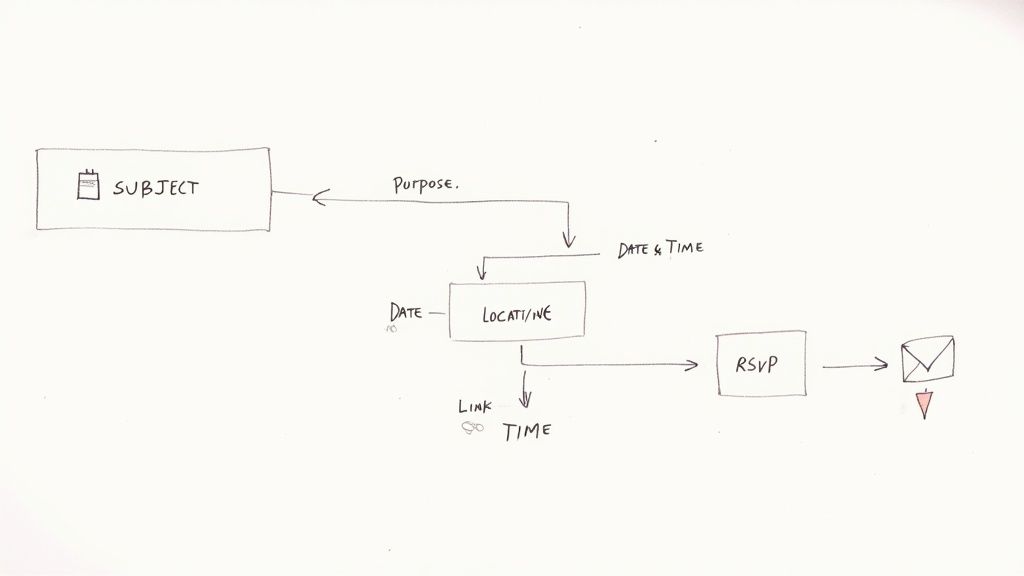
Think of the invitation as the meeting’s first impression. A vague or sloppy invite suggests the meeting itself will be just as disorganized. On the other hand, a thoughtful, well-crafted invitation signals professionalism and tells people this gathering will be a valuable use of their time.
The Core Components of an Invitation
Every effective meeting invitation, whether it's a formal letter or a quick calendar event, needs a few key ingredients. If you miss even one, you're setting yourself up for confusion, last-minute emails, and no-shows. These pieces are the absolute foundation of any meeting invitation letter template.
Let’s break down the essential components that every invitation needs to nail. The table below outlines these six core elements and why each one is so important for getting people to show up prepared and on time.
Essential Components of a Meeting Invitation
| Component | Purpose and Key Details |
|---|---|
| 1. Clear Subject Line | This is your headline. It needs to grab attention and immediately communicate the meeting's purpose and urgency so it doesn't get lost in a crowded inbox. |
| 2. Statement of Purpose | The "why." A concise, direct sentence or two explaining the reason for the meeting and what you expect to achieve. This helps people decide if they really need to be there. |
| 3. Detailed Logistics | The "who, what, when, where." This includes the full date, start and end times (with time zone), and the location—whether it's a physical address or a video conference link. |
| 4. A Clear Agenda | A brief, high-level outline of the topics for discussion. This isn't the full meeting minutes, just enough detail to help attendees prepare and know what to expect. |
| 5. Call to Action (RSVP) | Tell them exactly what to do next. Provide clear instructions on how to confirm their attendance (e.g., "Accept this invite," "Reply by EOD Friday") and a deadline. |
| 6. Contact Information | Who should they contact with questions? Include the organizer's name and email so attendees can easily reach out if they have a conflict or need more information. |
Having all these elements in place removes any guesswork for your attendees and sets a professional, organized tone from the start.
An effective meeting invitation is a tool for productivity. Its goal is not just to inform but to persuade the right people that their presence is essential for a specific, valuable outcome.
Why Structure Matters
Relying on a well-designed template is one of the smartest things you can do to improve your business communications. It guides you to include those six critical components every single time. The consistency pays off—we've seen that clear, complete invitations can lead to up to a 25% increase in acceptance rates. Why? Because they eliminate scheduling friction and frame the meeting as a worthwhile investment.
If you're interested in going deeper, you can explore more tips for successful meeting invitation emails to see these principles in action.
Once you master these fundamentals, you can adapt any template to your specific needs. You'll be sending invitations that are always professional, comprehensive, and—most importantly—successful in getting the right people in the room. This foundation is crucial before we dive into specific examples and more advanced strategies.
Writing Subject Lines That Actually Get Your Invitation Opened
Let's be honest: your invitation is just one of dozens, if not hundreds, of emails someone will get today. If it sits unopened in a crowded inbox, it might as well not exist. The subject line is your first—and often your only—shot at grabbing their attention and proving this meeting is worth their time. It needs to be clear, concise, and compelling enough to make them stop scrolling and click.
A killer subject line, combined with a sender name they recognize, is your secret weapon against no-shows. It immediately frames the meeting as a valuable use of everyone's time, which means attendees are more likely to show up prepared and ready to contribute.
The Magic of Clarity and Urgency
The average office worker slogs through about 62 meetings every month, so inbox fatigue is a very real problem. Adding a little urgency to your subject line can boost open rates by as much as 22%.
Now, "urgency" doesn't mean resorting to cheesy all-caps or a dozen exclamation points. It's about signaling importance and timeliness in a professional way. For example, "Meeting: Project Phoenix Launch Plan" is okay, but it's passive. "Action Required: Final Review of Project Phoenix Launch Plan" is leagues better—it's active and tells them exactly what's needed.
That subtle shift changes the entire dynamic from a simple update to a direct request for their input. If you're curious about how much invitation quality really matters, you can explore the full meeting statistics to see the data for yourself. A well-crafted subject line simply cuts through the noise and gets your invitation the attention it deserves.
Subject Line Examples That Work in the Real World
The perfect subject line is never one-size-fits-all. It has to match the context—your audience, the meeting's gravity, and even your company culture. What works for a quick team brainstorm would feel completely out of place for a formal board meeting.
Let’s break down a few scenarios:
- For a formal board meeting: “Board of Directors Meeting: Q3 Financial Review - Oct 25”
- Why it works: It’s straight to the point, professional, and includes the date right there for easy scheduling. No fluff.
- For an urgent team huddle: “URGENT: Quick Sync on Client X Feedback”
- Why it works: The "URGENT" tag immediately flags its priority, and the topic is specific enough that everyone knows what to expect.
- For a casual client check-in: “Catch-Up Call: [Your Company] + [Client Company]”
- Why it works: It feels friendly and personal, plus it clearly identifies who is involved.
The best subject lines answer three questions instantly: Who is this from? What is it about? And why should I open it right now?
By getting this small but critical piece of your meeting invitation right, you dramatically increase the chances of getting the response you need. A thoughtful subject line is a sign of respect for your recipient's time, and it sets a professional, productive tone before they've even opened the email.
Your Library of Ready-to-Use Meeting Templates
Alright, let's get to the good stuff—the practical toolkit you came for. This is a collection of copy-and-paste templates I've seen work time and again in real business situations. No generic filler here. Each meeting invitation letter template is built for a specific purpose and tone, helping you communicate clearly and get things done.
You’ll find options below for different scenarios, from a high-stakes board meeting to a free-flowing team brainstorm. I've also added some quick notes with each one, explaining where it fits best and pointing out the key spots you'll want to customize. This way, you can adapt the language and details to your exact needs with confidence.

Formal Business Meeting Template
This is your go-to for high-level discussions, board meetings, or any official update where professionalism is non-negotiable. The language is direct, respectful, and leaves no room for ambiguity.
Subject: Invitation to Business Meeting: [Meeting Topic]
Dear [Name],
We invite you to attend a business meeting on [Date] at [Time] at [Location/Platform]. The purpose of this meeting is to discuss the following agenda items:
- [Agenda Item 1]
- [Agenda Item 2]
- [Agenda Item 3]
Your insights are valuable to this discussion. Please confirm your attendance by replying to this email by [RSVP Date].
Sincerely,
[Your Name & Title] [Company]
Client Project Kickoff Template
Kicking off a new project with a client demands a tone that's both professional and collaborative. This template does just that. It sets expectations, outlines the first agenda, and establishes a positive dynamic right from the start.
Subject: Project Kickoff: [Project Name]
Hi [Client Name],
I hope you're doing well.
I’d like to schedule our kickoff meeting to officially start the [Project Name] project and align on our next steps. Here are the proposed details:
- Date: [Date]
- Time: [Time]
- Location: [Video Conference Link / Address]
Our initial agenda will cover introductions, project goals, timelines, and immediate action items. If there’s anything specific you’d like to add, please let me know.
Please confirm if this time works for you. I look forward to our collaboration.
Best,
[Your Name]
A well-crafted meeting invite is more than just a calendar entry; it’s an organizational tool. It sets the tone, defines expectations, and ensures attendees arrive prepared, which is the first step toward a productive outcome.
Informal Team Brainstorm Template
For those internal huddles focused on creativity, you can drop the formality. A more relaxed and direct approach works best. This template is perfect for quick syncs or brainstorming sessions where the goal is just to get ideas flowing.
Subject: Brainstorm Session: [Topic]
Hi Team,
Let's get together for a quick brainstorm on [Topic]. Your ideas and perspectives are crucial as we figure out [Goal of Brainstorm].
- When: [Date] at [Time]
- Where: [Conference Room / Video Link]
Come ready to share your thoughts. Please accept this calendar invite to confirm you can make it.
Thanks,
[Your Name]
Virtual Meeting Template with Tech Instructions
We've all been there—the frantic search for a meeting link seconds before it starts. Virtual meetings have their own unique hurdles. This template is designed specifically for online gatherings and includes clear instructions for joining the call.
Providing the link, meeting ID, and passcode upfront prevents those last-minute technical scrambles and helps everyone get in smoothly.
Subject: Zoom Meeting: [Meeting Topic] on [Date]
Hi [Recipient Name],
This email is to invite you to a Zoom meeting to discuss [Meeting Topic].
- Date: [Date]
- Time: [Time] (Please note the time zone: [Time Zone])
- Duration: [Duration]
Here is how you can join us online: Zoom Link: [Insert Zoom Link] Meeting ID: [Meeting ID] Passcode: [Passcode, if applicable]
Please let me know if you have any questions or have trouble accessing the link.
Best regards,
[Your Name] [Your Position]
How to Actually Get People to Show Up and Participate
https://www.youtube.com/embed/n-WIGWO9vLo
Let's be honest: sending the meeting invitation is the easy part. The real challenge is getting busy people to actually show up, and even more importantly, to arrive prepared and ready to contribute. Just firing off an email and hoping for the best isn't a strategy.
To get the results you want, you need to be proactive. It's about making the entire process, from RSVPing to preparing, as seamless as possible for your attendees. When you respect their time, you dramatically increase your chances of having a productive, well-attended meeting.
Stop the Back-and-Forth: Use Scheduling Tools
If you're still trying to find a meeting time through a chain of "what time works for you?" emails, it's time for an upgrade. We've all been there, and it’s a massive waste of everyone’s time.
Tools like Calendly, or even the scheduling features built right into Google Calendar and Outlook, are no longer a nice-to-have; they're essential. They completely cut out the manual guesswork and reduce the risk of someone misreading a time zone.
Crucially, always send a calendar event, not just a plain email. This lets people accept or decline with one click, automatically adding it to their calendar. It becomes their reminder. If you do run into issues, knowing how to handle a schedule conflict meaning you have to reshuffle things is a critical skill for any professional.
A great meeting invitation doesn't just inform; it facilitates. By integrating scheduling links and calendar events, you remove barriers to attendance and show that you've thought about the recipient's experience.
No Agenda? No Meeting.
An invitation without an agenda is a red flag. It tells your attendees you haven't fully thought through the purpose of the meeting, and it leaves them guessing about what's expected of them. You have to provide a roadmap.
But a good agenda isn't just a list of topics; it’s focused on outcomes. Frame each point as a goal.
- Instead of: "Discuss Q3 sales."
- Try this: "Analyze Q3 sales data to pinpoint our top 3 growth opportunities for Q4."
See the difference? The second version is active and tells everyone what you aim to achieve. If there’s required reading, consolidate it into a single document or link to a cloud folder. Don't send a flurry of attachments—that’s a surefire way to guarantee no one reads them.
Master the Gentle Nudge: The Follow-Up Reminder
People are busy. Calendars are packed. Even the most organized person can have a meeting slip their mind. That's why a strategic, polite reminder is your secret weapon.
Sending a brief follow-up 24 hours before the meeting is the gold standard. This isn't about nagging; it's about being helpful.
Keep it short and sweet. Reiterate the meeting's core purpose and, most importantly, include the key details again—the conference link, the address, the agenda. This saves them the hassle of digging through their inbox for the original invite. A simple, friendly reminder can easily be the difference between a full room and an empty one.
Picking the Right Channel for Your Invitation
How you send your meeting invitation matters just as much as what you write in it. We often default to email, but that’s not always the best play. The channel you choose sets the tone, signaling how formal or urgent the meeting is before anyone even reads the first word.
Getting this right can be the difference between a quick "Yes" and your invitation getting completely lost in the shuffle. It's about making sure your invite not only gets seen but also makes the right impression from the get-go.

Let's break down the options and when to use them.
Email: The Professional Standard
There's a good reason email is king. With over 4.37 billion users worldwide, it’s the go-to for more than 64% of businesses communicating with clients and colleagues. It feels professional, lets you attach files like a detailed agenda, and plugs right into everyone's calendar.
The numbers back it up: 77% of marketers saw better engagement from their email campaigns last year. It just works for most professional situations.
Of course, its biggest strength is also its biggest challenge. Everyone's inbox is a warzone. Your invitation has to fight for attention. If you're an Outlook user, mastering the art of scheduling emails can give you a bit of an edge in landing that prime spot in their inbox.
Instant Messaging for Quick Huddles
Sometimes, sending an email for a quick team sync-up just feels like overkill. That's where tools like Slack or Microsoft Teams come in. They're built for speed and informal chats.
- Speed: You send the message, they see it instantly. Responses are usually much faster than with email.
- Tone: It’s naturally more casual, which is perfect for a quick brainstorming session or an urgent project check-in.
- Context: The invite lives right inside the project channel, keeping all the conversation in one tidy place.
A Slack message is for a five-minute problem-solving huddle. An email is for a scheduled, agenda-driven discussion. Matching the channel to the meeting's weight is key.
The Case for Formal Printed Letters
In a world of endless digital pings, a physical letter lands with real impact. It’s a rare move, but for high-stakes situations, it’s the perfect way to signal importance and show genuine respect.
When should you break out the good stationery? Think about it for:
- An exclusive C-suite dinner.
- A major company anniversary celebration.
- A formal invitation to join a board of directors.
This old-school approach tells the recipient that this isn't just another meeting—it's a priority event that deserves their full attention. It's a powerful tool when you really need to make a statement.
Answering Your Top Questions About Meeting Invitations
Even with a solid template in your back pocket, you’re bound to run into some tricky situations. I’ve seen it all—from last-minute changes that throw everything into chaos to the dreaded sound of silence after you’ve sent out a critical invite.
Let's walk through some of the most common questions that pop up. Thinking through these scenarios now will help you handle them with confidence and professionalism when they inevitably happen.
How Far in Advance Should I Send an Invitation?
This is a classic question, and the answer really depends on who you're inviting and what the meeting is about. It's all about balancing giving enough notice without having your invite get buried.
Here’s a practical breakdown I’ve learned to rely on:
-
Major or High-Level Meetings: Think board meetings, quarterly strategy sessions, or major client kick-offs. For these, you’ll want to send the invitation 2-4 weeks in advance. Senior leaders and key stakeholders have calendars that fill up fast, so getting on their radar early is non-negotiable.
-
Standard Team or Client Meetings: For your typical project check-ins or regular client calls, aiming for 3-5 business days of notice is the sweet spot. It respects their weekly schedule and gives them time to prepare without being so far out that they forget about it.
-
Quick, Informal Huddles: If you just need to grab the internal team for a quick sync-up, a 24-hour notice is usually fine. This is especially true if you’re coordinating over a platform like Slack or Teams where the pace is faster.
At the end of the day, it all comes down to respecting people's time. A well-timed invitation shows you've planned ahead and genuinely value their presence.
What Is the Best Way to Handle Last-Minute Changes?
Life happens. A key stakeholder gets pulled into something else, or a conference room gets double-booked. The absolute key is to communicate changes immediately and clearly.
The very first thing you should do is update the original calendar event. This is the source of truth for most people and will directly adjust their schedules. Don't just send an email and hope they see it.
But for significant changes—like a new time or a shift from in-person to virtual—you need a two-pronged attack. After updating the calendar invite, send a direct and concise email.
Subject: UPDATE: Project Alpha Sync
"Hi Team,
Quick heads-up: Our meeting has been moved to Thursday at 3 PM and will now be on Zoom. I've updated the calendar invite with the new link.
Apologies for any inconvenience this causes."
This double-tap approach ensures the message gets through. On a related note, since attendees use all kinds of devices, knowing the basics of how to sync Google Calendar with an iPhone can help you troubleshoot if someone says they didn't get the update.
How Much Information Is Too Much in an Invitation?
Your invitation needs to be a helpful guide, not a novel. The goal is to give people just enough information to understand why they're invited and how to prepare—without overwhelming them.
Stick to the absolute essentials right in the body of the invite: the purpose (the "why"), a high-level agenda, the logistics (date, time, location/link), and a clear RSVP request.
If there's a lot of pre-reading or background material, resist the urge to paste it all into the email. That's a surefire way to get people to tune out. A much cleaner approach is to link out to a shared document on Google Docs or attach a single, well-organized PDF. This keeps the invitation scannable while giving everyone access to the deeper details if they need them.
Ready to stop juggling texts and spreadsheets? Kejoola gives you an AI-powered website with smart booking, client portals, and built-in SEO. Launch a professional site in minutes and let clients book themselves 24/7. Start your 14-day free trial at https://kejoola.com.