Turn Your Google Business Listing Into a Website Customers Can Actually Book
On Maps with no real site? Turn your Google Business listing into a 4-page bookable website, then put that URL back on Maps. For US trades in 2026.
Josh · Sep 1, 2026 · 7 min read
- google business profile
- website builder
- online booking
- home services
Turn Your Google Business Listing Into a Website Customers Can Actually Book
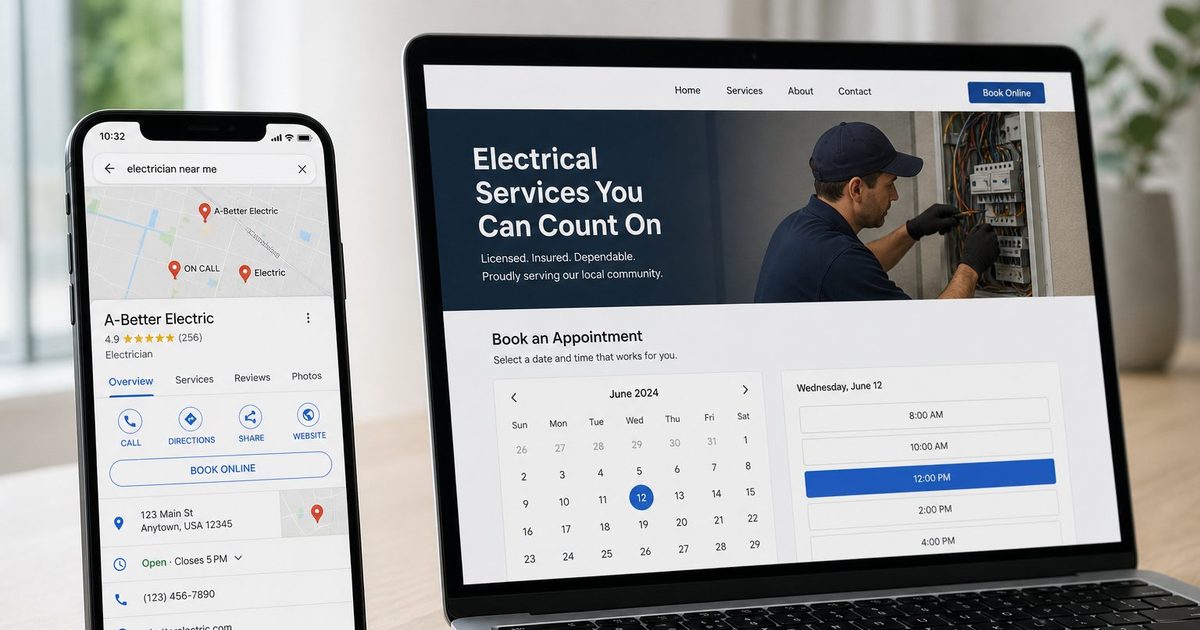
A Denver electrician shows up on Google Maps. Hours are current. Photos are decent. The Website button still opens a Facebook Page. A homeowner searching “electrician near me” at 9 p.m. can call. They cannot pick a panel-upgrade slot.
A Phoenix landscaper has the same listing plus an old Google Sites page with a mailto form. A Charlotte plumber points Website at Instagram. A Portland cleaner DMs her calendar from Messenger.
If you are already on Maps and you do not have a real site — or you are using Facebook, Instagram, or Google Sites as a stand-in — the next step is not another social link. It is a website that represents this business, plus a page where someone can finish a booking. You build that from the listing you already have, then put those URLs back on the profile.
The listing is not a website
Google treats two fields as two jobs. Website is the page that represents this location. Booking is an action link: a dedicated page where the customer completes the appointment, not a homepage they have to hunt through and not a chat thread.
Google’s representation guidelines: “Provide a phone number that connects to your individual business location, or provide a website that represents your individual business location.” Do not use URLs that redirect people to landing pages other than the actual business, “including pages created on social media sites.” (Google Business Profile Help)
That is why a Facebook Page, an Instagram profile, or a Messenger link fails as a Website field even when the tap “works.” Google is asking for a site that is this business, not a rented social profile.
The Booking field is stricter still. Local business links must lead to a dedicated landing page for the business, and they “must allow customers to complete the designated action.” They cannot be social media sites, messaging links, app store links, or link shorteners. The profile must be verified before you can add the link. (Google Business Profile Help)
A Charlotte plumber who pastes m.me/... into Booking is not missing a hidden setting. The destination is the wrong type of page.
Google used to generate a simple hosted site from the listing (the old business.site pages). That product is gone. WPBeginner, covering the shutdown: Google shut down Business Profile websites in March 2024; after the service closed, visitors were redirected to the Business Profile; those redirects only worked until June 10, 2024, and visitors after that date saw a page-not-found error. The listing on Search and Maps was not removed. (WPBeginner) Search Engine Land quoted Google’s help page the day the redirects started: “As of March 5, 2024, websites made with Google Business Profiles are no longer available and customers that visit your site will be redirected to your Business Profile instead.” (Search Engine Land, March 5, 2024) If Website still points at a dead business.site URL, replace it. Google does not host that page for you anymore.
What they do after they read your reviews
BrightLocal’s Local Consumer Review Survey 2026 (1,002 US adults) found that after reading positive reviews, 54% of consumers then check the business’s website, up from 32% in 2019. On the same survey, 66% do further research and 34% are ready to buy or book; 20% say they make an appointment. (BrightLocal, Local Consumer Review Survey 2026) That is not a Maps conversion rate. It is why a dead Website button next to five-star reviews is a drop-off.
They are doing that research on a phone. Pew Research Center’s Mobile Fact Sheet (survey of 5,022 US adults, February 5–June 18, 2025) reports that 91% of US adults own a smartphone, and 16% are smartphone-only internet users — they own a smartphone but do not subscribe to home broadband. (Pew Research Center) A Denver electrician’s Facebook Page that asks for a login, or a landscape brochure that does not wrap on a 6-inch screen, is the page they get after the reviews.
A brochure from the listing is not a booking page
Several tools will generate a one-page site from public Maps details — name, hours, photos, a few reviews. That can replace a blank Facebook stand-in. It still is not a booking page. Google’s booking link has to let the customer complete the appointment. A site that only restates what the map card already shows leaves them on Call, text, or “what time works Thursday?”
What a US trade needs from that listing is narrower:
- A homepage that is this shop, not a social profile.
- A services list a homeowner can scan (panel upgrade vs outlet, spring cleanup vs weekly mow, move-out clean vs recurring).
- A booking page that is a dedicated action URL.
- A contact page for the jobs that still need a call.
- A blog if you want pages for “plumber in Charlotte” later — not a requirement to go live.
Kejoola is built for that shape: a 4-page site (Home, Services, Blog, Contact) plus online booking, aimed at plumbers, landscapers, electricians, and cleaners. No code. It is not a Google booking partner. It is a site you publish, then paste into the profile yourself.
Build the bookable site from the listing you already have
You do not retype the business from scratch. Kejoola’s Google Business start page uses the listing as a head start.
- Open the business on Google Maps or Search.
- Share → Copy link. Links from that menu often start with
maps.app.goo.gl; Kejoola says those work. From Business Profile Manager (business.google.com), open the location, View on Maps, then Share → Copy link in Maps. - Paste that URL at kejoola.com/start/google-business.
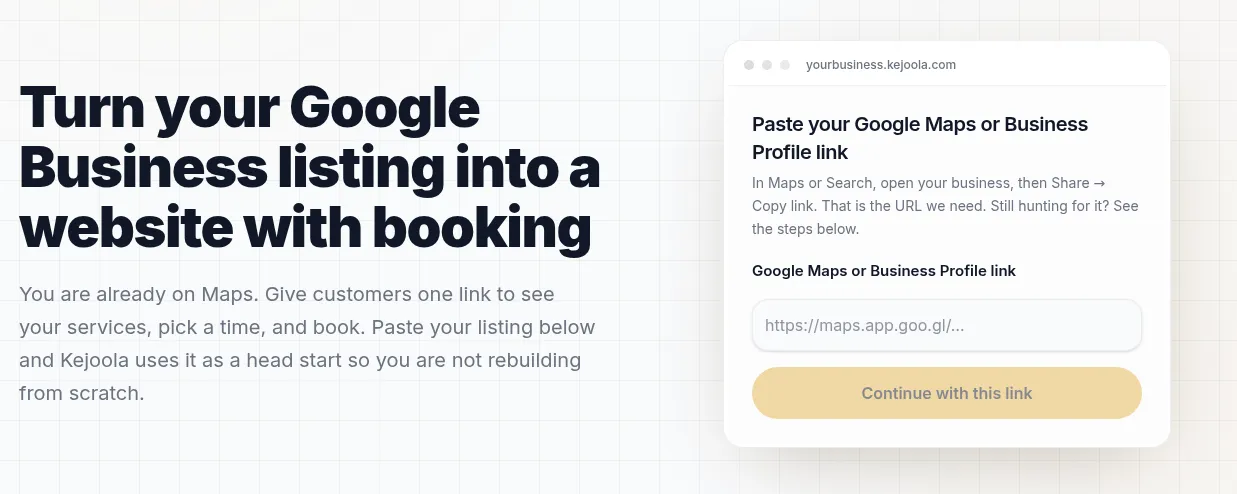
Kejoola’s public import page: paste the Maps share URL, then put the live homepage in Website and the booking page in Booking.
Kejoola hosts on a subdomain (yourbusiness.kejoola.com) and lists custom domain support on every plan. Plans on the live site (monthly; annual billing is also listed):
- Lite — $24/month — website only, if you do not need Kejoola booking or you already have another calendar.
- Starter — $39/month — up to 50 bookings/month, unlimited services, team members, and clients, automated email reminders.
- Professional — $89/month — up to 300 bookings/month, same unlimited services/team/clients, automated email reminders.
- Business — $159/month — unlimited bookings, dedicated phone support.
A 14-day trial is available with no credit card (sign-up). Kejoola’s FAQ states that most owners publish their first site and booking page in under an hour.. After publish, add services and real availability before you send anyone to Book.
Lite is the wrong plan if the point of this article is a Book button. Starter is the floor for a solo cleaner or electrician taking online jobs. Professional or Business is for a crew that will blow past 50 bookings in a month.
Then put those URLs back on Maps
The Google field only stores a URL. Publishing the site does not update the listing.
- Website = the homepage (
https://yourbusiness.kejoola.comor your custom domain). - Booking = the dedicated booking page, not the homepage, not Facebook.
Google: your Business Profile can include two types of links — ones that help customers learn more, and ones that let them take action from Maps or Search, including booking an appointment. (Google Business Profile Help)
The click-path in Search versus Maps, and the rest of the URL rules (one link per domain, crawlers must get HTTP 200, no shorteners), is in How to add a booking link to your Google Business Profile. Paste the live URLs there. Do not paste a shortener. Do not paste Messenger.
The listing must be verified before Booking will accept a link. (Google Business Profile Help)
Check it on a phone you do not use for work
- Search the business on Google and open Maps while signed out.
- Tap Website. You should land on the shop site, not Facebook and not a
business.site404. - Tap Book (or the equivalent action). You should land on the calendar, pick a service, and complete a test booking you then cancel.
- If Book is missing after a day, the usual causes are an unverified profile, a social or messaging URL, or a page that cannot finish the booking.
A Phoenix landscaper’s Maps card already answers where and when. The site you generate from that listing is what answers “can I book spring cleanup for Tuesday,” on the same phone they used to read the reviews.
Sources
- Google Business Profile Help — Guidelines for representing your business on Google
- Google Business Profile Help — Business links policies & guidelines
- Google Business Profile Help — Manage your local business links
- BrightLocal — Local Consumer Review Survey 2026
- Pew Research Center — Mobile Fact Sheet
- WPBeginner — How to Migrate Google Business Profile Website to WordPress
- Search Engine Land — Google Business Profile websites are now redirected to Google Maps
- Kejoola
- Kejoola — Turn your Google Business listing into a website with booking
- How to add a booking link to your Google Business Profile