Best Field Service Management Software for Small Trades
Compare 8 field service management software picks for small U.S. trades: Jobber, Housecall Pro, Workiz, Kickserv, Service Fusion, FieldPulse, FieldEdge, and ServiceTitan.
Josh · Oct 30, 2026 · 15 min read
- best field service management software
- field service management software
- fsm software
- field service software
- home services
- small business
The best field service management software for a small U.S. trade business is usually the one with a published price, a real free trial, and the fewest features you'll never open. This roundup compares eight tools that plumbers, HVAC techs, electricians, cleaners, and handymen shortlist. Jobber and Housecall Pro suit solo owners and small crews. Workiz and Kickserv fit phone-heavy and budget-minded shops. Service Fusion fits growing teams that want unlimited users, and FieldPulse, FieldEdge, or ServiceTitan fit shops ready for a demo-led setup. Prices checked October 2026 on each vendor's site.
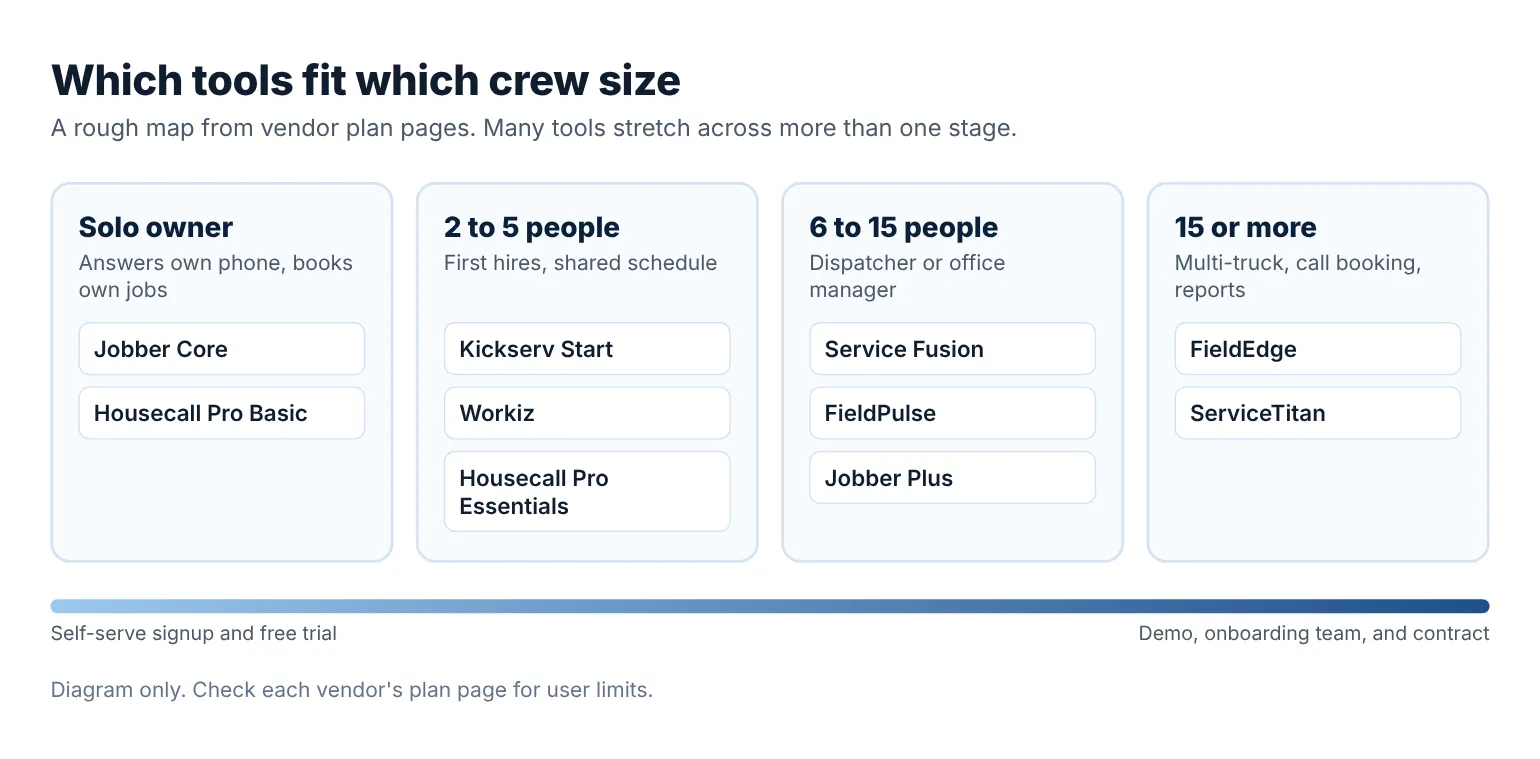
Where each tool usually fits by crew size. Diagram only.
How we picked
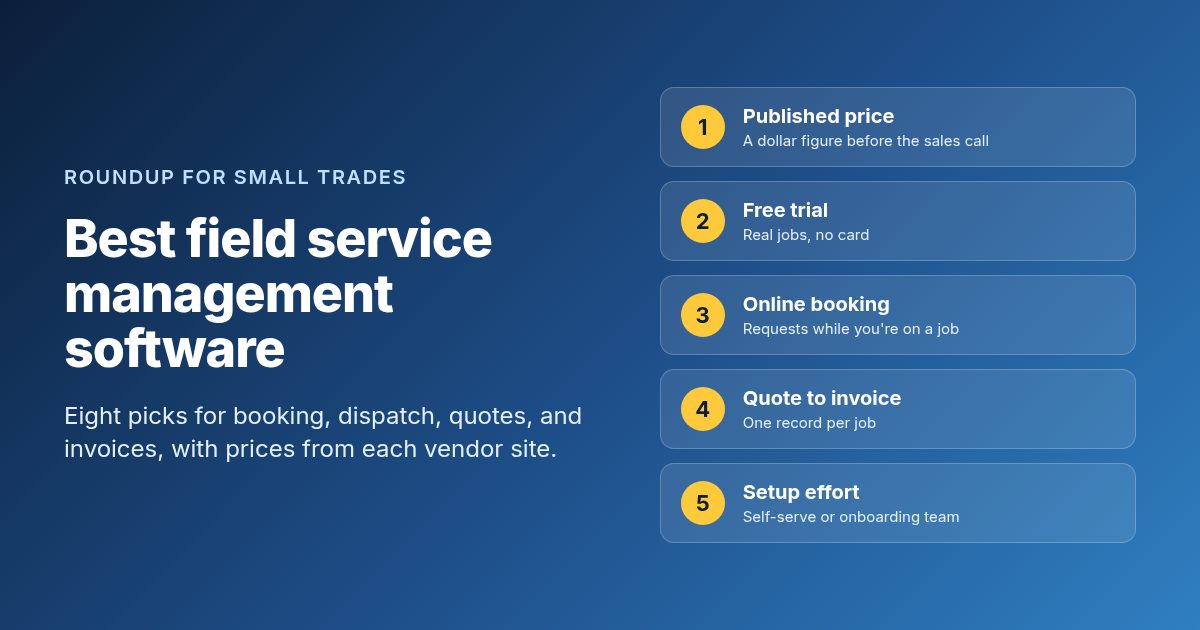
Field service management software, or FSM, runs the work after the phone rings. It holds the customer record, turns a quote into a job, puts the job on a tech's schedule, and sends the invoice when the work is done. Enterprise FSM platforms built for utilities and equipment makers are a different market, so they stay out of this list. We checked each tool against five things a 1 to 15 person trade shop cares about.
- Published price. Can you see a dollar figure before you talk to sales, or do you have to book a demo first?
- Free trial. Can you put real jobs into it for a week or two without a card?
- Online booking or requests. Can a homeowner ask for a visit while you're under a sink?
- Quote to invoice in one place. Do estimates, jobs, and invoices share one record?
- Setup effort. Can you run it yourself, or does it expect an onboarding team and a contract?
Every feature and price below comes from the vendor's own pricing or product page. Where a vendor hides its dollar amounts, we say so instead of guessing.
Quick comparison
| Tool | Best for | Starting price | Free plan or trial | Online booking | Watch out for |
|---|---|---|---|---|---|
| Jobber | Solo owners and small residential crews | $29/mo (Core, 1 user, billed annually) | 14-day free trial, no card | Yes, on Core | Extra users are $29/mo each |
| Housecall Pro | Residential shops that want booking and financing | $59/mo (Basic, billed annually) | 14-day free trial, no card | Yes, on Basic | Routes and flat-rate pricing start on Essentials |
| Workiz | Shops that live on the phone | Request pricing | 7-day free trial, no card | Yes, with optional checkout | Phone and answering tools are sold separately |
| Kickserv | Budget-minded crews of up to 5 people | $60/mo (Start, 5 users) | 30-day free trial | Embeddable contact form | Dispatch mapping starts on Run |
| Service Fusion | Growing teams that want unlimited users | $192/mo (Starter, billed annually) | Free demo | Customer web portal on Pro | Higher floor than per-user tools for a solo owner |
| FieldPulse | Teams outgrowing an entry-level app | Custom quote (seat-based) | No free trial, demo only | Booking portal listed | Seats are bought upfront for the contract term |
| FieldEdge | Established multi-truck HVAC, plumbing, and electrical shops | Request pricing | No free trial | Call booking on all plans | Customer portal costs extra below Elite |
| ServiceTitan | Larger residential and commercial contractors | Request pricing (per technician) | Free demo | Call booking on all packages | No public dollar price |
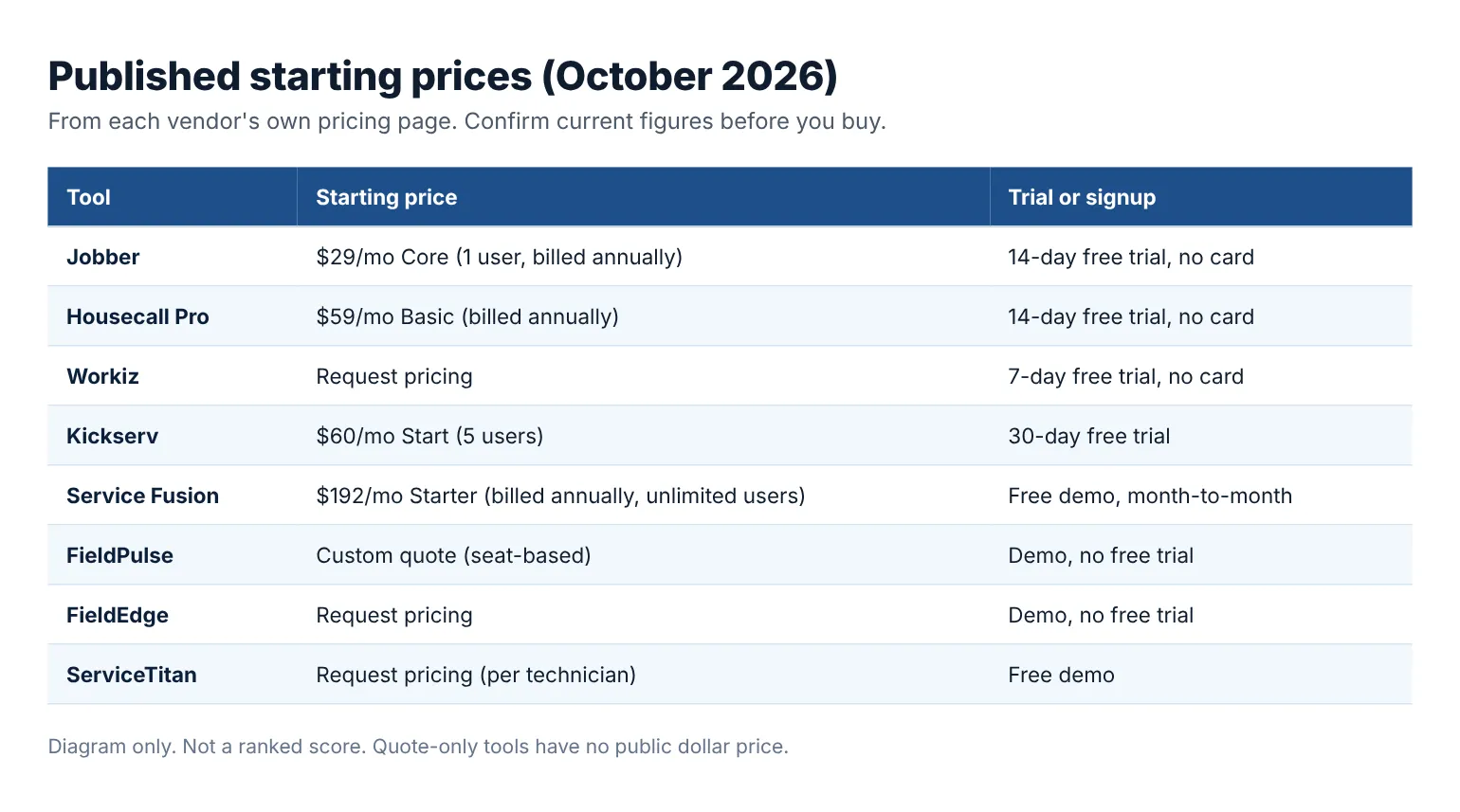
Published starting prices and trial terms from each vendor site, checked October 2026. Diagram only.
1. Jobber
Best for: Solo owners and small residential crews who want quotes, scheduling, invoices, and payments in one app with a low published floor.
Jobber is built for home-service businesses from one person to a few crews. Every plan includes a client manager, scheduling, quotes, invoices, and online payments. Higher plans add automation, job costing, and crew tools. It's the easiest tool on this list to try without talking to anyone.
What you get:
- Online booking and custom request forms on Core, plus a website builder
- Quotes with signature approval, and invoices customers pay online by card or bank transfer
- Automated client reminders, quote and invoice follow-ups, and a QuickBooks Online connection on Connect
- Job costing, optional line items, and two-way text messaging on Grow
- iOS and Android apps, with Spanish available for field team members
Price: Core is $29/month for 1 user billed annually, $39/month on a 1-year commitment, or $49/month with no commitment. Connect starts at $99/month and Grow at $149/month, each for 1 user billed annually. Plus starts at $399/month with 5 users. Extra users are $29/month each (Jobber pricing page, checked October 2026). The 14-day free trial runs on Grow with no credit card. A new-customer discount was showing through October 30, 2026, so check the current figure.
Watch out for:
- Two-way texting and job costing are not on Core or Connect
- Receptionist ($29/month), Pipeline ($49/month), and Marketing Suite ($99/month) are paid add-ons
- Annual prepaid plans are non-refundable if you cancel mid-term
2. Housecall Pro
Best for: Residential plumbing, HVAC, electrical, and cleaning shops that want online booking, a price book, and customer financing from the first plan.
Housecall Pro targets home-service businesses from solo operators to growing teams. Its Basic plan already covers the full loop from booking to payment. Essentials adds route planning and checklists for teams, and Max adds sales proposals and service plans for shops selling maintenance agreements.
What you get:
- Online booking from Google or your website, plus scheduling and dispatch on Basic
- Estimates, invoices, payments, consumer financing, a price book, and job costing on Basic
- Routes, flat-rate pricing, checklist automations, photo reports, employee GPS, and QuickBooks Online on Essentials, with 5 users included
- Sales proposals, recurring service plans, route optimization, and open API access on Max, with 8 users included
- Free iOS and Android app in English and Spanish, with offline viewing
Price: Basic is $59/month billed annually (Housecall Pro pricing page, checked October 2026). Essentials includes 5 users and Max includes 8, with extra Max users at $35/month each. The page shows short intro discounts on the higher plans, so confirm the price for your team size at signup. The 14-day free trial runs on Max with no credit card, and the FAQ says there are no long-term contracts.
Watch out for:
- Routes, flat-rate pricing, and checklists start on Essentials, not Basic
- Plan prices shift with team size and intro offers, so the list price can differ from your first bill
- Card processing fees start at 2.59%, and bank payments carry a 1% fee
3. Workiz
Best for: Locksmiths, garage door, appliance repair, junk removal, and HVAC shops whose work starts with a phone call.
Workiz pairs a standard FSM core with phone and AI answering add-ons. All three plans cover jobs, estimates, invoices, scheduling, and online payments, with unlimited jobs and clients. The higher plans add automations, inventory, and multi-day jobs. Its add-ons answer calls and texts for you when nobody in the office can.
What you get:
- Scheduling, jobs, estimates, invoices, and online payments on Standard
- Online booking with optional checkout, a client portal, and a price book on every plan
- Estimate deposits, consumer financing, and tap to pay through Workiz Pay
- QuickBooks Online, service areas, recurring jobs, and subcontractor management on Standard
- Service plans, flat rate, checklists, inventory, and multi-day jobs on Ultimate
Price: Standard, Pro, and Ultimate all show "Request pricing" on the pricing page (Workiz pricing page, checked October 2026). The FAQ says annual billing saves $400 or more compared with monthly billing. A 7-day free trial is available with no credit card.
Watch out for:
- No public dollar price, so you'll need a sales call to compare it
- Genius Phone, Genius Answering, and Genius Marketing are sold separately
- Checklists, flat rate, and multi-day jobs are only on Ultimate
4. Kickserv
Best for: Small crews on a tight budget who want several users on a published monthly price.
Kickserv sells three plans by user count instead of per seat. Its entry plan covers 5 users, which makes it cheaper than per-user tools once a second or third person needs a login. The homepage covers customers, estimates, jobs, invoices, and a mobile app, with reporting and dispatch tools on higher plans.
What you get:
- Estimates and invoices with signature approval, plus a Planner for scheduling jobs
- An embeddable contact form, automated email and text reminders, and more than 20 reports on Start
- QuickBooks Online on Start, and QuickBooks Desktop on Run for $50/month extra
- Dispatch mapping, GPS check-ins, custom fields, and custom reports on Run
- A Customer Center where customers track progress and pay, plus GPS and time tracking in the mobile app
Price: Start is listed at $60/month for 5 users, Run at $119/month for 10 users, and Scale at $199/month for 20 users (Kickserv pricing page, checked October 2026). The page says an annual subscription saves 20%, so confirm which billing term the listed price assumes. Each plan offers a 30-day free trial.
Watch out for:
- Online booking isn't listed by name, so test the contact form flow during the trial
- Card-not-present payments cost 3.9% + $0.30, higher than Tap to Pay at 2.9% + $0.30
- Dispatch mapping and GPS check-ins are not on Start
5. Service Fusion
Best for: Growing shops with several techs and office staff who want one flat price no matter how many people log in.
Service Fusion prices by plan, not by user, and every plan includes unlimited users. That matters once you have four techs, a dispatcher, and an office manager. All plans cover estimates, jobs, dispatch, invoicing, and payment processing. Plus and Pro add job costing, inventory, and customer self-service tools.
What you get:
- Customer management, estimates with options, scheduling, and dispatching on every plan
- Invoicing, payment processing, text messaging alerts, financing, and QuickBooks on every plan
- Job photo uploads, inventory management, job costing, and integrated voice and text on Plus
- eSign documents, a customer web portal, progress billing, and recurring invoicing on Pro
- A technician app for receiving and managing jobs in the field
Price: Starter is $225/month, Plus is $350/month, and Pro is $575/month on monthly billing. Annual billing takes 15% off, which brings them to $192, $298, and $489 per month (Service Fusion pricing page, checked October 2026). All plans are month-to-month with unlimited users. Service Agreements are included on Pro and cost $149/month as an add-on for Plus.
Watch out for:
- The entry price is high for a solo owner compared with per-user tools
- No self-serve free trial is listed on the pricing page, only a free demo
- GPS fleet tracking and ServiceCall.ai are separate add-ons
6. FieldPulse
Best for: Growing teams that are outgrowing an entry-level app and want help building their workflows.
FieldPulse sells a full FSM platform and says its team handles setup, migration, and training with you. Its feature list covers work orders, scheduling and dispatch, estimates and invoices, job costing, a customer portal, a booking portal, and maintenance agreements. ClearPath lets the office set required steps for each job stage.
What you get:
- Work order management, scheduling and dispatching, and project management
- Estimates, invoices, FieldPulse Payments, job costing, and a QuickBooks integration
- A customer portal, a booking portal, and maintenance agreements
- Inventory management, asset management, and dashboards and reporting
- Optional add-ons such as Operator AI, Engage phone system, Fleet Tracking, and Custom Forms
Price: Seat-based custom quote. The pricing page says you buy a set number of seats upfront for your contract term, and the rate depends on what each seat needs (FieldPulse pricing page, checked October 2026). The page also says prices on third-party review sites aren't verified by FieldPulse.
Watch out for:
- No free trial. The FAQ offers a demo built around your trade instead
- Seats are committed for the contract term, so plan your headcount first
- Add-on pricing varies, with some flat-rate, some seat-based, and some usage-based
7. FieldEdge
Best for: Established multi-truck HVAC, plumbing, and electrical shops that want flat-rate pricing and QuickBooks Desktop support.
FieldEdge sells three plans aimed at HVAC, plumbing, and electrical contractors. Every plan includes call booking, work orders, scheduling, dispatching, a price book with flat-rate pricing, integrated payments, and texting. The higher tiers add multi-option quotes, advanced service agreements, and more mobile app licenses.
What you get:
- Call booking, work orders and jobs, scheduling, and tech time tracking on every plan
- Pricebook and flat-rate pricing, invoices, purchases, and integrated payments on every plan
- QuickBooks Online and Desktop on every plan
- Multi-option quotes and advanced dispatching on Premier and Elite
- Mobile app licenses included: 2 on Select, 4 on Premier, and 6 on Elite
Price: Select, Premier, and Elite all show "Request Pricing" (FieldEdge pricing page, checked October 2026). The FAQ says you can downgrade at the end of your current contract period, and an onboarding specialist is included on every plan.
Watch out for:
- No free trial. The FAQ says onboarding is done with its team instead
- Proposal Pro, MarketingEdge, and the customer portal are call-for-pricing below Elite
- Warehouse inventory requires QuickBooks Desktop Enterprise with Advanced Inventory
8. ServiceTitan
Best for: Larger residential and commercial contractors with a full office who want one platform for calls, dispatch, sales, and reporting.
ServiceTitan is the heaviest tool on this list, with separate solutions for residential, commercial, and construction contractors. It suits shops with office staff, a busy phone line, and marketing spend to track. All three packages include the core dispatch, scheduling, and invoicing tools, with payroll and reporting built in. Its pricing is per technician, set through sales.
What you get:
- Dispatching, scheduling, call booking, and invoicing on every package
- Pricebook and mobile estimates for technicians in the field
- Payroll management, commission tracking, and advanced reporting
- Customizable memberships for maintenance plans
- Call recording, marketing attribution, and automated checklists
Price: Starter, Essentials, and The Works all show "Request Pricing," and the page describes the pricing as per technician (ServiceTitan pricing page, checked October 2026).
Watch out for:
- No public dollar price and no self-serve trial listed, only a demo
- It's built for shops with office staff to run it, which is more than most one-truck owners need
- Per-technician pricing grows with every tech you hire
How to choose
Start with headcount, then with how your work arrives. A solo plumber who answers his own phone needs something he can set up on a Sunday night. A 10-person HVAC shop with a dispatcher needs flat-rate pricing, service agreements, and a dispatch board.
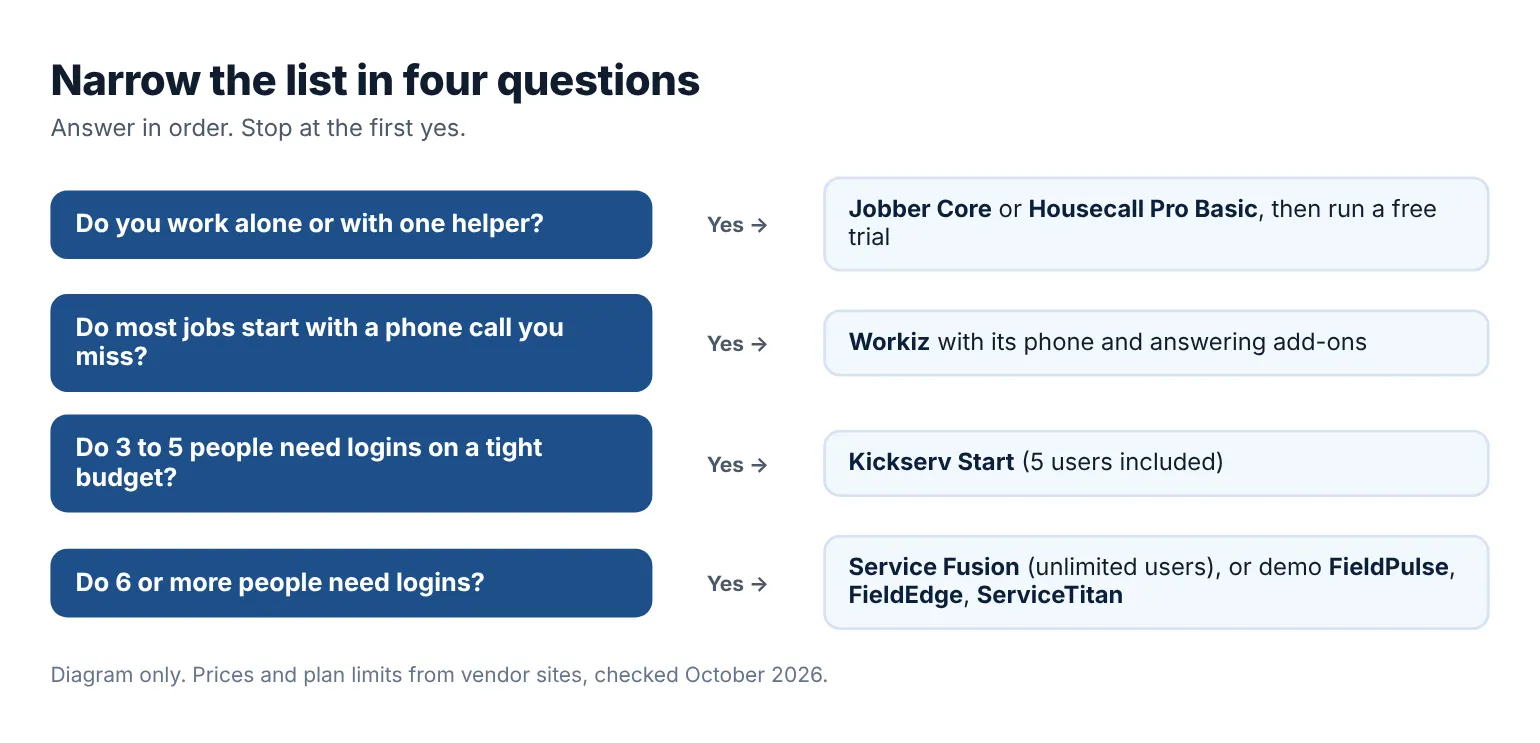
A quick way to narrow the list before you start trials. Diagram only.
| If you… | Start with… |
|---|---|
| Work alone and want the lowest published price | Jobber Core or Housecall Pro Basic |
| Want online booking and financing on the first plan | Housecall Pro Basic |
| Get most jobs by phone and miss calls on the job | Workiz, with its phone add-ons |
| Need 3 to 5 logins on a small budget | Kickserv Start |
| Have 6 or more people and hate per-user pricing | Service Fusion |
| Want help building workflows and can sign a contract | FieldPulse or FieldEdge |
| Run a large shop with a call center and marketing spend | ServiceTitan |
Use the free trials while you have real work on the schedule. Put a week of actual jobs through two tools: one quote, one booked visit, one invoice paid. You'll learn more from that than from any feature chart. The trade-specific versions of this list go deeper for plumbing shops, HVAC companies, and lawn care businesses.
Many small owners also find that the real gap isn't the office software. It's the front door. If homeowners can't find you, see your services, and ask for a time without calling, even a good dispatch board stays empty. A booking website for home services fills that gap. A Kejoola site is one option for it: a 4-page website (Home, Services, Blog, Contact) where customers pick a service and book a time, and the booking lands in your bookings. It is a website, not field service software, so quotes, crews, and invoices still live in the FSM app you choose. For more ways to fill the schedule, see these home services marketing ideas.
Questions owners ask about field service management software
What is the best field service management software for a small business?
For most small trade shops, Jobber or Housecall Pro is the best place to start. Both publish their prices, offer a 14-day free trial with no card, and include online booking on the first paid plan. Kickserv is worth a look if you need several logins on a small budget, and Service Fusion makes sense once per-user pricing starts to hurt.
How much does field service management software cost?
Published starting prices in this list run from $29/month (Jobber Core, 1 user, billed annually) and $59/month (Housecall Pro Basic, billed annually) to $60/month (Kickserv Start, 5 users) and $192/month (Service Fusion Starter, billed annually, unlimited users). Workiz, FieldPulse, FieldEdge, and ServiceTitan ask you to request a quote. Always confirm the current figure on the vendor's pricing page before you sign.
Is there free field service management software?
None of the eight tools here has a free forever plan listed on its pricing page. What you can get for free is a trial: 30 days on Kickserv, 14 days on Jobber and Housecall Pro, and 7 days on Workiz. FieldPulse and FieldEdge say they don't offer a free trial and use demos instead.
Do I need FSM software if I'm a one-person business?
Not on day one. A solo handyman or cleaner can run on a calendar, a simple invoice app, and a clear way for customers to book. FSM software starts paying for itself when you're losing track of quotes, chasing unpaid invoices, or sending a second person to jobs. At that point, a low-cost plan with a free trial is the safest first step.
What's the difference between FSM software and a booking website?
FSM software runs the job: quotes, scheduling crews, work orders, and invoices. A booking website is where new customers find you, see your services, and ask for a time. Some FSM tools include a basic booking page or website, and some owners pair a field app with a separate site. Pick the field app for your crew and the site for your customers.
Get a site customers can book from
If you want a site where customers can see your services and book a time, you can get a site customers can book from with Kejoola. Already have a Google Business listing? Paste your listing link to get a first draft of your site, then finish it with your own services, towns, and photos.
14-day free trial, no card needed. Online booking starts on the Starter plan.