Best HVAC Software for Small Shops
Compare 7 best HVAC software picks for small U.S. shops: Jobber, Housecall Pro, Workiz, Service Fusion, ServiceTitan, FieldEdge, and a bookable website option.
Josh · Oct 10, 2026 · 13 min read
- best hvac software
- hvac software
- hvac scheduling software
- hvac dispatch software
- home services
- field service
The best HVAC software for a small U.S. shop depends on crew size and what you need first: dispatch for service calls, estimates to invoices and payments, or a site customers can book. This roundup covers seven tools that show up for HVAC owners, with a quick pick by situation below. Prices checked October 2026 on each vendor's site.
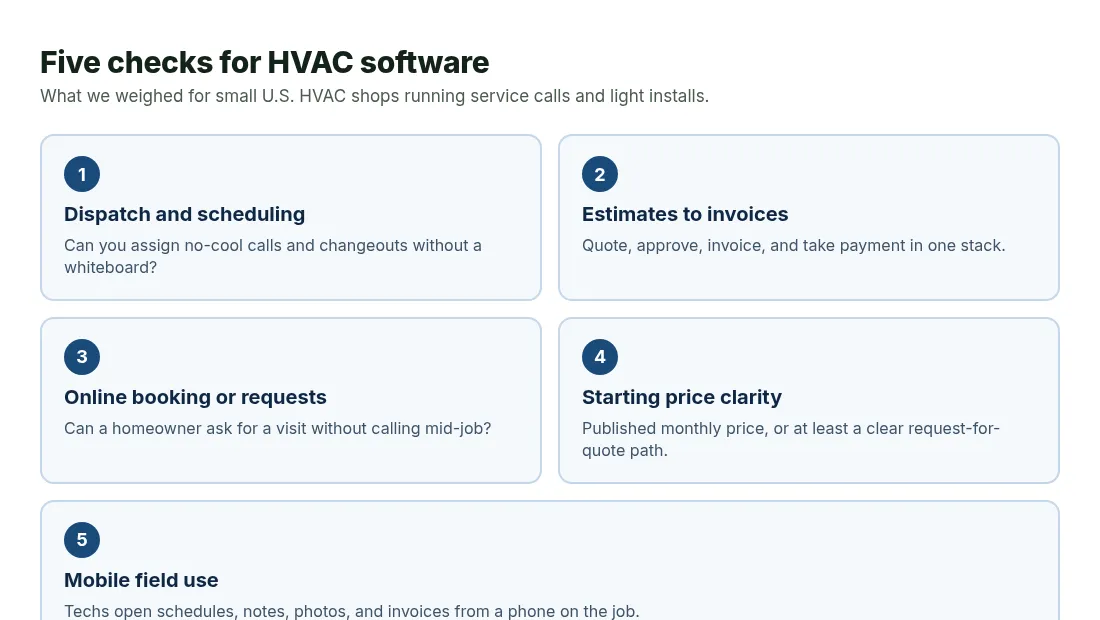
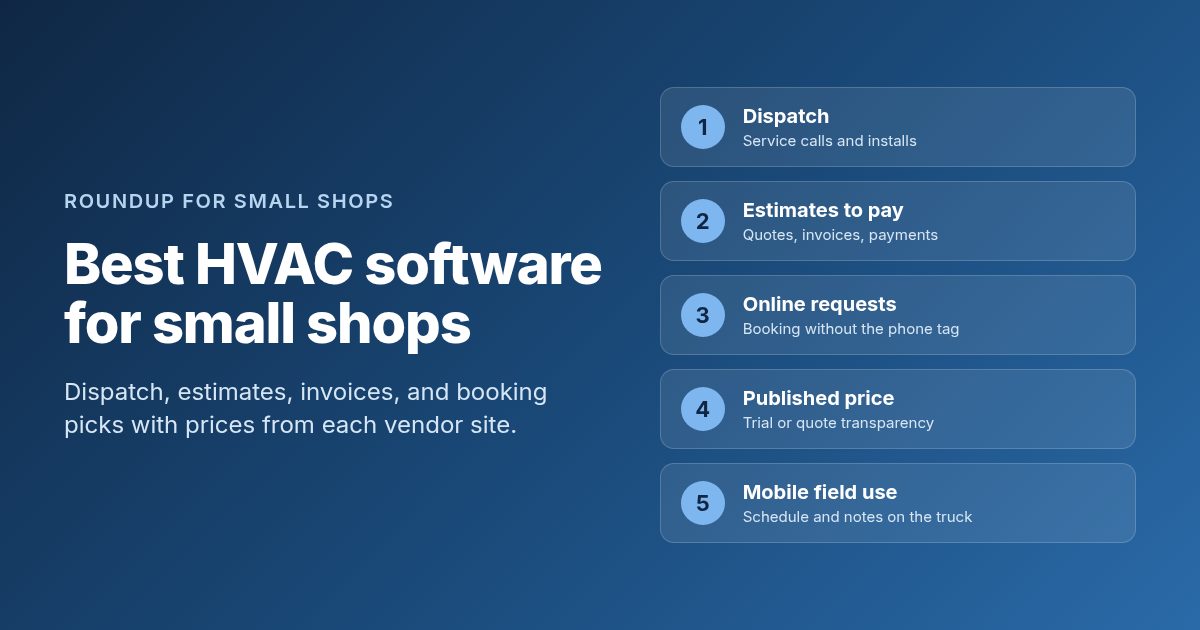
What we weighed for small HVAC shops. Diagram only.
How we picked
We scored each product on five checks that matter when you run no-cool calls, seasonal tune-ups, and light installs with a small crew.
- Dispatch and scheduling. Can you assign techs to emergency repairs and changeouts without a whiteboard?
- Estimates to invoices. Can you send a quote, get approval, invoice the job, and take payment without a second stack of apps?
- Online booking or work requests. Can a homeowner ask for a visit without calling while you are on a rooftop?
- Starting price. Is there a published monthly price, or at least a clear request-for-quote path a solo owner can use?
- Mobile use in the field. Can a tech open the schedule, notes, photos, and invoices from a phone on the job?
We only list features and prices that appear on each vendor's own product or pricing page. Review-site numbers stay out. Tools without an HVAC page or a public pricing story stayed off the list when we could not source them.
Quick comparison
| Tool | Best for | Starting price | Free plan or trial | Online booking | Watch out for |
|---|---|---|---|---|---|
| Jobber | Solo to small crews that want one stack | From $29/mo (Core, billed annually) | 14-day free trial | Yes (online booking on plans) | Higher plans and extra users add up fast |
| Housecall Pro | HVAC shops that want booking, memberships, and flat rate | From $79/mo (Basic on HVAC pricing) | 14-day free trial | Yes | HVAC rates differ from other trades. Seats and add-ons grow the bill |
| Workiz | Teams that want phone tools with field ops | From $275/mo (Standard, annual, 5 users) | 7-day free trial | Yes (online booking on plans) | Phone and payment add-ons sit outside the base plan |
| Service Fusion | Shops that want unlimited users at a published floor | From $208/mo (billed annually) | Month-to-month listed (no self-serve free trial on pricing page) | Customer web booking portal listed | Annual prepay for the discount. Add-ons raise the bill |
| ServiceTitan | Growing shops ready for enterprise HVAC depth | Request pricing (per-technician packages) | Free demo | Call booking and related tools on platform | No public dollar price. Demo-led buying |
| FieldEdge | Multi-truck HVAC shops that want plan tiers by demo | Request pricing (Select, Premier, Elite) | No free trial (demo and onboarding) | Call booking listed on plans | Pricing is quote-only. Setup is onboarding-led |
| Kejoola | Owners who need a bookable website first | From $39/mo (Starter, with booking) | 14-day free trial, no card | Yes | No crew dispatch or online payments yet. Google Calendar is one-way only |
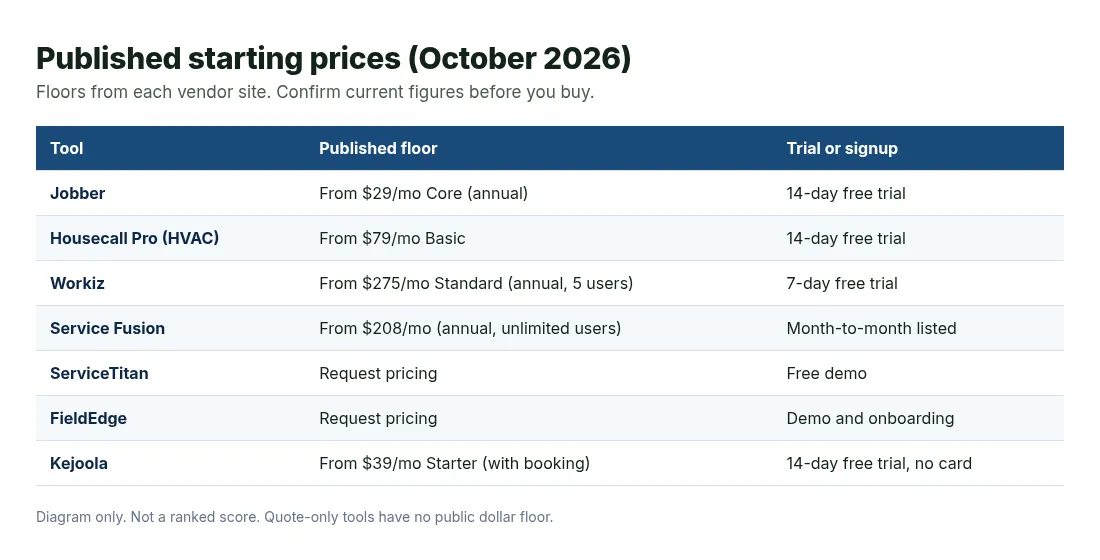
Published starting prices from each vendor site, checked October 2026. Diagram only.
1. Jobber
Best for: Solo owners and small HVAC crews that want quotes, schedules, invoices, and payments in one place.
Jobber markets HVAC software for scheduling and dispatch, estimating, client communication, and getting paid. It is a general home-service platform with a dedicated HVAC page. For many small shops, that general stack is enough: send a quote for a repair or install, schedule the tech, invoice after the visit, and take a card or ACH payment.
What you get:
- Online booking and request forms so customers can book or request service that lands in Jobber
- Professional quotes, invoices, and online payments (cards, ACH in the US, and Tap to Pay on published plans)
- Scheduling, routing tools, GPS tracking options, and a mobile app for field techs
- Client Hub where customers can approve quotes, check visits, and pay
- Automations for reminders, quote and invoice follow-ups, and recurring maintenance on higher plans
Price: From $29/month for Core with 1 user when billed annually, or $49/month with no commitment (Jobber pricing page, checked October 2026). Connect, Grow, and Plus plans step up from there. Extra users are listed at $29/month each on many tiers. A 14-day free trial is available with no credit card required.
Watch out for:
- Team plans and add-ons (Marketing Suite, Receptionist, Pipeline) raise the monthly bill quickly
- Job costing and deeper crew tools sit on higher plans, not Core
- It treats HVAC as one trade among many, so enterprise pricebook depth is lighter than HVAC-only suites
2. Housecall Pro
Best for: HVAC owners who want online booking, membership plans, and flat-rate tools once a second tech is on the truck.
Housecall Pro publishes an HVAC industry page covering scheduling and dispatch, estimates, invoicing, membership plans, equipment tracking, and flat-rate pricing. The HVAC pitch leans on no-cool emergencies, good-better-best proposals, recurring service agreements, and “on my way” updates with GPS.
What you get:
- Online booking so customers can book and pay from Google or your website
- Scheduling and dispatch, plus estimates and invoicing
- Membership plans, equipment tracking, and flat-rate pricing on Essentials and higher (HVAC package)
- Sales proposal tool for visual good-better-best options on Essentials and Max
- Route optimization, pipeline, and dedicated onboarding on Max
Price: On the HVAC industry page, Basic starts at $79/month for 1 user. Essentials is shown at $229/month for a solo user or $299/month with 5 users included ($100/month per additional user). Max is shown at $349/month solo or $649/month with 8 users included ($75/month per additional user) (Housecall Pro HVAC page, checked October 2026). A 14-day free trial is available with no credit card required to start. The general pricing wizard may show different floors for other industries, so confirm the HVAC quote for your seat count.
Watch out for:
- HVAC, plumbing, and electrical shops see a different rate card than many other trades
- Extra users and add-ons sit outside the base plan
- Essentials and Max dollar amounts still need a careful seat-count check before you buy
3. Workiz
Best for: Small and mid-size HVAC teams that want scheduling, invoicing, and phone tools in one system.
Workiz positions HVAC software around scheduling, estimates, invoicing, pricebooks, equipment history, service plans, and AI answering for missed calls. The HVAC page covers good-better-best proposals, maintenance campaigns, multi-day install jobs, and financing options. Integrated phone and payment tools are part of the product story, with some pieces sold as add-ons.
What you get:
- Scheduling, jobs, estimates, invoices, and a mobile app on published plans
- Online booking with optional checkout on plan comparisons
- Price book tools, with flat rate, service plans, and equipment tracking on Ultimate
- Genius AI suite options (answering, leads, scheduling, marketing) by plan or add-on
- QuickBooks Online sync listed on Standard and higher
Price: Standard is $275/month billed annually for up to 5 users. Pro is $325/month billed annually for up to 5 users with added AI tools. Ultimate is custom-priced (Workiz pricing page, checked October 2026). A 7-day free trial is available with no credit card required. Communications (phone system) and Workiz Pay are sold separately as add-ons per Workiz’s own pricing notes.
Watch out for:
- The published floor is higher than Jobber Core or Housecall Pro Basic
- Phone and payment add-ons can change the real monthly bill
- Ultimate pricing needs a sales conversation
4. Service Fusion
Best for: HVAC shops that want unlimited users at a published monthly price.
Service Fusion markets HVAC service software for scheduling and dispatch, estimates and jobs, QuickBooks sync, payments, and a customer web booking portal. Unlimited users is the unusual part: the monthly floor does not rise with each new tech login on the published plans.
What you get:
- Customer management, estimates, jobs, scheduling, and dispatching
- Integrated payments and QuickBooks integration on published tiers
- Text messaging alerts, with integrated voice and text on mid and high tiers
- Customer web booking portal on higher tiers or as an add-on depending on plan
- Job photos, inventory, and job costing included or as add-ons by tier
Price: Plans billed annually start at $208/month, $325/month, and $533/month, each with unlimited users. Month-to-month options are listed at $245, $382, and $627 per month (Service Fusion pricing page, checked October 2026). Annual billing is shown with a 15% save versus monthly. GPS fleet tracking and ServiceCall.ai appear as add-ons.
Watch out for:
- The annual discount is charged as one annual payment at sign-up
- Several tools that small shops want (portal, progressive billing, GPS) sit on higher tiers or add-ons
- A self-serve free trial is not listed on the public pricing page
5. ServiceTitan
Best for: Growing HVAC companies that need enterprise dispatch, pricebook, and reporting depth and can buy through a demo.
ServiceTitan is built around HVAC residential, commercial, and construction workflows: dispatching, scheduling, call booking, invoicing, pricebook, proposals, service agreements, and a mobile app for techs. The pricing page states per-technician pricing and shows package names without public dollar amounts.
What you get:
- Dispatching, scheduling, call booking, invoicing, and pricebook on the core platform story
- Mobile app for field techs with job details, estimates, and payments workflows
- Proposals, job costing, CRM, reporting, and service agreement tools on the HVAC industry pages
- QuickBooks Online and Desktop integrations listed in HVAC FAQs
- Free demo path instead of a published self-serve checkout
Price: Not listed as a public monthly dollar figure. The pricing page describes per-technician packages (including Starter, Essentials, and The Works naming in ServiceTitan materials) and directs buyers to request pricing or book a demo (ServiceTitan pricing page, checked October 2026).
Watch out for:
- No published dollar floor, so you cannot budget from the website alone
- Buying is demo-led, which fits larger shops more than a one-van trial
- Implementation depth is higher than self-serve tools like Jobber Core
6. FieldEdge
Best for: Multi-truck HVAC contractors that want Select, Premier, or Elite plan tiers and will price through a demo.
FieldEdge targets home-service contractors with HVAC software for dispatching, booking and scheduling, agreements and quotes, pricebook and flat-rate pricing, and integrated payments. The public pricing page lists Select, Premier, and Elite feature sets without dollar amounts.
What you get:
- Call booking, work orders, scheduling, reporting, and tech time tracking
- Pricebook and flat-rate pricing, invoices, purchases, and QuickBooks Online and Desktop
- Integrated payments and SMS texting on published plan tables
- Mobile app licenses included by tier (2 on Select, 4 on Premier, 6 on Elite)
- Advanced dispatching, multi-option quotes, and advanced service agreements on Premier and Elite
Price: Request pricing. FieldEdge states that plans vary by technicians, employees, and add-ons, and asks buyers to book a demo (FieldEdge pricing page, checked October 2026). A free trial is not offered. Onboarding and training resources are included with plans.
Watch out for:
- No public dollar price for Select, Premier, or Elite
- No free trial. Setup is onboarding-led
- Add-ons such as Proposal Pro and MarketingEdge are call-for-pricing on lower tiers
7. Kejoola
Best for: HVAC owners who need a clean bookable website before (or beside) full crew software.
Kejoola is our product. It publishes a 4-page site (Home, Services, Blog, Contact) with online booking for home-service businesses, including HVAC. It is not a dispatch board or flat-rate pricebook. If your gap is that homeowners cannot see services and request a time without calling, this is the fit. Pair it later with field software if you outgrow a simple booking inbox.
What you get:
- A 4-page bookable website with your services and towns
- Online booking from the Starter plan up
- Booking form with name, email, phone, and a text notes box for gate codes, equipment notes, and job details
- Bookings that land in your bookings list, with an optional one-way Google Calendar add if you connect it under Integrations
- Theme palette plus your brand color, editable copy, photos, sections, and fonts
Price: Lite $24/month (website only, no booking). Starter $39/month (first plan with booking). Professional $89/month. Business $159/month. 14-day free trial, no card (Kejoola pricing, checked October 2026).
Watch out for:
- No crew dispatch, GPS, flat-rate pricebook, or membership billing tools
- No online payments yet (customers pay in person for now)
- Google Calendar is one-way only. No SMS, client portal, or recurring appointment engine
If you already have ops software and only need a public page customers can book, start with an HVAC website design shape, then finish services and photos yourself.
How to choose
Match the tool to the bottleneck you feel this season, not to a feature checklist you will never open.
| If you… | Start with… |
|---|---|
| Run solo or a tiny crew and want quotes, schedules, and pay in one app | Jobber |
| Care most about HVAC memberships, flat rate, and booking as you hire | Housecall Pro |
| Want phone tools plus field ops in one place | Workiz |
| Want unlimited users at a published monthly floor | Service Fusion |
| Are ready for enterprise HVAC depth through a demo | ServiceTitan |
| Want multi-truck HVAC tiers priced in a sales call | FieldEdge |
| Need a bookable website more than crew software | A bookable website builder |
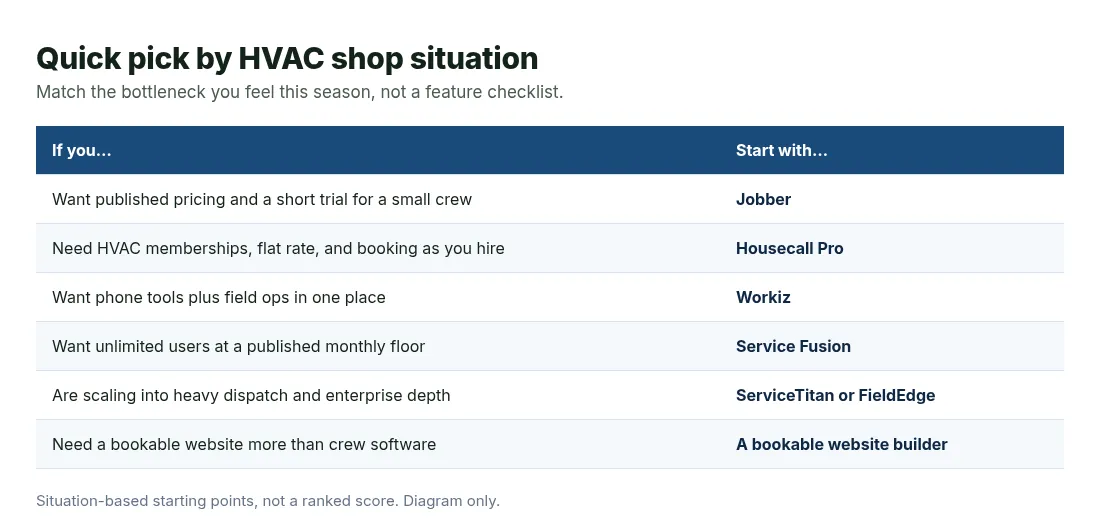
Situation-based starting points, not a ranked score. Diagram only.
A practical path for many owners is two steps. First, pick the ops tool that matches crew size. Second, make sure customers can still find and request work online. A booking website for home services covers that second gap when your field app’s public page is thin. For demand-side tactics after the software is in place, see HVAC marketing. If you want a parallel roundup for outdoor crews, the best lawn care software post uses the same comparison shape.
Questions HVAC owners ask about software
What is the best HVAC software for a solo operator?
Start with Jobber Core if you want one paid stack with a short trial and a published low floor. Housecall Pro Basic on the HVAC rate card is the next common step when you want booking and payments with an HVAC-specific package. Solo owners usually lose more time to missed calls and late invoices than to missing enterprise reports.
Do I need HVAC-specific software or will general field service apps work?
General apps like Jobber and Workiz work well for service calls, tune-ups, and simple installs. Lean toward Housecall Pro’s HVAC package, ServiceTitan, or FieldEdge when memberships, flat-rate pricebooks, equipment history, and heavier dispatch are daily work.
How much does HVAC software cost?
Published floors in this list run from about $29/month (Jobber Core annual) and $79/month (Housecall Pro HVAC Basic) up through $208/month (Service Fusion annual) and $275/month (Workiz Standard annual). ServiceTitan and FieldEdge ask you to request pricing. Always confirm the current figure on the vendor pricing page.
Can customers book HVAC service online?
Yes on Jobber, Housecall Pro, Workiz, and bookable website builders. Service Fusion lists a customer web booking portal by plan or add-on. ServiceTitan emphasizes call booking and related customer tools on its platform pages. Online booking is different from a full public marketing site, so check both.
Should I buy enterprise HVAC software before I have a crew?
Usually no. Enterprise suites shine when you have stable tech headcount, a dispatcher, and enough membership or install volume to earn back demo-led pricing. A published-price tool or a 14-day trial is the safer first move than a long implementation for a one-van shop.
Get a site customers can book from
If the missing piece is a public page where homeowners see your HVAC services and request a time, you can get a site customers can book from with Kejoola. Already have a Google Business listing? Paste your listing link to get a first draft of your site, then finish it with your own services, towns, and photos.
14-day free trial, no card needed. Online booking starts on the Starter plan.