Best Electrical Contractor Software for Small Shops
Compare 7 electrical contractor software picks for small U.S. shops: Jobber, Housecall Pro, Knowify, Service Fusion, ServiceTitan, FieldEdge, and a bookable website option.
Josh · Oct 23, 2026 · 15 min read
- best electrical contractor software
- electrical contractor software
- electrician software
- electrician scheduling software
- field service
- home services
The best electrical contractor software for a small U.S. shop depends on the kind of work that fills your week: same-day service calls, multi-phase project work with change orders, or a mix of both. This roundup covers seven tools electricians shortlist. Jobber and Housecall Pro suit service-heavy shops with one or a few trucks. Knowify fits contractors who bill rough-in and trim-out in stages. Service Fusion fits crews that keep adding logins, and ServiceTitan or FieldEdge fit shops ready for a demo-led setup. Prices checked October 2026 on each vendor's site.
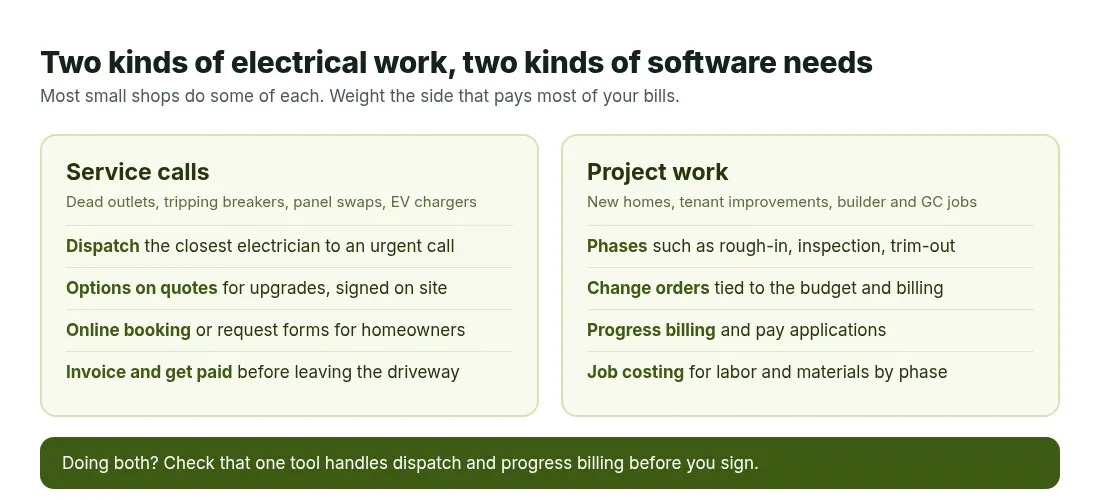
Service calls and project work need different tools. Diagram only.
How we picked
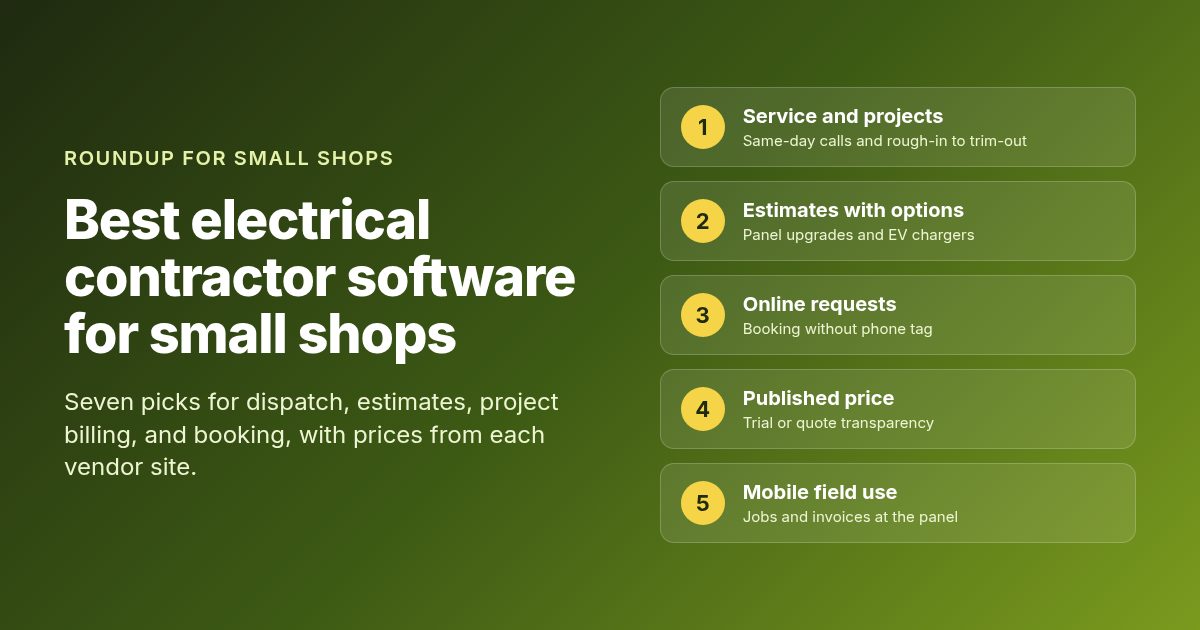
Electrical work splits two ways, and most bad software purchases come from mixing them up. A service shop lives on short visits: a dead outlet, a tripping breaker, a panel swap, an EV charger install. A project shop lives on phases, change orders, and progress bills to a general contractor. Many small shops do both, so we checked each product against five things.
- Service calls and project work. Can it dispatch a same-day call and also track a job through rough-in, inspection, and trim-out?
- Estimates with options. Can you quote a 100-amp to 200-amp panel upgrade with a good, better, best choice and get a signature on site?
- Online booking or work requests. Can a homeowner ask for a visit while you are in an attic pulling wire?
- Starting price. Is there a published monthly price, or at least a clear request-for-quote path a one-truck owner can use?
- Mobile use in the field. Can an electrician open the job, photos, notes, and invoice from a phone at the panel?
Takeoff and bid software for plan sets is a separate category, so it stays out of this list. We only list features and prices that appear on each vendor's own product or pricing page. Where a vendor hides its dollar amounts behind a demo, we say so instead of guessing.
Quick comparison
| Tool | Best for | Starting price | Free plan or trial | Online booking | Watch out for |
|---|---|---|---|---|---|
| Jobber | Solo electricians and small service crews | From $29/mo (Core, billed annually) | 14-day free trial | Yes (book and schedule jobs online on Core) | Extra users and add-ons raise the bill |
| Housecall Pro | Service shops selling panel and EV installs as they hire | From $79/mo (Basic, 1 user) | 14-day free trial | Yes | Flat rate and job costing start at Essentials |
| Knowify | Contractors who bill projects in phases and pay apps | From $99/mo (Core, billed yearly, 1 user) | 14-day free trial | Not listed (service portal with Service Pro add-on) | Dispatch for service calls is a paid add-on |
| Service Fusion | Shops that want unlimited users at a published floor | From $208/mo (billed annually) | Month-to-month listed (free demo, no self-serve trial on pricing page) | Customer web portal on Pro or as add-on | Annual prepay for the discount. Add-ons raise the bill |
| ServiceTitan | Growing residential, commercial, and construction shops | Request pricing (per technician) | Free demo | Call booking and client portal on platform | No public dollar price. Demo-led buying |
| FieldEdge | Multi-truck electrical shops that will price by demo | Request pricing (Select, Premier, Elite) | No free trial (demo and onboarding) | Call booking on all plans | Quote-only pricing. Customer portal is call-for-pricing below Elite |
| Kejoola | Electricians who need a bookable website first | From $39/mo (Starter, with booking) | 14-day free trial, no card | Yes | No crew dispatch or online payments yet. Google Calendar is one-way only |
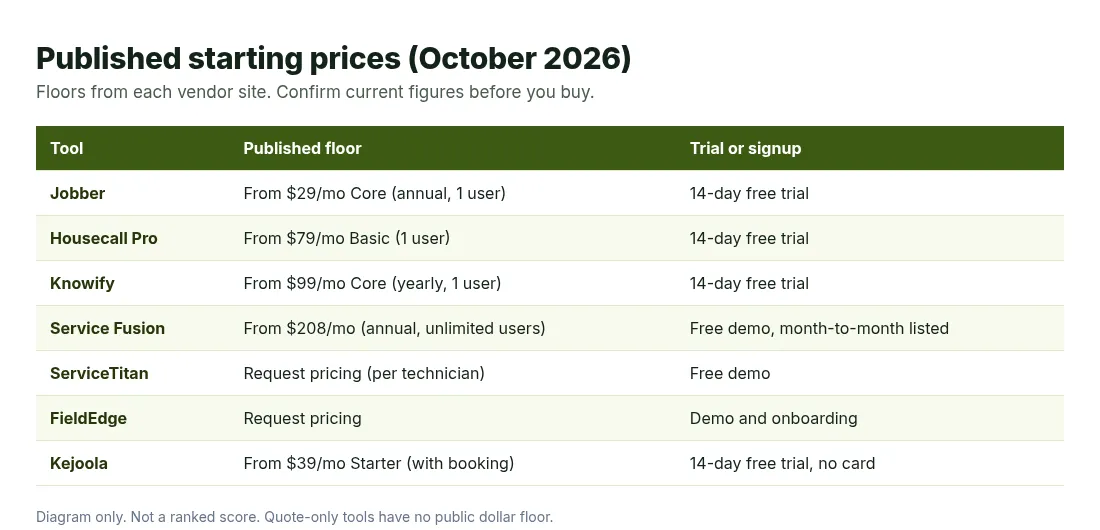
Published starting prices from each vendor site, checked October 2026. Diagram only.
1. Jobber
Best for: Solo electricians and small service crews that want quotes, schedules, invoices, and payments in one app.
Jobber covers many home-service trades, and its electrical page leans on quoting and getting paid. It talks about upselling surge protection, dedicated circuits, panel upgrades, and safety inspections as optional line items. It also covers progress invoicing tied to milestones for larger electrical jobs. Scheduling, dispatch, and the customer record all live in the same account.
What you get:
- Online booking and work request forms on the Core plan, for your website and social profiles
- Quotes with photos, reviews, and optional line items, plus automatic quote follow-ups by email or text
- Client hub where customers request work, approve estimates, check visits, and pay
- Card, ACH, and Tap to Pay payments, with progress invoicing for milestone billing
- Free iOS and Android app with schedules, job details, checklists, photos, and time tracking
Price: Core is $29/month for 1 user billed annually, $39/month on a 1-year commitment, or $49/month with no commitment (Jobber pricing page, checked October 2026). Connect starts at $99/month and Grow at $149/month, both for 1 user billed annually. Plus starts at $399/month with 5 users. Extra users are $29/month each. The 14-day free trial runs on Grow with no credit card. A limited-time discount for new customers was also showing in October, so check the current figure.
Watch out for:
- Optional line items, job costing, and two-way text messaging sit on Grow, not Core
- Receptionist ($29/month), Pipeline ($49/month), and Marketing Suite ($99/month) are paid add-ons
- The electrical page is built around service work and does not mention AIA pay applications for general contractors
2. Housecall Pro
Best for: Residential service electricians who sell panel upgrades and EV charger installs and plan to add a second or third truck.
Housecall Pro wrote its electrical page around real electrical work. It covers dispatching the closest electrician to an emergency call, scheduling panel upgrades and EV installs from one board, and presenting good, better, best options on big installs. It also mentions job and safety checklists with photo proof, which helps when an inspector asks what was done.
What you get:
- Online booking from Google or your website, plus scheduling and dispatch on every tier
- Estimates, invoicing, payments, consumer financing, and a price book on Basic
- Sales proposals, checklist automations, flat-rate pricing, job costing, and QuickBooks Online on Essentials
- Pipeline, route optimization, pricing insights, and open API access on Max
- Progress invoicing for staged jobs and a mobile app that works offline in English and Spanish
Price: On the electrical page plan cards, Basic is $79/month for 1 user. Essentials is $229/month for a solo user or $299/month with 5 users, plus $100/month per additional user. Max is $349/month solo or $649/month with 8 users, plus $75/month per additional user (Housecall Pro electrical page, checked October 2026). The same page's FAQ lists $399/month for solo Max, so confirm the figure at signup. A 14-day free trial is available with no credit card required.
Watch out for:
- Flat rate, sales proposals, and job costing start at Essentials, not Basic
- Extra users cost $75 to $100/month each depending on tier
- The page shows short intro discounts, so the first months can differ from the list price
3. Knowify
Best for: Electrical contractors who run project work for builders or general contractors and bill it in phases.
Knowify is built for contract work first. Its electrical page covers new construction, commercial tenant improvements, and service calls in one system. Jobs are organized by phases like rough-in and trim-out, approved change orders flow into the budget and billing, and official AIA G702 and G703 pay applications are available for commercial progress billing. Service dispatch comes through a Service Pro add-on.
What you get:
- Multi-phase estimates and budgets with cost codes, plus job templates for common electrical projects
- Change orders sent for e-signature and applied to the right billing cycle
- Progress billing, AIA pay apps, and real-time WIP and job costing reports
- A two-way QuickBooks Online connection, plus QuickBooks Payments for card or ACH
- A mobile app for schedules, time tracking, photos, and expenses, and a client portal for job details and invoices
Price: Core is $99/month billed yearly or $149/month billed monthly, with 1 user. Advanced is $329/month billed yearly or $399/month billed monthly, with 10 users. Enterprise is priced by request. Each additional user is $29/month. The Service Pro add-on for dispatch, maintenance agreements, and a service portal is $99/month billed yearly or $199/month billed monthly (Knowify pricing page, checked October 2026). Knowify offers a 14-day free trial with no credit card.
Watch out for:
- Dispatching service calls needs the Service Pro add-on on top of a base plan
- Online booking for homeowners is not listed on the pricing or electrical pages
- The tool is built around QuickBooks Online, so shops on other accounting software should check fit first
4. Service Fusion
Best for: Electrical shops that want unlimited users at a published monthly price.
Service Fusion markets electrical contractor software for scheduling and dispatch, estimates and jobs, payments, and QuickBooks. Unlimited users is the unusual part. Your monthly bill does not climb when you add an apprentice, a second journeyman, or a dispatcher on any published plan.
What you get:
- Customer management, estimates and jobs, scheduling and dispatching, and invoicing on every plan
- Integrated payments and QuickBooks integration on every plan
- Text messaging alerts on every plan, with integrated voice and text on Plus and Pro
- Job photos, inventory, and job costing on Plus, or as add-ons on Starter
- eSign inside estimates, a customer web portal, and progress billing on Pro or as add-ons
Price: Starter, Plus, and Pro are $208/month, $325/month, and $533/month billed annually, each with unlimited users. Month-to-month plans are $245, $382, and $627 per month (Service Fusion pricing page, checked October 2026). Annual billing saves 15% and is charged as one payment at sign-up. GPS fleet tracking and ServiceCall.ai are add-ons on every plan.
Watch out for:
- The annual discount requires paying the full year up front
- The customer web portal, progress billing, and eSign need Pro or add-ons
- A self-serve free trial is not listed on the public pricing page, which points you to a free demo
5. ServiceTitan
Best for: Growing electrical companies that run residential, commercial, and construction work and can buy through a demo.
ServiceTitan covers all three sides of electrical work on one platform. Its electrical page lists multi-option proposals, job costing, CRM, reporting, service agreements, accounting, pricing tools, and a self-service client portal. It also describes project tracking with estimates, purchase orders, job costing, and AIA-style billing for construction work.
What you get:
- Dispatching, scheduling, call booking, invoicing, a pricebook, and mobile estimates on the core platform
- Proposals that turn into agreements when the customer accepts
- ServiceTitan Mobile on iOS and Android with customer history, directions, estimates, and card payments
- Project tracking with purchase orders, job costing, and AIA-style billing
- QuickBooks Online and QuickBooks Desktop Premier and Enterprise integrations
Price: Not listed as a public dollar figure. The pricing page shows Starter, Essentials, and The Works packages with per-technician pricing and a request pricing button for each (ServiceTitan pricing page, checked October 2026). The electrical page names Marketing Pro and Phones Pro as add-ons.
Watch out for:
- No published dollar floor, so you cannot budget from the website
- Buying is demo-led, which suits a shop with an office manager more than a one-van trial
- Setup is heavier than self-serve tools like Jobber Core
6. FieldEdge
Best for: Multi-truck electrical contractors that want Select, Premier, or Elite plan tiers and will price through a demo.
FieldEdge aims at small and mid-market electrical companies with several trucks, locations, or business units. Its electrician page covers a central dispatch board with GPS tracking, flat-rate pricing, QuickBooks, on-site invoicing and payments, and Proposal Pro for good, better, best options. The pricing page lists features by tier with no dollar amounts.
What you get:
- Call booking, work orders, scheduling, reporting, and tech time tracking on every plan
- Pricebook and flat-rate pricing, invoices, purchases, and QuickBooks Online and Desktop on every plan
- Integrated payments, text messaging, reminders, custom forms, and lead tracking on every plan
- Mobile app licenses by tier: 2 on Select, 4 on Premier, 6 on Elite
- Advanced dispatching and multi-option quotes on Premier, with Proposal Pro and a customer portal on Elite
Price: Request pricing for every tier. FieldEdge says you choose the number and type of licenses you need and asks you to book a demo to see the cost (FieldEdge pricing and electrician pages, checked October 2026). There is no free trial. Every plan includes an onboarding specialist.
Watch out for:
- No public dollar price for any tier
- No free trial, and downgrades wait until the end of your contract period
- Proposal Pro, MarketingEdge, and the customer portal are call-for-pricing below Elite
7. Kejoola
Best for: Electricians who need a clean bookable website before, or beside, full field software.
Kejoola is our product. It publishes a 4-page site (Home, Services, Blog, Contact) with online booking for home-service businesses, electricians included. It does not dispatch trucks, price jobs from a flat-rate book, or bill project phases. If your gap is that homeowners cannot see your services and request a time without calling, this is the fit. You can add field software later if you outgrow a simple bookings list.
What you get:
- A 4-page bookable website with your services and the towns you cover
- Online booking from the Starter plan up
- A booking form with name, email, phone, and a text notes box for the address, panel age, or what keeps tripping
- Bookings that land in your bookings list, with an optional one-way Google Calendar connection under Integrations
- A theme palette plus your brand color, with editable copy, photos, sections, and fonts
Price: Lite $24/month (website only, no booking). Starter $39/month (first plan with booking). Professional $89/month. Business $159/month. 14-day free trial, no card (checked October 2026).
Watch out for:
- No crew dispatch, GPS, flat-rate pricebook, or progress billing
- No online payments yet, so customers pay in person for now
- Reminders go out by email only, and Google Calendar is one-way only
If you already run field software and only need a public page customers can book from, the guide to website design for electricians covers what that page should include.
How to choose
Pick the tool that fixes the bottleneck you feel this month, not the one with the longest feature list.
| If you… | Start with… |
|---|---|
| Run solo or one truck on service calls and want quotes, schedules, and payment in one app | Jobber |
| Sell panel upgrades and EV installs with options and plan to hire | Housecall Pro |
| Bill builders or general contractors in phases with change orders and pay apps | Knowify |
| Keep adding electricians and office staff and want one flat monthly price | Service Fusion |
| Run residential, commercial, and construction work with an office team | ServiceTitan |
| Run several trucks and want tiered plans priced in a sales call | FieldEdge |
| Need a bookable website more than crew software | A bookable website builder |
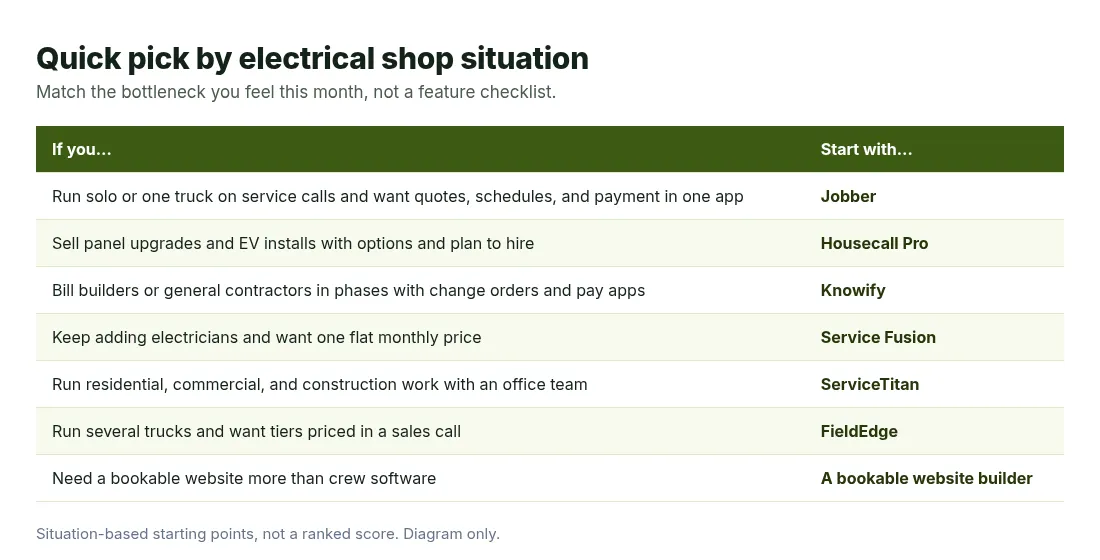
Situation-based starting points, not a ranked score. Diagram only.
Three questions narrow it fast. First, what share of your revenue is service versus project work? A shop doing mostly outlets, breakers, and panel swaps will get more from Jobber or Housecall Pro than from a project billing tool. A shop wiring new homes for a builder needs phases, change orders, and pay apps, which is where Knowify and ServiceTitan earn their cost.
Second, how many people need a login this year? Per-user pricing at Jobber, Housecall Pro, and Knowify is cheap for one electrician and adds up at six. Service Fusion's flat price starts to win once headcount grows. Third, can you afford a demo-led rollout? ServiceTitan and FieldEdge both onboard you with a specialist, which takes office time a one-truck owner rarely has.
If you are still setting up the business itself, the guide on how to start an electrical business covers licensing, insurance, and first jobs before software matters. For many owners, the path after that is two steps. Pick the field tool that matches your crew and your mix of work. Then make sure customers can still find you and ask for work online. A booking website for home services covers that second gap when your field app's public page is thin, and these electrician marketing ideas help fill the schedule once it is live. For the same comparison on the heating and cooling side, see best HVAC software.
Questions electricians ask about software
What is the best electrical contractor software for a solo electrician?
Jobber Core is the easiest place to start if you want one paid app with a low published floor and a 14-day trial. Housecall Pro Basic is the next step when you want online booking, a price book, and financing together. Solo electricians usually lose more money to missed calls and slow invoices than to missing enterprise reports, so start small.
Do I need different software for service work and new construction?
Not always, but the tools lean one way. Jobber and Housecall Pro are built around service calls. Knowify is built around phased project work and adds service dispatch as an add-on. ServiceTitan covers both on one platform at a higher buying effort. If you do both, check that the tool handles change orders and progress billing before you sign.
How much does electrical contractor software cost?
Published floors in this list run from $29/month (Jobber Core, annual) and $79/month (Housecall Pro Basic) to $99/month (Knowify Core, yearly) and $208/month (Service Fusion, annual, unlimited users). ServiceTitan and FieldEdge ask you to request pricing. Always confirm the current figure on the vendor's pricing page before you sign.
Can customers book an electrician online with these tools?
Yes on Jobber, Housecall Pro, and bookable website builders. Service Fusion offers a customer web portal on Pro or as an add-on. Knowify offers a client portal and a service portal through Service Pro, but online booking is not listed. ServiceTitan and FieldEdge focus on call booking for your office, with customer portals on the platform or higher tiers.
Is estimating software the same as electrical contractor software?
No. Takeoff and bid tools price a job from a plan set, while the tools in this list run the work after the bid: scheduling, dispatch, invoicing, and payment. A shop bidding large commercial jobs often runs one of each. A residential service shop can usually quote from the price book inside its field app.
Get a site customers can book from
If the missing piece is a public page where homeowners see your electrical services and request a time, you can get a site customers can book from with Kejoola. Already have a Google Business listing? Paste your listing link to get a first draft of your site, then finish it with your own services, towns, and photos.
14-day free trial, no card needed. Online booking starts on the Starter plan.
Sources
- Jobber electrical contractor software
- Jobber pricing
- Housecall Pro electrical contractor software
- Knowify electrical contractor software
- Knowify pricing
- Service Fusion electrical contractor software
- Service Fusion pricing
- ServiceTitan electrical software
- ServiceTitan pricing
- FieldEdge electrician software
- FieldEdge pricing
- Kejoola