Booking system for small business: Boost efficiency and grow revenue
Discover how a booking system for a small business can boost efficiency, reduce no-shows, and grow revenue. This guide covers key features, ROI, and implementation.
Josh · Jan 21, 2026 · 15 min read
- small business
- booking system
- scheduling software
- efficiency
- revenue growth
At its heart, a booking system for a small business is a digital tool that lets your clients book appointments online, whenever it suits them, without having to call or email you directly. Think of it as your virtual front desk—one that manages your calendar, sends out reminders, and can even handle payments, all automatically. The entire point is to get you out of the weeds of manual scheduling, which is often tedious and ripe for mistakes.
Moving Beyond Manual Scheduling Chaos
Remember the last time you played phone tag with a client just to find a 30-minute slot that worked for both of you? Or sifted through a dozen DMs to confirm a single appointment? For most small business owners, wrestling with spreadsheets, paper calendars, and endless back-and-forth messages is a huge time-suck. It’s a frantic way to work, creating bottlenecks that frustrate you and your clients.
It's like comparing a restaurant host juggling a Saturday night rush with a pen and notepad to one using a digital system that manages reservations and waitlists on its own. The difference in stress and efficiency is night and day.
Your 24/7 Digital Front Desk
Bringing a booking system for small business into your workflow is the first real step toward taking back your time. It effectively opens your doors 24/7, allowing clients to book, reschedule, or get confirmations whenever they want—even while you're sleeping. This simple shift to automation pays off almost immediately.
- Less Admin, More Action: You’ll spend far less time tethered to your phone and far more time on the work that actually brings in money.
- A Better Client Experience: Customers love the convenience. Giving them the power to book on their own terms is a huge win.
- Fewer Mix-ups: An automated system is your best defense against dreaded double-bookings, ensuring your calendar stays accurate.
The market is clearly heading in this direction. The global appointment scheduling software market is expected to jump from $546.1 million in 2025 to an incredible $1,518.4 million by 2032. Small businesses are the driving force behind this growth as they turn to these platforms to manage an ever-increasing volume of appointments.
While a booking system is perfect for handling your client-facing schedule, it's just as important to streamline your internal meetings. Learning to master a meeting planner workflow can help you organize your team with the same level of efficiency. Ultimately, this isn't just about getting a fancier calendar; it's about building a business that can grow without the chaos.
Calculating the Real Return on Your Investment
Putting money into a booking system for a small business isn't just another line item on your expense sheet. It's a direct investment in generating more revenue. The financial payoff becomes crystal clear when you look at three key areas: slashing costly no-shows, capturing bookings 24/7, and winning back your own valuable time.
This isn't just theory—it’s about a real, measurable impact on your bottom line. Moving from clunky manual methods to a smart, automated platform creates efficiencies that directly boost your income. The initial cost is quickly covered by plugging money leaks and opening up new ways to get paid.
Slashing No-Shows and Recovering Lost Income
No-shows are the silent killers of profit. Every time a client doesn't show up, that's revenue you'll never see again. One of the simplest yet most powerful tools against this are automated SMS and email reminders.
A simple automated reminder can drastically change client behavior, turning a potential loss into a secured appointment. This direct intervention protects your income with minimal effort.
Think about it: businesses using manual methods often struggle with 20-30% no-show rates. Simply introducing automated reminders can slice that figure down to just 10-15%.
Let's put some numbers to that. Below is a quick comparison showing how this plays out for a small business with 50 appointments a week.
Manual vs Automated Scheduling: A Revenue Comparison
| Metric | Manual System (25% No-Show Rate) | Automated System (12.5% No-Show Rate) | Monthly Impact |
|---|---|---|---|
| Weekly Appointments | 50 | 50 | N/A |
| Price per Appointment | $100 | $100 | N/A |
| Weekly No-Shows | 12.5 | 6.25 | 6.25 fewer no-shows |
| Weekly Lost Revenue | $1,250 | $625 | $625 recovered |
| Monthly Recovered Revenue | N/A | N/A | $2,500 |
By cutting the no-show rate in half, the business recovers a significant amount of monthly income that was previously just disappearing. Want to dig deeper? You can read more about how automated reminders reduce no-shows and protect your cash flow.
Capturing Bookings Beyond Business Hours
You might lock up at 5 PM, but your customers are often making plans late into the evening. Without a way for them to book online, you're invisible to every potential client who decides they need you after you've gone home.
A 24/7 booking portal captures that impulse. It empowers customers to lock in an appointment the moment they're motivated, turning a late-night thought into a confirmed sale. This makes your business available when it’s most convenient for them, not just you.
The market reflects this shift. The entire industry for scheduling software is on a steep growth path, expected to climb from $546 million in 2025 to over $1.5 billion by 2032.
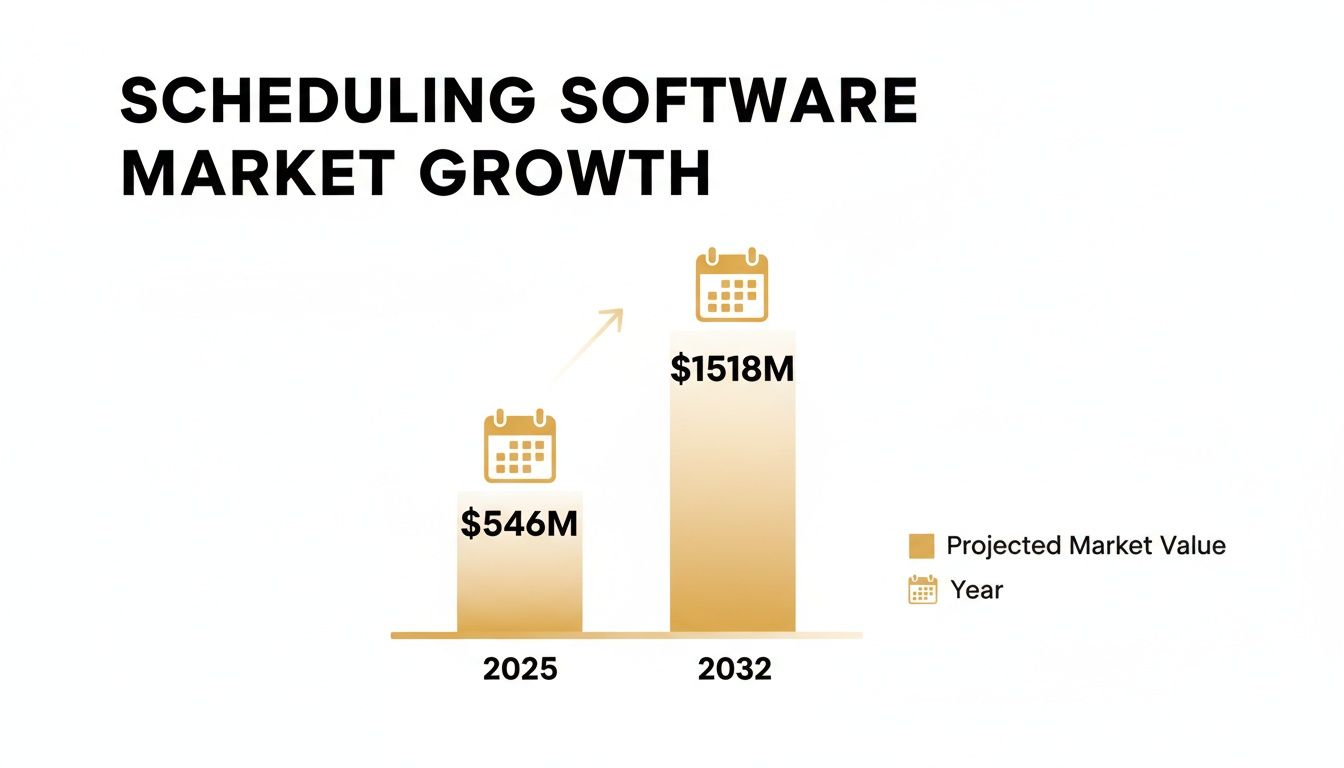
This explosion in growth shows just how essential these tools have become for small businesses aiming to compete and grow efficiently.
Quantifying the Value of Reclaimed Time
Finally, let’s talk about the time you spend on the admin hamster wheel—playing phone tag, answering the same emails, and shuffling your calendar around. A booking system handles all of that for you, freeing up hours every single week.
If you save just five hours a week and your time is worth $75/hour, that’s $375 back in your pocket. That's time you can now spend on the work that actually makes you money. To truly understand the full picture, it helps to check out this ultimate guide to calculating customer acquisition cost, which connects your software investment to real business growth metrics.
Core Features Your Business Cannot Afford to Ignore
When you start looking at booking systems, the sheer number of options can be overwhelming. To cut through the noise, you need to focus on the features that actually make a difference for a small business—the ones that give you back your time and help you grow.
Think of it like building your business's operational toolkit. You don't need every gadget on the market, but you absolutely need the essentials that handle the heavy lifting. Let's break down the non-negotiables.

Real-Time Calendar Sync
First on the list: flawless calendar synchronization. If a booking system can't talk to your existing calendar—whether it's Google Calendar or Outlook—it's not worth your time. This feature is your central command, the one source of truth that prevents the dreaded double-booking.
When a client books an appointment, it needs to show up instantly on all your connected calendars. And just as importantly, if you block out time for a dentist appointment, that slot has to disappear from your public booking page. This two-way sync is the bedrock of an organized, stress-free schedule.
Automated Reminders and Confirmations
Tired of chasing down clients to confirm appointments? This is where automation becomes your best friend. A good booking system will fire off confirmations the moment a client books and then send out polite reminders via email or SMS before the appointment.
It’s a deceptively simple feature with a massive impact. It not only looks professional but also drastically cuts down on no-shows. When clients have the details right in their inbox, they’re far more likely to show up on time or give you a heads-up if they need to reschedule.
Integrated Online Payments
Want to stop losing money to last-minute cancellations? Start taking payments or deposits at the time of booking. A system with a built-in payment processor lets you securely handle transactions right on your booking page.
Integrating payments does more than just improve cash flow; it creates a commitment from the client. When a financial transaction occurs, the perceived value of the appointment increases, significantly lowering the likelihood of a no-show.
This turns your booking page from a simple scheduler into a complete point-of-sale, streamlining everything for you and your clients.
A Self-Service Client Portal
Giving clients a bit of control is a win-win. A client portal is a secure, personal space where your customers can log in to see their appointment history, reschedule a booking, or update their payment information without ever having to call you.
This self-service approach frees you up from endless administrative back-and-forth. It also delivers the kind of modern, flexible experience that customers now expect.
The move toward these systems isn't just a trend; it's a fundamental shift in how small businesses operate. The global appointment scheduling software market is on track to hit $546.31 million by 2026, largely because small businesses are using these tools to slash admin work by 40-60% and boost repeat business. For a deeper dive into these numbers, you can explore detailed market research from Allied Market Research.
To help you sift through the options, here’s a quick checklist of what to look for.
Core Features Checklist for a Small Business Booking System
Use this checklist to evaluate and compare different booking systems based on the features that provide the most value to service-based businesses.
| Feature | Why It Matters | Impact on Your Business |
|---|---|---|
| Real-Time Calendar Sync | Acts as a single source of truth for your availability, preventing scheduling conflicts. | Eliminates double-bookings and saves hours of manual calendar management. |
| Automated Reminders | Sends timely SMS or email alerts to clients about their upcoming appointments. | Drastically reduces no-show rates and protects your revenue. |
| Integrated Payments | Allows you to require deposits or full payment at the time of booking. | Secures your income, improves cash flow, and creates client commitment. |
| Self-Service Client Portal | Empowers clients to manage their own appointments—reschedule, cancel, or update info. | Cuts down on administrative phone calls and emails, improving overall efficiency. |
Ultimately, choosing a system with these core functions isn't just about convenience. It's about building a more resilient, professional, and profitable business.
How to Select the Right Platform for Your Future
Picking a booking system for a small business isn’t just about comparing feature lists. Think of it this way: the vendor you choose is becoming a long-term partner in your growth. This decision will shape your daily operations, client experience, and even your bottom line for years to come.
So, it's crucial to look past your immediate needs. You need to ask how this platform will support you as your business evolves. A tool that feels perfect today could become a frustrating bottleneck tomorrow if it can't keep up with where you're headed.
Analyzing Pricing Models and Total Cost
The sticker price is rarely the whole story. Booking platforms use all sorts of pricing models, and what's right for you depends entirely on your cash flow and business structure. You need to dig into the total cost of ownership, not just the monthly fee.
- Flat-Rate Subscriptions: These give you predictable monthly costs, which is a huge relief when you're trying to budget. This model is usually the best bet for businesses with a steady flow of bookings.
- Per-Booking or Transaction Fees: This pay-as-you-go approach can be a lifesaver for new businesses with inconsistent income, since your costs rise and fall with your revenue. The catch? Keep a close eye on those transaction fees—they can start to really eat into your profits as you get busier.
Always read the fine print. You'd be surprised how quickly hidden fees for payment processing, priority support, or certain integrations can add up. If you're just starting out, remember that some of the best free online scheduling tools can be a fantastic, budget-friendly place to begin.
Ensuring the Platform Can Scale With You
Let your business goals guide your choice here. A system designed for a solo operator probably won't have the muscle to manage a growing team.
Choosing a scalable platform is like building your business on a solid foundation instead of a temporary scaffold. It ensures you won't have to go through a disruptive migration process a year or two down the line.
Ask yourself these critical scalability questions before you commit:
- Can it handle more staff? You need a system that lets you add multiple user accounts, each with its own calendar and set of permissions.
- Will it support new services or locations? As you add new offerings or open another branch, your software has to handle that extra complexity without creating headaches.
Evaluating Integration and Security Capabilities
No software lives on an island. Your booking system absolutely must connect smoothly with the other tools you use every day, whether that's a payment processor like Stripe or your email marketing platform. Clunky integrations just create more manual work, completely defeating the purpose of automation.
Just as important—if not more so—is security. You're the one responsible for protecting sensitive client data, from names and phone numbers to payment details. Any reputable vendor will be completely upfront about their security measures, like data encryption and compliance with privacy laws. A data breach can be catastrophic for a small business, so this is non-negotiable.
Choosing a platform with rock-solid security isn’t a technicality; it's a fundamental part of earning and keeping your clients' trust.
A Simple Checklist for a Smooth Implementation
Bringing a new booking system into your business should feel like a step forward, not a headache. The key to a stress-free launch is a solid plan. Think of it less as a huge technical project and more as a series of small, manageable steps.
This checklist will walk you through everything, from the initial setup to taking your very first online booking. Following a clear path helps you sidestep common mistakes and get up and running much faster.
Phase 1: Foundational Setup
First things first, you need to teach the system how your business actually runs. This is where you lay the groundwork, translating your real-world services and schedules into the digital rules the software will follow.
-
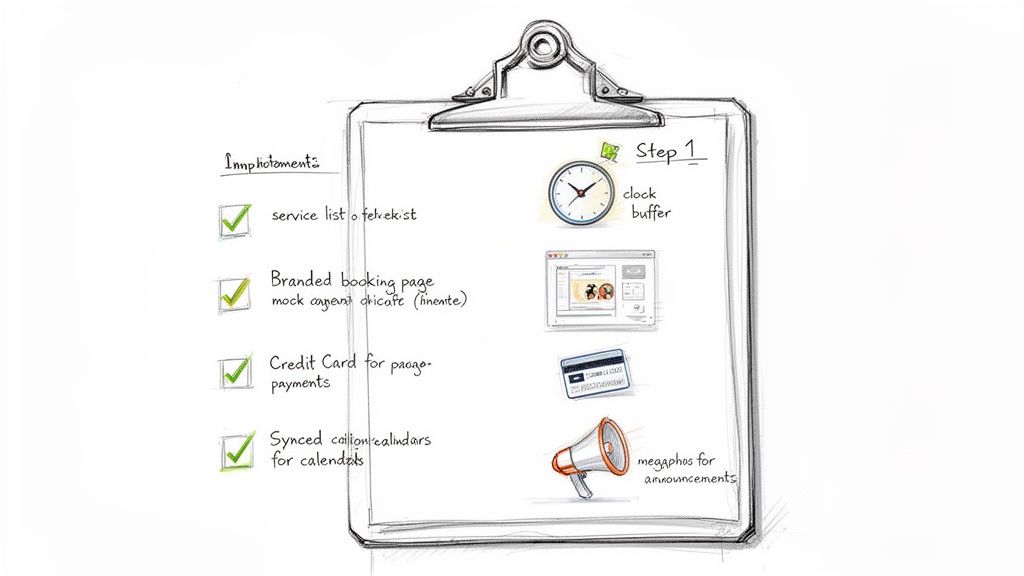
Define Services and Availability: Begin by listing out every single service you offer. Be specific. For each one, set its duration, price, and assign the staff members who can provide it. Then, block out your overall business hours and any unique schedules for individual team members.
-
Configure Booking Rules: Now, let's get into the nitty-gritty of your schedule's logic. How much time do you need between appointments for cleanup or a quick coffee? Set those buffer times. What's your cancellation policy? How far in advance can people book? Defining these rules is what keeps your calendar organized and prevents chaos.
Getting this initial configuration right is the most important part of the entire process. If you nail your services, timing, and rules from the start, the system becomes an asset that prevents scheduling conflicts, rather than a source of them.
Phase 2: Client-Facing Configuration
With the back-end logic sorted, it's time to shift your focus to what your clients will see and experience. This is all about making your booking page professional, easy to use, and a true reflection of your brand.
-
Customize Your Booking Page: Treat your booking page like a digital storefront. It’s often the first impression a new client gets. Add your logo, use your brand colors, and write clear, compelling descriptions for your services. A polished page builds instant trust. If you need some pointers, you can learn more about how to create a booking website that really works.
-
Integrate a Payment Processor: Don't leave money on the table. Connect a payment gateway like Stripe or Square to secure your revenue. This is your chance to decide if you want to require deposits or full payments upfront—a simple move that drastically cuts down on no-shows and keeps your cash flow healthy.
Phase 3: Final Sync and Launch
The last few steps are about connecting the dots with the tools you already use and, finally, letting your clients know about the great new way they can book with you.
-
Sync Calendars: This is non-negotiable. Connect the booking system to every calendar that matters—your business's main schedule on Google Calendar, your personal one, your team's calendars in Outlook. A proper two-way sync is the only way to guarantee you have one source of truth for your availability and avoid embarrassing double-bookings.
-
Announce to Your Clients: You're ready to go live! Spread the word. Send out an email to your customer list and post about it on your social media channels. Make sure to play up the convenience factor—24/7 online booking from anywhere—to get them excited to try it out.
Got Questions? Let's Clear Things Up
Diving into a new system for your business always brings up a few key questions. It's smart to get straight answers before you commit, so you can feel confident you're making the right call. Here are some of the most common things we hear from small business owners just like you.
What’s This Going to Cost Me?
The price tag on a booking system for a small business can really run the gamut, but most platforms stick to a few pricing models. You'll often see a flat-rate monthly subscription, which is great because it keeps your costs predictable, especially if your appointment calendar is consistently full.
Another popular approach is a per-booking or per-user model. This can be a lifesaver for newer businesses where income might swing month-to-month, as your costs grow alongside your team or your client list. Just be sure to ask about any hidden costs—things like transaction fees on payments can sneak up and take a bite out of your total investment.
Can I Add This to My Existing Website?
Yes, you almost certainly can. Modern booking systems are built with easy integration in mind. Typically, you have a couple of straightforward options to get it working on your site.
The most common way is with an embeddable widget. You just copy a small snippet of code from the booking platform and paste it onto your webpage. This lets customers book with you right there, without ever having to leave your site. The other option is a dedicated booking page hosted by the provider, which you can simply link to from your website.
Client data security is non-negotiable. A reputable platform will prioritize data encryption and adhere to privacy standards like GDPR, ensuring your clients' personal and payment information is always protected.
How Long Does It Take to Get Started?
You'd be surprised how fast you can get up and running. With a well-designed platform, you can often go from sign-up to taking your first booking in just a couple of hours.
The main task is the initial setup: defining your services, blocking out your availability, and maybe tweaking the look of your public booking page. Once you've got that groundwork laid, syncing your calendar and dropping the booking widget onto your site is usually the easy part.
Ready to stop juggling spreadsheets and DMs? Kejoola gives you an AI-powered website and a smart booking system in one simple platform. Get your professional, SEO-optimized site live in minutes and let clients book 24/7. Start your free 14-day trial today.


