How to Create a Booking Website: Automate Appointments & Grow Your Business
Learn how to build a booking website that automates your schedule and wins back time. Follow our guide from defining services to launching a site that works for you.
Josh · Jan 2, 2026 · 19 min read

- booking website
- online scheduling
- small business
- SEO
Learning how to build a booking website that actually works comes down to four things: defining what you sell, picking the right platform, setting up your booking rules, and getting your payment system sorted. If you nail these, you'll automate your schedule and win back a ton of time you currently spend on admin.
Your Blueprint for a Successful Booking Website
Before you even start thinking about domain names or website colors, you need a solid plan. This blueprint is what turns a website from a simple online brochure into a hardworking business tool. A good strategy is the difference between a system that prevents double bookings and one that causes them, keeping clients happy and helping you hit your goals.
The shift to online booking is massive. Just look at the travel industry—it's a $654 billion market online. With 72% of travelers now booking everything from flights to hotels on their own, that expectation for easy, instant booking has trickled down to every service business. People want to book a haircut or a consultation with the same convenience.
Defining Your Core Services and Client Flow
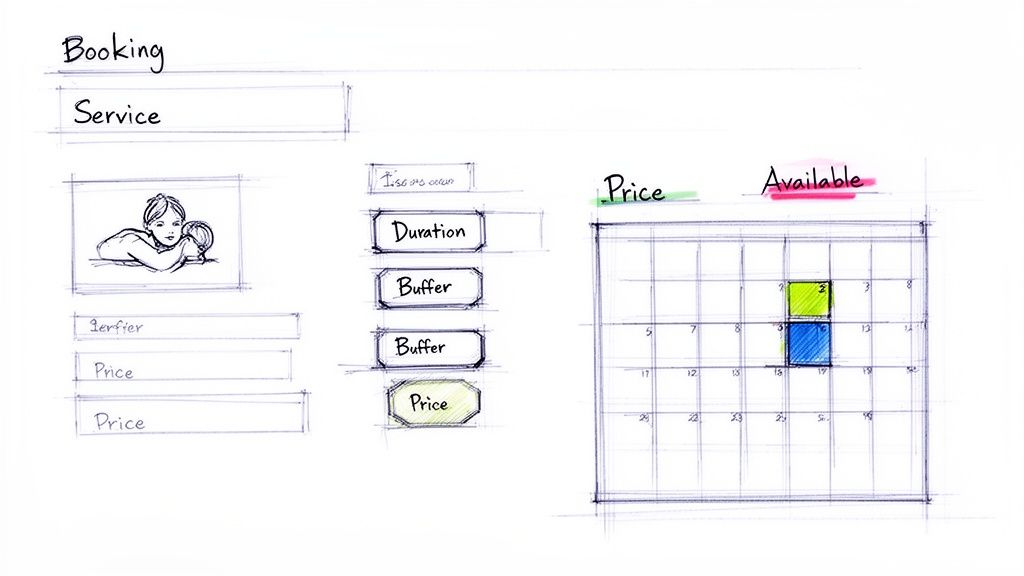
First things first, get granular. List out every single service you offer. For each one, write down the exact duration, the price, and—this is key—any buffer time you need between appointments. This level of detail is non-negotiable for an automated system to work properly.
Let's take a massage therapist as an example. Her service breakdown would look something like this:
- 60-Minute Deep Tissue Massage: The service itself is 60 minutes, but she needs 15 minutes afterward to clean the room and prep for the next person. So, the total time blocked on her calendar is 75 minutes.
- 90-Minute Hot Stone Massage: This one takes 90 minutes, plus a 20-minute buffer for stone cleanup. The total time blocked is 110 minutes.
Mapping this out prevents those stressful back-to-back bookings that lead to burnout. Getting these operational details right from the start means the system will support you, not create more work. For more on this, we've got a great guide on how to get your website fully booked.
Understanding Your Ideal Client’s Needs
Now, put yourself in your client's shoes. What do they need to know to feel confident enough to hit that "book now" button? If you can answer their questions before they even have to ask, you build trust and make the whole process feel effortless.
A successful booking website answers a client’s questions before they have to ask. Clarity in service descriptions, pricing, and policies is the fastest way to build trust and convert a visitor into a paying customer.
Make sure your plan clearly defines these key elements:
- Clear Service Descriptions: What’s included? What are the benefits? Who is this for?
- Transparent Pricing: Are there different options or packages? Is a deposit required upfront?
- Cancellation Policy: How much notice do they need to give to reschedule or get a refund? Be specific.
- Booking Confirmation: What happens right after they book? Let them know to expect an email, a text reminder, or both.
Sketching out this entire client journey, from the moment they land on your site to the final confirmation email, gives you the architectural plan for your website. This strategic groundwork makes all the technical stuff that comes next so much easier and ensures your site is a perfect fit for your business.
Choosing Your Tech Stack: The DIY Gauntlet vs. the All-in-One Advantage
With your business plan in hand, it's time to make a foundational decision: how are you actually going to build this thing? This isn't just a technical choice; it's a decision that will directly impact your time, your budget, and frankly, your sanity. You've essentially got two paths: the do-it-yourself (DIY) route or an all-in-one platform built for the job.
The DIY path, most often traveled with WordPress, gives you the keys to the kingdom. You get to pick your own hosting, find a theme, and then bolt on plugins for every little function—one for bookings, another for payments, a third for calendar syncing. On the surface, that level of control sounds great.
But here’s the catch: every plugin is a separate piece of software, often made by different developers. That means you become the IT department. You're the one managing updates, patching security holes, and troubleshooting when one plugin’s update suddenly breaks your entire booking system right before a busy weekend.
The True Cost of a DIY Setup
I've seen too many business owners get blindsided by the hidden costs of a DIY site. It’s not just a one-time purchase; it's a constant drain on your resources.
- Hosting: A reliable host will set you back anywhere from $15 to $50+ per month.
- Premium Plugins: A good booking plugin alone can run $150-$300 per year, and that's before you add plugins for payment gateways, SEO, or security.
- Your Time: This is the big one. Every hour you spend updating software, fixing conflicts, or worrying about security is an hour you can't spend serving your clients or growing your business.
Choosing your tech isn't just about the initial price tag. It’s about what you value more: endless customization or operational peace of mind. An all-in-one platform lets you trade the maintenance headaches for the freedom to focus on what you do best.
The All-in-One Platform: Built for Business
This is where all-in-one platforms like Kejoola come in. They’re designed from the ground up specifically for service businesses. Everything you need is already built-in and works together seamlessly: an AI-powered website builder, booking and payment systems, and automated SEO tools. All the technical headaches of the DIY path simply disappear.
There are no plugins to update or conflicts to fix because the entire system is managed for you. You pay one predictable fee for a tool that just works, day in and day out. It allows you to get back to running your business. For a deeper dive, our guide on choosing a top booking system breaks down the features that really move the needle.
To make this choice clearer, let's look at a direct comparison.
DIY WordPress vs All-in-One Platform Kejoola
| Factor | DIY WordPress + Plugins | All-in-One Platform (e.g., Kejoola) |
|---|---|---|
| Setup Time | Days to weeks, depending on technical skill. Involves finding hosting, installing WordPress, and configuring multiple plugins. | Minutes to hours. The platform handles all the technical setup, letting you focus on content and services. |
| Initial Cost | Varies widely. Free open-source software, but premium themes and plugins can cost $50-$500+ upfront. | Low to none. Typically a single, predictable monthly subscription fee. |
| Ongoing Cost | Multiple recurring fees for hosting, domain, and premium plugin licenses. Costs can fluctuate and stack up. | A single monthly or annual fee that covers everything—hosting, software, security, and support. |
| Maintenance | High. You are responsible for all updates, security monitoring, backups, and troubleshooting plugin conflicts. | None. The platform handles all updates, security, and maintenance behind the scenes. It just works. |
| Ease of Use | Steeper learning curve. Requires managing multiple dashboards and settings. | Designed to be intuitive and user-friendly for non-technical business owners. |
| Support | Fragmented. You might have to contact your host, theme developer, and multiple plugin developers to solve one issue. | Centralized support. One point of contact for any question or issue you have. |
Ultimately, while the DIY approach offers maximum flexibility, it demands a significant investment of time and technical know-how. An all-in-one platform is designed to give you back your time, so you can focus on your clients instead of your code.
And make no mistake, this is a market worth focusing on. The online travel sector alone grew from $512.5 billion to $523 billion and is on track to hit $1.3 trillion by 2030. While big players dominate, direct booking sites have a powerful advantage: they convert better (3.8% vs. Booking.com's 3.2%) and give you a direct line to build loyalty with your customers. As these online booking statistics from Navan show, your choice of platform isn't just a technical detail—it's a core part of your business strategy.
Nailing Down Your Booking and Payment Engine
This is where the magic happens.This is where the magic happens. You’re about to turn your static website into an automated, 24/7 employee that handles the grunt work for you. Getting your booking and payment engine configured correctly is the absolute core of building a website that works for you, not against you. The end goal? A seamless system that manages your schedule and protects your revenue without you having to lift a finger.
First, you'll face a fundamental choice: a DIY build or an all-in-one platform. This decision tree lays out the thought process.
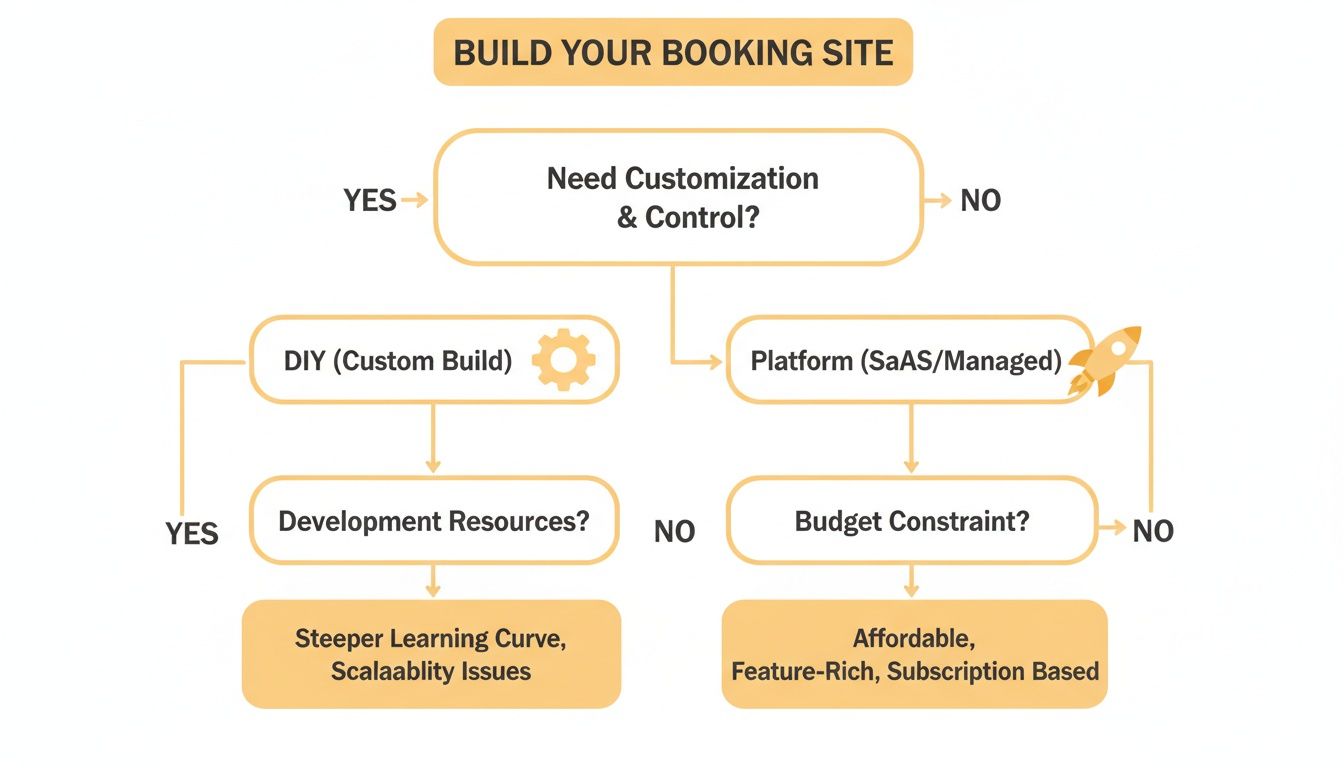
As you can see, it really boils down to how much control you need versus how quickly you want to get up and running. More control often means a DIY solution, while speed and simplicity point toward a dedicated platform.
Dialing in Your Services and Availability
Your first job is to translate what you do into clear, bookable services on your site. This isn't just a copy-paste job; each entry needs to be crystal clear to avoid confusion and booking mistakes down the line.
For every single service you offer, make sure you define:
- A Clear Description: What does the service actually include? Who is it for? Spell it out so there are no surprises.
- Precise Duration: Be specific about how long the appointment will last from the client's point of view.
- Buffer Times: This is a pro tip I can't stress enough. Always add a non-bookable window of time after each appointment for cleanup, travel, or just to catch your breath. A simple 15-minute buffer after a 60-minute session can be a lifesaver.
- Upfront Pricing: No one likes hidden fees. Display the full cost clearly, and detail any options for packages or add-ons.
With your services defined, it's time to set your availability. This means blocking out any time you aren't working—evenings, weekends, holidays, and personal appointments. The single most effective way to manage this is by syncing your booking system with your personal calendar, like Google Calendar.
A two-way calendar sync is non-negotiable. It ensures that when a client books online, the event appears on your personal calendar, and when you add a personal event, that time becomes unavailable on your website.
This simple automation completely wipes out the risk of double-bookings, one of the most common and frustrating headaches of manual scheduling. If you need a hand with the setup, we have a detailed guide on how to sync Google Calendar with your iPhone that can walk you through it.
Integrating Secure Payment Gateways
Want to drastically reduce no-shows? Start taking payments upfront. Requiring a deposit or full payment at the time of booking creates a real commitment from the client and, more importantly, protects your income.
Connecting a trusted payment processor like Stripe or PayPal is the industry standard for a reason. They provide top-notch security and a checkout experience your customers already know and trust. You can set up rules for each service, deciding whether to ask for a small deposit, the full amount, or even offer a "pay later" option.
Don't underestimate this step. The online booking market is exploding. Just look at Booking.com, which pulled in nearly 519 million visits in a single month. The market as a whole is projected to jump from $576.42 billion to $641.07 billion in just one year. Without a slick booking and payment flow, small businesses are leaving a massive amount of money on the table.
7. Elevate the Client Experience with a Professional Portal
A great booking website doesn't just take appointments; it builds relationships. If you really want to level up, the next logical step beyond a simple booking form is a professional client portal. This one feature can transform your site from a basic utility into a premium, high-touch experience that fosters serious client loyalty.
Think about it: you're offering a secure, branded space where your clients can manage their entire history with your business. This isn't just a nice-to-have. It’s a powerful signal of your professionalism and commitment to providing a top-tier service.
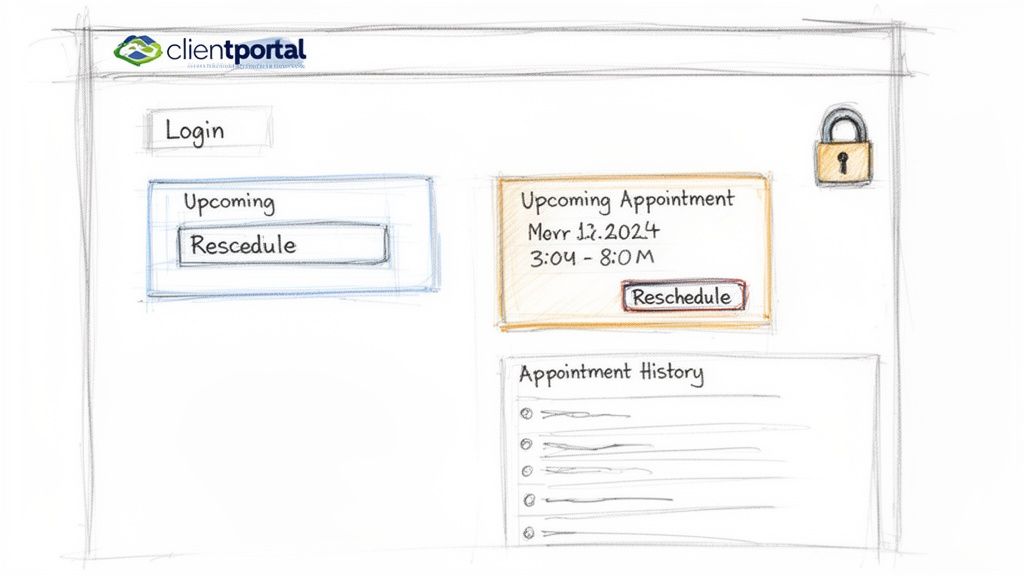
Giving clients this kind of self-service capability empowers them, and just as importantly, it cuts down on your administrative back-and-forth. You're showing them you value their time as much as your own.
The Power of a Centralized Client Hub
A client portal acts as a single source of truth. No more digging through old text messages, DMs, or scattered emails to find appointment details. When clients have one place to go for everything, communication becomes organized and effortless for everyone involved.
A centralized hub like this offers some game-changing advantages:
- Appointment Management: Clients can see their full appointment history, check the details of upcoming sessions, and even reschedule if your policies allow—all without needing to contact you.
- Information Updates: They can easily update their contact info, preferences, or any other personal details, which means your records are always current without any manual data entry on your part.
- Secure Communication: For any service that deals with sensitive information, a portal provides a much more secure environment for messaging and sharing files than standard email.
This level of transparency and control is precisely what today’s clients have come to expect. Offering it not only meets that expectation but also puts you head and shoulders above competitors still stuck in the old, manual ways of communicating.
A dedicated client portal isn't just a feature; it's a retention strategy. By giving clients control and a clear history of their engagement with your business, you foster a sense of partnership and loyalty that a simple booking form cannot match.
How to Implement a Client Portal
If you're going the DIY route with a platform like WordPress, adding a solid client portal usually means hunting for yet another premium plugin. This adds another layer of complexity, cost, and a potential point of failure you'll have to manage. You’ll need to research, install, and configure a solution that plays nice with your existing booking and payment plugins.
This is one area where an integrated, all-in-one platform really makes a difference. For instance, platforms like Kejoola include a professional client portal as a core, out-of-the-box feature. Because it’s baked into the same system that runs your website, bookings, and payments, it just works—no technical setup required.
This approach lets you deliver a polished, high-end client experience from day one, reinforcing the value and professionalism of your services. When you’re thinking about how to create a booking website, choosing a platform with this capability built right in is a savvy move for long-term client satisfaction and your own operational sanity.
Winning Local Clients with Smart SEO
Here’s the thing: a beautifully designed booking website is useless if new clients can't find it. This is where search engine optimization (SEO) stops being a buzzword and becomes your most powerful marketing tool, turning your site from a simple scheduling utility into a client-generating machine. For a service business, that means one thing: local SEO.
You're not trying to reach the entire world. Your goal is to show up when someone in your city or neighborhood is actively looking for the exact service you provide. It’s a targeted game, and winning means appearing right at the top when someone searches for something like "holistic nutritionist in Denver."
Getting the Fundamentals Right for Local Search
Before you even think about complex strategies, you have to nail the fundamentals. A few things are completely non-negotiable in local search. First up is page speed. If your site is sluggish, people will just hit the back button. It’s that simple. Just as important is having a mobile-first design, because the overwhelming majority of local searches are happening on a phone.
Once the technicals are solid, your content needs to speak the local language. Weave your city, state, and even specific neighborhood names naturally into your service descriptions, page titles, and headings. Put yourself in your customer's shoes: what would they type into Google to find someone like you?
These are the absolute cornerstones for ranking locally:
- Location-Specific Keywords: Think "[Your Service] in [Your City]" and sprinkle it naturally throughout your site.
- Fast Page Load Times: A quick, responsive site keeps potential clients from getting frustrated and leaving.
- Mobile-Friendly Design: Your booking process must be effortless on any device, especially a smartphone.
- Google Business Profile: This is non-negotiable. A well-maintained profile is your ticket to appearing in local map results.
The Under-the-Hood Secret: Structured Data
Now for one of the most powerful—and most overlooked—pieces of the local SEO puzzle: structured data, also known as Schema markup. Think of it as a translator for search engines. It's a bit of code on your site that tells Google, in its own language, exactly what your business is all about.
Schema markup explicitly tells Google what you do, where you are, and when you're open. This makes your site eligible for eye-catching search results, like map listings and rich snippets, which can seriously boost how many people click on your site.
This code spells out your business name, address, phone number (NAP), services, and hours of operation. When Google can understand this information perfectly, it rewards you by displaying it directly in the search results. This gives you a massive leg up on competitors who haven't bothered with it.
The good news? You don't need to be a developer to get this right. Many modern, all-in-one platforms like Kejoola build this functionality right in. They automatically generate and apply the correct local business schema to your site, taking care of the technical SEO heavy lifting so you can focus on what you do best. It’s a built-in advantage from day one.
Getting Ready to Go Live: Testing and Launching Your New Booking Site
Before you pop the champagne and announce your new site to the world, there's one critical step you can't afford to skip: a thorough, top-to-bottom final check. This pre-launch phase is your last chance to catch any frustrating glitches that could lose you a client on day one. A smooth, professional debut is the goal, and this is how you get there.
Think of it as a dress rehearsal. You want to simulate the real client experience from every possible angle. Don’t just click around a few pages; actively try to find what’s broken. Trust me, a few hours of focused testing now will save you from countless headaches and frantic support emails down the road.
The Pre-Launch Checklist I Swear By
To make sure your launch is flawless, you need to walk in your client’s shoes. Go through the entire booking process just as they would. This isn't just about checking if the buttons work; it's about auditing the entire customer journey to ensure it's intuitive and error-free.
Here’s exactly what you need to test:
- Book Everything You Offer: Go through the full booking flow for each of your services. Start from the homepage, find a service, pick a date and time, fill out the intake form, and finalize the appointment. No shortcuts.
- Check It on Your Phone (and Desktop): Run through the booking process on a desktop computer and then do it all again on your mobile phone. Over 50% of web traffic is mobile, so the experience has to be perfect on a small screen.
- Test the Money Flow: This is a big one. Use a real credit card to process a test payment or a deposit. Make sure the transaction is successful and that you see the funds appear in your connected Stripe or PayPal account.
- Confirm the Calendar Sync: Once a test booking is complete, immediately check your personal calendar (like Google Calendar or Outlook). Did the appointment show up automatically? Is the time block correct, including any buffer time you added?
A successful launch isn't about just flipping a switch. It’s the culmination of systematically checking that every piece—the booking form, the payment, and the calendar sync—works in perfect harmony to give your clients a reliable and professional experience.
Announcing Your Site and Keeping It Running
Once you've triple-checked everything and you're confident it's all working perfectly, it’s go-time. Announce your new, easier way for clients to book with you. You don’t need a massive marketing campaign; a simple and direct approach works best.
Fire off an email to your client list and share the news on your social media profiles. The key is to frame it as a benefit for them—highlight how much more convenient it is to book with you now.
After the launch, your job isn't quite done. Your ongoing maintenance tasks will depend entirely on the tech stack you chose. If you built a DIY site on WordPress, you're now on the hook for regular plugin updates, security scans, and performance monitoring.
However, if you opted for an all-in-one platform like Kejoola, this is where you really get to relax. You can enjoy the 'zero maintenance' benefit because the platform handles all the technical upkeep behind the scenes. That means you can get back to what you do best: serving your clients.
Frequently Asked Questions
When you start thinking about how to create a booking website, a few key questions always come up. Getting these sorted out first will help you pick a path that actually fits your budget, your technical skills (or lack thereof), and where you want your business to go.
What’s the Real Cost to Create a Booking Website?
Honestly, the cost can be all over the map. It really depends on the route you take.
If you go the DIY route with a platform like WordPress, you might spend a few hundred to several thousand dollars just getting it set up. That covers things like premium themes and the necessary plugins. After that, you're still on the hook for monthly hosting, which typically runs anywhere from $15 to $50 or more. If you decide to hire an agency to build it for you? Be prepared for a bill that could easily hit $5,000 or higher.
On the other hand, you have all-in-one platforms. These are great because they offer predictable monthly plans, usually between $29 and $149. The beauty of this model is that everything is bundled together—the website builder, secure hosting, the booking engine, and all the technical maintenance—into one clear price. No surprises.
Do I Need to Be a Tech Whiz to Build a Booking Site?
Not like you used to. A few years ago, building a WordPress site meant you had to get comfortable tinkering with plugins, settings, and updates. It was a learning curve, for sure.
But today's platforms are built specifically for business owners, not developers. Many new AI-powered builders can get a fully functional, booking-ready website up and running in a matter of minutes. From there, your job is simply to swap in your own photos, write your service descriptions, and connect your calendar. You never have to look at a single line of code.
The whole point of modern tools is to let you focus on running your business, not on becoming a part-time web developer. The goal should always be to get a professional, high-performing site online fast, so you can start taking appointments.
How Do I Actually Get My Website in Front of Local Customers?
This is where smart local SEO comes in. Just having a website isn't enough; people in your area need to find it. The most impactful strategies I've seen work time and again are:
- Sprinkle local keywords naturally throughout your site’s content (e.g., "dog groomer in San Diego").
- Set up and fully optimize a Google Business Profile. This is non-negotiable for local businesses.
- Make sure your site uses "local business" schema markup. This is a bit of behind-the-scenes code that tells Google you're a local service provider, which can help you show up in those valuable local search results.
The good news is that many platforms designed for service businesses now automate these critical SEO tasks for you. This gives you a serious leg up right from day one, helping you connect with the customers in your town who are actively searching for the services you offer.
Ready to stop juggling texts and DMs? With Kejoola, you can launch a professional, booking-ready website in minutes—no technical skills required. Our AI-powered platform includes everything you need, from smart scheduling and client portals to automated local SEO, all for one simple price. Start your free 14-day trial and see how easy it is to automate your business.