A Guide on How to Reduce No Shows Appointments
Discover effective strategies to reduce no-show appointments, from implementing frictionless online booking and automated reminders to crafting a clear cancellation policy. This guide provides actionable tips to protect your revenue and streamline your schedule.
Josh · Jan 4, 2026 · 19 min read
- appointment scheduling
- no-shows
- cancellation policy
- client management
- business tips
A no-show isn't just an empty slot in your calendar. It's a direct hit to your bottom line, a major disruptor to your day, and a constant source of frustration for any service business owner. That open time block represents lost income and wasted prep time, creating a domino effect that can throw your entire schedule into chaos.
To truly reduce no-shows, you need a system built on three core ideas: a frictionless booking process, smart automated communication, and a cancellation policy that’s both clear and consistently enforced. It's this combination that creates a framework that respects your time and your clients'.
The Real (and Hidden) Costs of Client No-Shows
The financial sting of a missed appointment is significant, and it’s a problem that plagues every industry, from salons to medical clinics.
Just look at the healthcare sector, where the numbers are staggering.
The U.S. healthcare system loses an estimated $150 billion annually due to missed appointments. For the average physician practice, that’s about $150,000 per year, with each no-show costing a provider an average of $200.
These figures tell a story that every service provider knows all too well: empty appointments are expensive. With a global average no-show rate sitting around 23.5%, we're talking about nearly one in four appointments simply being abandoned. If you want to dig deeper, you can explore a detailed analysis of the financial impact.
So, Why Don't They Show Up?
Before you can fix the problem, you have to understand it. Clients usually don't miss appointments out of malice; life just gets in the way.
- They simply forgot. An appointment booked weeks in advance is easy to lose track of amid daily distractions.
- Something came up. Unexpected work deadlines, a sick kid, or a flat tire can derail anyone's plans.
- It’s too hard to cancel or change. If rescheduling means finding time to make a phone call during your business hours, many will just give up and not show.
- They don't see the value. Sometimes, a client doesn't fully grasp the importance of the appointment or the real-world impact their absence has on your business.
Once you recognize these triggers, you can build a system that gets ahead of them. This isn't about blaming clients; it's about making it incredibly easy for them to remember, commit, and communicate.
It's More Than Just Lost Money
While the revenue hit is the most obvious pain point, the damage runs deeper. No-shows throw your entire day off-kilter, causing a ripple effect that delays subsequent clients and creates a ton of stress for you and your staff.
And it doesn't stop there. Chronic no-shows can seriously strain client relationships. Having to chase people down or enforce penalties creates tension and can erode the loyalty you’ve worked so hard to build. Fixing this issue is as much about protecting your operational sanity as it is about protecting your bank account.
To tackle this head-on, let's break down the most effective strategies you can implement. The table below summarizes the core methods we'll be diving into.
| Core Strategies to Reduce Appointment No-Shows | | :--- | :--- | :--- | | Strategy | Key Action | Primary Benefit | | Online Booking & Deposits | Implement self-serve scheduling and require a deposit or card on file. | Increases client commitment and reduces friction. | | Automated Reminders | Set up multi-channel (SMS & email) reminders at strategic intervals. | Drastically reduces forgetfulness. | | Clear Cancellation Policy | Create and enforce a firm but fair policy for no-shows and late cancellations. | Sets clear expectations and protects your revenue. | | Waitlists & Client Portals | Offer a waitlist for fully booked slots and a portal for self-management. | Fills last-minute gaps and empowers clients. | | Data Tracking & Iteration | Monitor your no-show rate and test different strategies to see what works. | Provides clear data to refine your approach over time. |
By weaving these elements into your business operations, you can build a robust system that not only reduces no-shows but also improves the overall client experience.
Make Your Booking Process Effortless
The first step in preventing a no-show happens the moment a client decides to book with you. If your process is a headache—involving phone tag, back-and-forth emails, or a clunky website—you're already losing their commitment. When scheduling is a chore, the appointment itself feels flimsy and easy to forget.
That friction plants a seed of doubt. A client who has to wait hours for a confirmation or can't easily see your open slots might just give up. The goal is to make booking so smooth that it feels like a solid, confirmed plan, not just a tentative request.
This is where a modern online scheduling system completely changes the game. It puts clients in the driver's seat, letting them book on their own terms, day or night. That sense of control is one of your most powerful tools for cutting down no-shows.
Let Clients Book Themselves with Self-Service Scheduling
Think of an online booking system as a live, interactive window into your calendar. Clients see exactly what's available and can pick the time that works best for them, right then and there. This simple act of choosing and getting instant confirmation creates a much stronger sense of ownership over the appointment.
The benefits are pretty clear for everyone involved:
- No more double bookings. The system handles it all, so human error is a thing of the past.
- You're always open. Clients can book at 10 PM on a Sunday if they want to.
- Instant confirmation. The booking is locked in immediately, solidifying the appointment in their mind and, just as importantly, in their digital calendar.
This self-serve approach tears down the barriers that make scheduling a pain. If you're starting from scratch, our guide on how to create a booking website walks you through setting one up.
Weave in Prepayments and Deposits
Asking for a financial commitment is, without a doubt, one of the most effective ways to make sure someone shows up. Whether it's a small deposit or the full payment upfront, it transforms a casual booking into a real transaction. But how you implement this is key. If it feels clunky or punitive, you'll scare off good clients.
A great booking system makes this part of the flow feel natural. After the client picks their time, they're prompted to enter their card details to hold the spot. It should feel like a standard, secure step, not some inconvenient afterthought.
A small financial stake dramatically increases perceived value. When clients pay upfront, they are not just booking your time; they are investing in their own appointment, making them far more likely to protect that investment.
For example, a busy hair stylist might require a $50 deposit for all new color clients, while a business coach could ask for the session to be paid in full at the time of booking. It's a simple, professional way to filter out people who aren't serious and get a firm commitment from those who are.
Be Crystal Clear at Checkout
The way you talk about your deposit or prepayment policy matters. You want to avoid any language that sounds accusatory or suspicious. Instead, frame it as a standard and necessary step to reserve their dedicated time with an expert—you.
Here’s a couple of ways you could phrase this on your booking page:
- For a Deposit: "To secure your appointment, we require a small deposit of $25. This will be applied to your final bill. Thank you for your understanding!"
- For a Card on File: "Please provide a card to hold your reservation. Your card will not be charged unless you cancel within 24 hours of your appointment or do not show up."
This kind of transparency builds trust and sets clear expectations right from the beginning. It shows clients you value your time while assuring them the policy is fair. By turning your booking system into an asset that encourages reliability, you're building a powerful foundation for reducing no-shows for good.
Implementing a Proactive Reminder System
Let's be honest: in a world of constant pings and notifications, a single reminder the day before an appointment just doesn’t cut it anymore. If you want to seriously cut down on no-shows, you need a smart communication workflow that keeps your service top-of-mind without becoming a nuisance. It's time to move beyond a basic 24-hour email and embrace an automated, multi-channel strategy that meets clients where they actually are.
Relying on clients to manually add appointments to their calendars is a gamble, and it often leads to empty time slots. Life gets in the way, and even the most well-intentioned person can forget. A proactive reminder system is your friendly, professional nudge that reinforces their commitment and gives them an easy out if their plans change.
The Power of Multi-Channel Communication
Everyone has their preferred way of communicating. Some people are glued to their email inbox, while others only glance at text messages. By using both SMS and email, you dramatically increase the chances of your message being seen and acted upon. Texts are brilliant for short, urgent alerts, while email gives you the space for more detail, like pre-visit instructions or a link to your cancellation policy.
A smooth, frictionless booking process is the first step in getting a client invested.
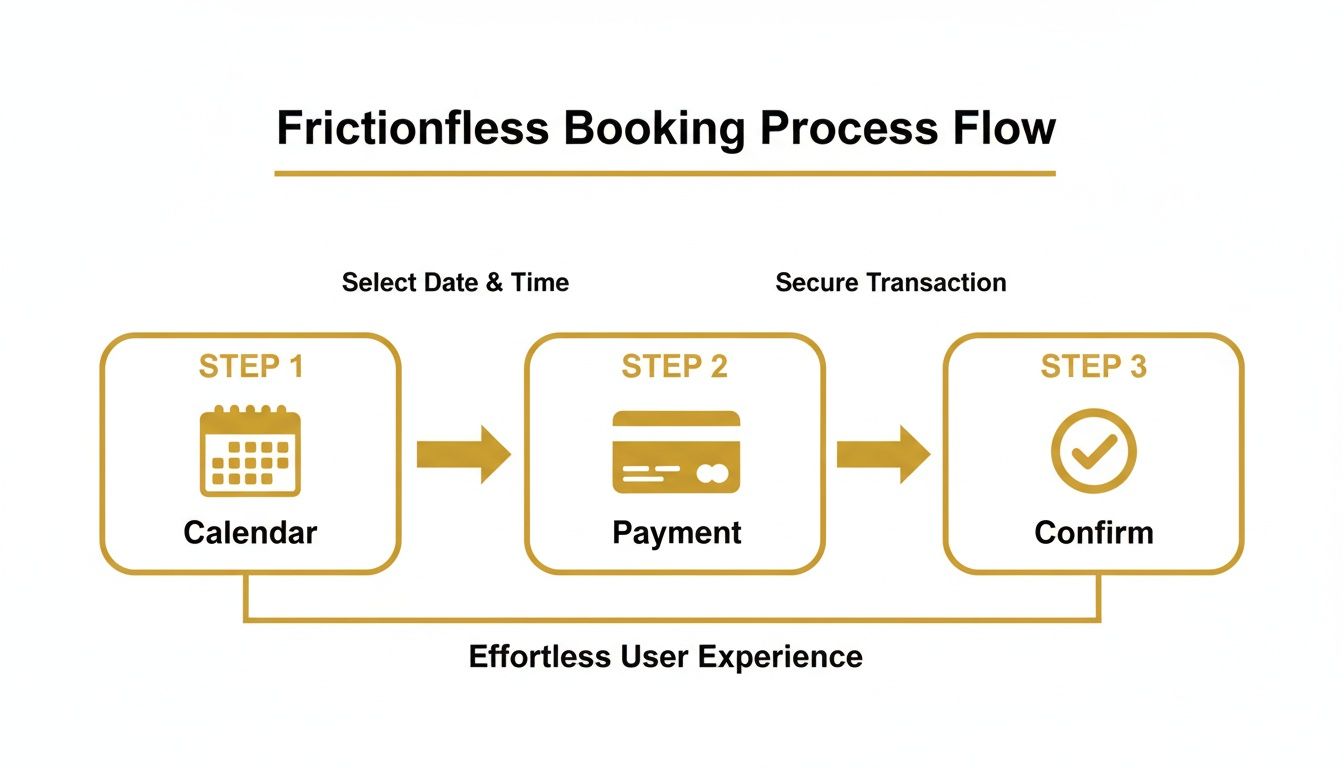
From the moment they pick a time to the instant confirmation, each step builds a sense of commitment that your reminders can later reinforce.
And it’s not just a hunch—the numbers support this. Digital communication is one of the most effective tools we have for reducing no-shows. Research from MGMA shows that appointments booked online with flexible rescheduling options see lower no-show rates because clients tend to make changes 24-48 hours in advance. That's the golden window, giving you enough time to fill that newly opened spot.
Timing Your Reminders for Maximum Impact
A successful reminder strategy is all about the timing. Send too many messages, and you become annoying. Send too few, and you're just ineffective. The sweet spot is a carefully planned sequence of touchpoints that gently guides the client toward their appointment without overwhelming them.
Here’s a communication timeline that I've seen work wonders:
- Immediately After Booking: Send an instant confirmation via both email and text. This message should have all the key details and, crucially, an "Add to Calendar" button.
- 48 Hours Before: An email reminder serves as the first real check-in. This is the perfect moment to ask for confirmation and gently remind them of your cancellation policy.
- 24 Hours Before: A quick, concise SMS reminder is perfect for the final confirmation. At this point, the appointment is just a day away and should be top-of-mind.
This multi-step approach works because it meets clients where they are in their own planning process—from the initial booking to the final day-before prompt.
The best reminder systems aren't just informative; they're interactive. Giving clients one-click options to confirm, reschedule, or cancel is a game-changer. It empowers them and gives you the advance notice you need to keep your schedule full.
Make Your Reminders Interactive and Actionable
A passive reminder that just states the date and time is a huge missed opportunity. Your messages should prompt clients to take immediate action, which gives you invaluable, real-time feedback on your schedule. By making communication a two-way street, you turn a simple notification into a powerful scheduling tool.
Include clear, simple calls to action in every single message. For example, your SMS could say: "Hi [Client Name], your appointment with [Your Name] is tomorrow at 10 AM. Reply YES to confirm or call us at [Phone Number] to reschedule."
This simple tweak does two critical things. First, it forces the client to actively engage with the message, which cements the appointment in their memory. Second, it gives you an immediate status update.
If you're looking to perfect your messaging, our guide on how to send a reminder email offers some great templates and best practices. By building an automated and interactive system, you stop passively hoping clients will show up and start actively ensuring they do.
Crafting a Cancellation Policy That Works
Let's be honest: a clear, fair cancellation policy isn't just a document. It’s a powerful statement that your time and expertise are valuable. Without one, you’re basically inviting last-minute gaps in your schedule and watching potential revenue disappear. The goal here is to create a policy that clients respect and you can actually enforce without feeling like the bad guy.
This isn't about punishing people. It's about setting professional boundaries and creating a relationship built on mutual respect. When clients know the rules of the game from the moment they book, it establishes a solid foundation for working together.
Defining Your Notice Period
The heart of any good cancellation policy is the notice period. This is the window a client has to cancel or move their appointment without any penalty. The two most common options you’ll see are 24 or 48 hours.
- 24-Hour Notice: This is the industry standard for a reason—it feels fair to almost everyone. It usually gives you just enough time to fill that newly opened slot, especially if you keep an active waitlist.
- 48-Hour Notice: This option provides a much bigger buffer. It's a lifesaver for businesses with longer, high-value appointments or for those whose clients book weeks or months out. That extra day can make all the difference in finding a replacement.
So, which one is right for you? It really comes down to your business model. A massage therapist might be perfectly fine with a 24-hour window. But if you're a consultant booking half-day strategy sessions, you'll probably need that 48-hour cushion to salvage your schedule. The key is to pick a timeframe that protects your income without being unreasonable to your clients.
Setting Clear Consequences
A policy without consequences is just a friendly suggestion. You have to be crystal clear about what happens when someone cancels late or, even worse, doesn't show up at all. This is precisely why requiring a credit card on file at the time of booking is non-negotiable.
Here are the most common ways to handle this:
- Forfeit the Deposit: If you're already taking deposits, the simplest consequence is making it non-refundable for late cancellations or no-shows.
- Charge a Percentage Fee: Charging 50% of the service fee is a popular and effective middle ground for late cancellations.
- Charge the Full Service Fee: This one is best reserved for true no-shows—when a client makes zero effort to get in touch.
Once you set the rule, stick to it. Consistency is everything. When clients see that you apply your policy fairly to everyone, it builds credibility and ensures it actually works.
Communicating Your Policy Effectively
Your policy is completely useless if your clients have no idea it exists. You need to make sure they see it, and not just once. The terms should be communicated clearly at multiple points before their appointment.
Don't bury your policy in the fine print of a lengthy terms-of-service page. Make it a visible, upfront part of your booking process. Transparency builds trust and completely sidesteps that awkward "I didn't know!" conversation down the line.
Make sure your policy is prominently displayed in these key places:
- On your booking page: The best way to do this is with a mandatory checkbox. Clients must actively acknowledge they've read and agree to your terms before they can confirm.
- In confirmation emails: A simple summary of the policy in the initial booking confirmation email reinforces the message right away.
- In reminder messages: A quick, friendly line in your 48-hour or 24-hour reminder can be a gentle nudge (e.g., "Just a heads-up, any changes need to be made at least 24 hours in advance!").
- On your website's FAQ or policy page: Create a dedicated, easy-to-find page that lays out the entire policy in plain language.
The goal is to make it impossible for a client to claim ignorance. And for those situations where you need to send a more formal notice, you can find some great examples in our post on cancellation letter templates. By being proactive and transparent, you create a system that protects your business while treating your clients with respect.
Recovering Revenue with Smart Scheduling Tools
Even with the best reminders and a rock-solid cancellation policy, life gets in the way. Last-minute openings are simply part of running a service business. The real question is what you do when those gaps appear. Instead of scrambling to fill a sudden vacancy, you can use smart tools to turn that potential loss into a win.
This is where the strategy shifts from just preventing no-shows to actively recovering revenue. Two of the most effective tools for this are automated waitlists and dedicated client portals. They work hand-in-hand to fill your calendar without you lifting a finger, all while empowering your clients.

Fill Every Spot with an Automated Waitlist
Think of an automated waitlist as your secret weapon for a perpetually full schedule. When your calendar is booked solid, interested clients can add themselves to a digital queue. The second an existing client cancels, the system instantly messages the first person on the waitlist, offering them the newly available spot.
It's a seamless, lightning-fast process. The client can accept the appointment with a single click, and your calendar updates automatically. This completely eliminates the need for you to manually track a messy list of names and numbers or waste precious time calling people one by one, hoping someone is free.
An intelligent waitlist system transforms a cancellation from a financial loss into a chance to delight an eager client. It's a proactive tool that ensures your time is always maximized.
Empower Clients with a Self-Service Portal
Beyond just filling empty slots, you can significantly reduce no shows appointments by giving clients a real sense of ownership over their bookings. A client portal does exactly that, providing a central, professional hub where they can manage their entire relationship with your business.
This secure, personalized space lets them handle everything on their own time:
- View Past and Future Appointments: A clear record of their history and upcoming commitments makes it much harder to forget.
- Reschedule or Cancel Independently: When you give clients an easy, self-service way to make changes (within your policy window, of course), they are far more likely to cancel in advance than to ghost you.
- Update Their Contact Information: Accurate details mean your reminders and other important communications always get through.
This self-service approach isn't just about saving you administrative headaches; it builds a stronger, more professional relationship. Clients genuinely appreciate the convenience and transparency, which in turn fosters loyalty and respect for your time.
The Long-Term Impact of Client Engagement
The damage from a single no-show goes way beyond the immediate financial hit—it torpedoes client retention. Research is clear on this: a single missed appointment dramatically increases the chance a person will never return. A 2019 study found that clients with just one no-show have an attrition rate of nearly 70%, a staggering figure compared to only 19% for those who always keep their appointments.
You can dig deeper into these patient no-show findings to see just how critical engagement is. Tools that keep clients involved and in control are not just nice to have; they are absolutely vital for the long-term health of your business.
Common Questions About Reducing No-Shows
Putting these new strategies into practice can feel like a big shift, and it’s only natural to have questions about the trickier, more personal aspects of enforcing new rules. Here, we'll tackle some of the most common real-world concerns service providers face when they start to tighten up their appointment policies.
Think of this as your practical guide to handling those gray areas with confidence and professionalism.
What Is a Fair No-Show Fee?
Determining a fair fee is a balancing act. You want a number that's significant enough to make a client think twice before skipping, but not so high that it scares away potential customers. For most service businesses, charging 50% of the scheduled service price for a late cancellation and 100% for a complete no-show is a widely accepted standard.
This structure works for a few key reasons:
- It reflects the lost value. The 50% fee for a late cancellation acknowledges their attempt to communicate, while still compensating you for the high likelihood of not filling the spot.
- It’s easy to understand. The math is straightforward, leaving no room for confusion or arguments over a flat fee.
- It’s defensible. You can clearly explain that the fee covers the time, preparation, and revenue lost from that specific, reserved time block.
If you require a deposit, the simplest method is to make it non-refundable. This is often the path of least resistance, as the transaction has already occurred, and you’re simply retaining funds for a violation of the agreed-upon terms.
How Should I Handle a Loyal Client Who No-Shows?
This is where rigid policies meet human relationships. When a long-time, reliable client misses an appointment for the first time, leading with empathy is always the best approach. A strict, automated penalty can damage years of goodwill.
Instead, pick up the phone. A quick, personal call shows you're concerned, not just angry about the missed slot. You could say something like, "Hi [Client Name], we missed you at your appointment today. Just wanted to check in and make sure everything is okay."
For a first-time offense from a loyal client, consider a one-time waiver of your fee. This gesture of goodwill reinforces their value to your business and often ensures it never happens again. You can still gently remind them of the policy for the future.
This approach gives them the benefit of the doubt and opens a dialogue. Maybe there was a genuine emergency. By handling it with grace, you strengthen the relationship rather than strain it. However, if it becomes a pattern, you'll need to have a more direct conversation and enforce the policy.
How Can I Enforce My Policy Without Being Confrontational?
The key to non-confrontational enforcement is to remove yourself from the equation and let the system do the work. This is why having your policy clearly stated and agreed to during the booking process is so critical. You're not the "bad guy"; you're simply upholding the terms they agreed to from the start.
When a fee needs to be charged, your communication should be polite, direct, and matter-of-fact. An email could state: "Hi [Client Name], as per our cancellation policy which was agreed to at booking, a fee of [Amount] has been charged to the card on file for the appointment missed on [Date]."
This approach has several advantages:
- It avoids emotional, back-and-forth debate.
- It refers back to a pre-existing agreement, removing any sense of personal attack.
- It maintains a professional boundary, showing you run a serious business.
The goal is to be consistently professional, not punitive.
How Do I Track My No-Show Rate Accurately?
You can't improve what you don't measure. Tracking your no-show rate is essential for understanding if your new strategies are actually working. This doesn't need to be a complicated process.
Start by calculating your baseline rate before you implement any changes. The formula is simple:
No-Show Rate = (Number of Missed Appointments / Total Number of Appointments) x 100
For example, if you had 10 no-shows out of 200 total bookings in a month, your rate would be 5%. Track this metric weekly or monthly. As you introduce deposits, improve reminders, or enforce your policy, you should see this number start to drop. This data gives you concrete proof of what’s working and where you might need to make further adjustments.
Ready to stop chasing clients and start filling your calendar automatically? Kejoola gives you all the tools we've discussed—from a professional booking site and automated reminders to client portals and waitlists—in one simple platform. Get your business online in minutes and say goodbye to no-shows for good. Start your free 14-day trial at https://kejoola.com.


