A Guide to Class Scheduling Software for Service Businesses
Discover how class scheduling software can automate your bookings, reduce no-shows, and free up your time to grow your service business. This guide covers core features, how to choose the right tool, and setup tips.
Josh · Jan 12, 2026 · 17 min read
- scheduling software
- small business
- automation
- client management
Let's get straight to it: class scheduling software is more than just a digital calendar. Think of it as a 24/7 automated receptionist that handles the entire booking process for your classes, appointments, or sessions. It's the system that lets you ditch the spreadsheets, phone tag, and endless back-and-forth emails for a clean, self-service experience where clients can book and pay whenever it suits them.
This technology isn't just about convenience; it's about reclaiming your time and running a smarter, more professional service business.
What Class Scheduling Software Actually Does
Imagine a world where you aren't constantly interrupted by booking requests. No more late-night texts, no more deciphering DMs, and no more double-booking a time slot because you forgot to update your paper planner. That’s the reality class scheduling software delivers. It’s the operational backbone that brings order to the chaos of manual scheduling.
This isn’t a tool reserved for massive gyms or corporate training centers. It's a game-changer for solo instructors, small studios, and growing teams. The core problem it solves is the huge drain on time and revenue that comes from handling everything by hand. Those administrative hours spent juggling schedules are hours you could be billing or using to grow your business.
Beyond the Booking Calendar
The public-facing booking page is what your clients see, but the real magic happens behind the scenes. This software becomes the central nervous system for your client management, connecting everything from payments to communications.
It’s especially powerful for organizing more complex group programs. For example, the very structure of cohort-based courses depends on getting the right people in the right session at the right time, with all the necessary details. A solid scheduling system makes that possible without constant manual intervention.
The industry's rapid move towards these tools tells a clear story. Service businesses are done with inefficient, old-school methods.
The market for appointment scheduling software—a close cousin to class scheduling—jumped from USD 405.5 million in 2023 to USD 470.79 million in 2024. Projections show it rocketing to USD 1,554 million by 2032.
This explosive growth is fueled by a simple need: businesses want systems that automatically confirm bookings, send reminders, and keep calendars synced without anyone lifting a finger. You can dig deeper into these trends in the full appointment scheduling software market report.
To see just how stark the difference is, let's compare the old way with the new.
Manual vs. Automated Scheduling at a Glance
| Aspect | Manual Scheduling (Spreadsheets, Texts, DMs) | Class Scheduling Software |
|---|---|---|
| Availability | You are the bottleneck. Bookings only happen when you're available to respond. | 24/7/365. Clients can book anytime, from anywhere, on any device. |
| Payments | Manual invoicing, chasing payments, and handling cash or separate transfers. | Integrated and automated. Payments are collected at the time of booking. |
| Reminders | You have to remember to send texts or emails, or clients simply forget. | Automated. Email and SMS reminders go out automatically, reducing no-shows. |
| Admin Time | Hours per week spent on scheduling, rescheduling, and answering queries. | Minutes per week. The system handles almost everything on its own. |
| Client Experience | Clunky and slow. Clients have to wait for your reply, creating friction. | Seamless and professional. Clients get instant confirmation and feel in control. |
| Reporting | Painful to compile. You have to manually track attendance and revenue. | Instant insights. Dashboards show revenue, attendance, and booking trends. |
The table makes it clear: one method is a constant time sink, while the other is a growth-enabling tool.
The Strategic Solution for Growth
Ultimately, adopting class scheduling software is a strategic move, not just an operational one. It elevates your brand, offers customers the modern, on-demand experience they expect, and frees you from the drudgery of administrative work.
When you give clients the power to book on their own terms, you’re not just making them happier—you're freeing yourself to focus on what truly matters: delivering an incredible service. This shift from reactive busywork to proactive, automated management is what sets the stage for sustainable growth.
The Core Features That Keep Your Business Running
At its heart, class scheduling software is an engine with several key parts that work together. Each one is designed to solve a specific, nagging problem for service businesses. Together, they automate your operations, protect your revenue, and give every client a polished, professional experience.
The chaos of manual scheduling isn't just an annoyance; it has real consequences.
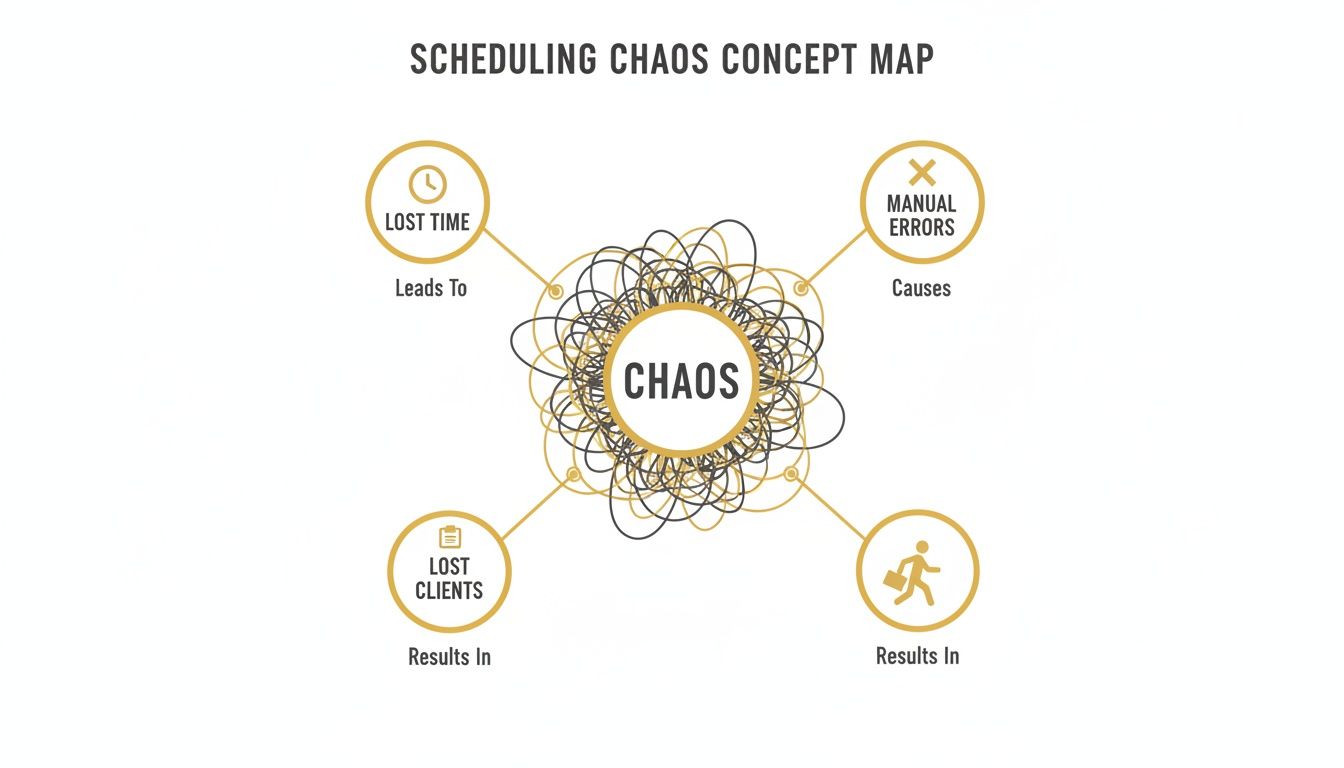
This is exactly what these core features are designed to prevent. Manual errors lead to lost time and frustrated customers, but automation creates a smooth, reliable system.
Online Booking Calendars
Think of your online booking calendar as your digital storefront. It’s always open, always accurate, and always ready to do business. This isn’t just a convenience—it’s a powerful sales tool that captures clients right at the moment they decide they want what you offer.
Instead of hitting a wall and having to send an email, a potential client sees your live availability and books their spot in seconds. This simple, frictionless process is often the difference between gaining a new customer and losing them to a competitor.
Automated Reminders and Notifications
No-shows are the silent killer of profit for any service-based business. Automated reminders are your single best defense. These systems automatically send out email and SMS notifications to clients before their class or appointment, drastically reducing the chances they’ll forget.
But it goes beyond just reminders. This feature also handles booking confirmations, reschedule notices, and even follow-up messages, all without you having to lift a finger. It creates a professional, reliable communication loop that builds trust and keeps everyone in the loop.
By taking manual tasks like scheduling and reminders off your plate, you slash administrative overhead. You're not just saving time; you're also eliminating the risk of human error, which can hit your revenue and damage your reputation.
Integrated Payments
Getting paid upfront is a non-negotiable for healthy cash flow. By integrating payment processing directly into your booking system, you turn your scheduler into a point-of-sale. Clients are required to pay when they book, securing your revenue instantly.
This one feature solves a ton of common headaches:
- No More Chasing Payments: You get paid for your time before the service is even delivered.
- Fewer Last-Minute Cancellations: Clients who have paid for their spot are far more committed to showing up.
- Simplified Bookkeeping: All transactions are neatly logged in one place, making financial tracking a breeze.
This direct link between booking and payment is a cornerstone of modern class scheduling software.
Waitlist Management
What happens when your most popular class fills up? Without a system, you just turn people away. A waitlist feature turns that dead end into an opportunity. It allows interested clients to add their names to a list for a full class.
Then, if a registered client cancels, the software can automatically notify the next person on the waitlist and give them a chance to grab the open spot. This keeps your classes full, keeps eager clients engaged, and turns a potential lost sale into a win.
Client Portals
Long-term client relationships are built on trust and convenience. A client portal gives your customers a secure, personalized space where they can manage their own experience with your business.
From their own dashboard, clients can see their upcoming schedule, reschedule or cancel bookings (based on rules you set), update their payment info, and track their attendance history. This self-service model doesn't just empower your clients; it dramatically cuts down on the administrative emails and phone calls you have to handle. It's a win-win that builds loyalty and saves you time.
How to Choose the Right Scheduling Software
Choosing the right class scheduling software feels like a huge commitment, but it doesn't have to be overwhelming. The trick is to have a clear game plan. With the right framework, you can cut through the noise and zero in on what your business actually needs—not just today, but a year from now.
Think of it this way: you're not just buying a tool; you're picking a partner for your business. The best way to start is by asking some tough questions before you even look at a demo. It all begins with a deep dive into what you offer.
Define Your Non-Negotiable Requirements
Before you get tempted by a slick interface or a long list of features, take a moment to map out your absolute must-haves. A yoga studio's needs are worlds apart from a private tutor's, and a music school with multiple instructors has a completely different set of challenges than a solo consultant.
Get specific by asking yourself these critical questions:
- Service Diversity: Can the software handle everything you sell? We're talking one-on-one appointments, group classes, multi-day workshops, and even those recurring class packs or memberships. If it can't, it's not the one.
- Ease of Use: Honestly, how tech-savvy are you? A system that requires hours of tutorials to set up defeats the whole purpose of saving time. It should feel intuitive right out of the box.
- Payment Integration: How easy is it for clients to pay you? Look for seamless connections with trusted payment gateways like Stripe or PayPal. Dig into the fine print, too—are there extra transaction fees on top of what the payment processor charges?
Nailing down these basics will help you build a solid shortlist, saving you from wasting time on platforms that were never going to work in the first place.
This screenshot from Kejoola's homepage is a great example of what to look for—a clean, booking-first experience for your clients.
The simple layout and clear "Book now" button are designed to turn a curious visitor into a confirmed client with as few clicks as possible.
Evaluate Scalability and Support
It’s a classic mistake: picking software that solves today’s problems perfectly, only to find it holds you back six months down the line. Your business is going to grow, and your software needs to be ready for that.
This is why the underlying technology matters. The scheduling software world is dominated by cloud-based platforms, which hold over 60% of the market share in related industries. There's a good reason for this. Around 65% of small businesses are moving to the cloud to handle more clients without surprise costs or technical headaches. For you, this means you can get started quickly and scale up without needing an IT department. You can dive deeper into how cloud solutions are shaping the market on futuremarketinsights.com.
Choosing a scalable, cloud-based system isn't just a technical detail—it's a strategic decision that gives your business the agility to grow without being held back by its own tools.
But technology is only half the story. What happens when something goes wrong at 8 PM, right before a big class launch? That's when you'll be glad you considered the human side of things. Reliable, responsive customer support is a feature you can't put a price on. Check for support channels like live chat, email, or phone, and read reviews that specifically mention how helpful the support team is.
As you weigh your options, it's also smart to see what's out there at every level. You might find our guide on free online scheduling tools helpful for comparing different platforms.
Setting Up Your System for a Smooth Launch
Switching to a new class scheduling software can feel like a big move, but it doesn't have to be a headache. A smooth launch really comes down to two things: setting up the system thoughtfully and, just as crucially, getting your clients excited about the change. If you frame it as a major upgrade to their experience, you'll see them jump on board right away.
Think of the initial setup as building the foundation. You're essentially teaching your new digital assistant everything it needs to know to run your schedule perfectly, so you don't have to.
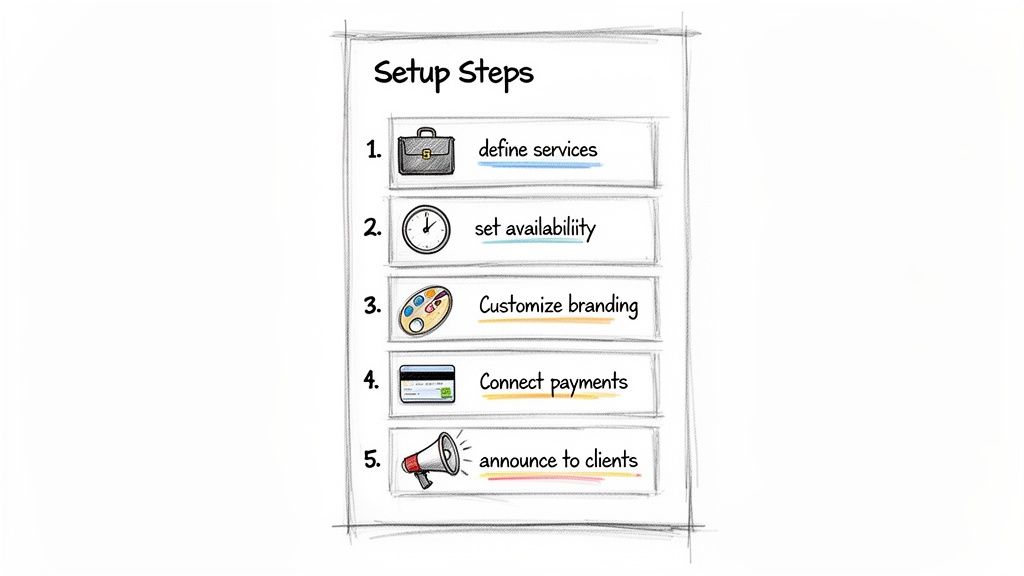
Your Implementation Checklist
Let's walk through the key steps to get you up and running. Taking the time to get these right ensures your booking system actually works the way your business does.
- Define Your Services: Don't just list a service name. For every class, workshop, or one-on-one session, add a clear description, its duration, and the price. This simple step heads off a lot of potential client confusion down the road.
- Set Your Availability: This is the heart of your schedule. Be sure to block out your personal time, define your standard working hours, and then assign specific slots for each service. Good software will even let you add buffer time between appointments.
- Customize Your Branding: Get your logo uploaded and pick your brand colors. When your booking page looks and feels like the rest of your website, it builds a sense of professionalism and trust from the very first click.
- Connect Your Payment Processor: This is a big one. By linking your Stripe or PayPal account, you can require deposits or full payments upfront, which is the single most effective way to slash no-shows.
After the backend is dialed in, you'll want to sync everything with the tools you already use. Connecting your business and personal calendars is non-negotiable if you want to avoid double-bookings. If you're a bit unsure, our guide on how to sync Google Calendar with your iPhone offers some clear, step-by-step help.
Announcing the New System to Clients
The way you tell your clients about this new system will make or break the transition. A confusing announcement creates resistance, but a well-planned one can build genuine excitement. The trick is to focus entirely on how it benefits them.
Frame the transition as a significant upgrade to their customer experience. Emphasize that the new system empowers them to book anytime and manage their own schedule, putting them in control.
Draft an email that’s both clear and enthusiastic. You can highlight fantastic new conveniences like 24/7 booking from their phone and automatic reminders so they never miss a class. Most importantly, make it incredibly easy for them to act by including a big, bold "Book Now" button that links straight to your new scheduling page.
Finally, update your digital storefront. Put that "Book Now" call-to-action everywhere: on your website's homepage, in your social media bios, and even in your email signature. This consistency creates a clear, simple path for clients to book, no matter where they find you—setting you up for a successful launch and happier, more empowered customers.
Why Your Website and Booker Should Be The Same Thing
Having great class scheduling software is a fantastic start, but it's only one piece of the puzzle. If clients can't find you online, the slickest booking process in the world won't matter. This is why connecting your scheduler directly to your website isn't just a "nice-to-have" feature; it's the core of a smart growth strategy.
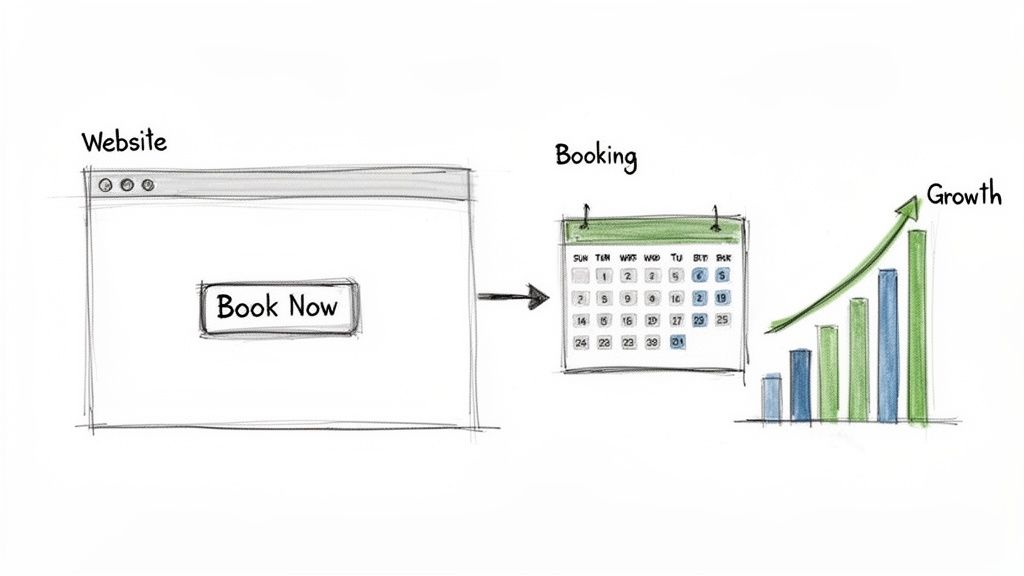
When your website and your booking system are part of a single, unified platform, your online presence stops being a static brochure and becomes a dynamic machine for attracting and converting clients. It creates a completely seamless path for someone, from the moment they find you on Google to the second they hit "confirm booking."
Unifying The Customer Journey
Think about it from your client's perspective. They land on your website, read about a class they’re excited about, and click "Book Now." If that click sends them to a completely different website with unfamiliar branding, it creates a moment of hesitation. That friction, that split-second of doubt, is often all it takes for them to leave and never come back.
An all-in-one solution keeps everything under one roof. The client stays on your domain, surrounded by your branding, as they move from exploring your services to booking their spot. This builds trust and makes the entire process feel professional and secure, which dramatically boosts conversion rates.
An integrated system removes the technical and psychological barriers between interest and action. It’s the difference between a potential client thinking, "I'll come back to this later," and actually completing their booking right then and there.
Boosting Your Local SEO
Search engines like Google are obsessed with user experience. They reward websites that provide clear, helpful information and make it easy for visitors to get what they want. An integrated platform is a natural fit for this. Your class schedules, detailed descriptions, and real-time availability are all part of your website's native code.
This makes it incredibly easy for Google to crawl, understand, and rank your services for local searches like "yoga classes near me."
A unified structure also directly improves key SEO metrics that search engines watch closely:
- Reduced Bounce Rate: Visitors stay on your site to complete their booking instead of being redirected elsewhere.
- Increased Dwell Time: People spend more time interacting with your schedule and class details, signaling to Google that your content is valuable.
- Improved Brand Authority: All booking activity happens on your domain, strengthening its reputation and authority over time.
Getting this right is fundamental to building a discoverable online presence. If you want to dig deeper, our guide on how to create a booking website explains these principles in more detail.
Eliminating Technical Headaches
Trying to patch together separate tools—a website builder from one company, hosting from another, and a booking plugin from a third—is a recipe for disaster. You're creating a fragile system where a single update or glitch can bring everything crashing down, costing you bookings and causing endless frustration. It's crucial to anticipate and plan for common data integration problems to keep things running smoothly.
An integrated platform simply erases this complexity.
The alternative is to choose an all-in-one platform where the website, hosting, security, and booking engine are all built to work together and are managed by a single provider. This means no plugin conflicts to worry about, no surprise maintenance fiascos, and just one number to call if you ever need help.
Let's break down the real-world differences between these two approaches.
Integrated Platform vs Standalone Tools
| Feature | Integrated Platform (e.g., Kejoola) | Standalone Tools (Separate Website, Booking Plugin) |
|---|---|---|
| Client Experience | Seamless journey on a single branded website. | Disjointed; often redirects to a third-party booking page. |
| Technical Management | One provider handles all updates, security, and support. | You manage multiple vendors, plugins, and potential conflicts. |
| SEO Impact | Natively optimized; all content strengthens your domain. | Booking content may not benefit your site's SEO. |
| Setup & Maintenance | Simple, all-in-one setup with no integration work. | Requires technical setup and ongoing plugin maintenance. |
| Cost Structure | Typically a single, predictable monthly or annual fee. | Multiple separate costs (hosting, domain, plugin, themes). |
| Reliability | Designed to work together, leading to higher uptime. | A single plugin update can break the entire system. |
Ultimately, choosing an integrated system is about more than just convenience. It’s a strategic decision to build your business on a solid, scalable foundation. It frees you from being a part-time IT manager so you can focus on what you do best: serving your clients and growing your business.
Frequently Asked Questions
Jumping into a new piece of software, especially one that handles your schedule and client relationships, always brings up a few questions. It’s a big decision that touches every part of your business. Let's walk through some of the most common concerns we hear from service providers to clear up any lingering doubts.
How Much Does Class Scheduling Software Typically Cost?
You'll find that pricing for these platforms is all over the map, but most use a tiered subscription model that scales with your needs. If you're a solo provider just starting out, you can find a solid, feature-rich plan for around $29 per month.
Once you start adding staff members or need more sophisticated tools like memberships and detailed reporting, you’re likely looking at plans in the $79 to $149 per month range. A word of advice: always look past the sticker price. Dig into the details on payment processing fees or extra charges for adding another location, as those can really change the total cost.
Will I Lose My Existing Client Data if I Switch Systems?
Absolutely not—or at least, you shouldn't have to. Any reputable scheduling platform knows that businesses don't start from scratch. They are built with migration in mind and almost always provide a way to import your client list, usually from a simple CSV file you can export from your current system or spreadsheet.
Before you sign on the dotted line, make this a non-negotiable question. Ask about their specific import process and whether their support team will help guide you through it. Getting this right from the start saves you from a world of frustration and ensures all that valuable client history comes with you.
Can This Software Integrate With My Personal Calendar?
Yes, and this is one of the most critical features you should look for. Any quality class scheduling software worth its salt offers seamless, two-way synchronization with major calendars like Google Calendar, Outlook, and Apple Calendar.
"Two-way synchronization" is the magic ingredient here. It means that when a client books a slot, it instantly appears in your personal calendar. And just as important, when you block off time for a dentist appointment in your Google Calendar, that slot automatically becomes unavailable on your public booking page. It’s the ultimate defense against double-bookings.
Is This Kind of Software Secure for Client Information?
Security is paramount, and professional software providers treat it that way. They rely on encryption and follow strict data privacy standards to protect everything from names and phone numbers to sensitive payment details.
When you're comparing your options, look for transparency. Does the company openly discuss its security measures? Do they mention compliance with regulations like GDPR or CCPA? A trustworthy platform will have this information easy to find, giving both you and your clients confidence that their data is being handled responsibly.
Ready to stop juggling spreadsheets and start automating your growth? Kejoola gives you an all-in-one website, booking, and client management platform designed for service businesses. Launch a professional, booking-ready site in minutes and give your clients the seamless experience they deserve. Start your free trial at Kejoola.com.