Creating Mobile Websites That Turn Clicks Into Clients
Learn how to create a mobile-first website for your service business that converts visitors into booked appointments. This guide covers design, tools, and local SEO.
Josh · Mar 30, 2026 · 17 min read

- creating mobile websites
- service business
- website builder
- local seo
If you’re running a local service business—whether you’re a hairstylist, personal trainer, or plumber—you might think your Instagram or Facebook page is enough. It's not. Social media is great for getting discovered, but your own website is where you get booked.
Why Your Service Business Needs a Mobile-First Website Now
Relying just on a social media profile is like having a beautiful shop window but locking the front door. Potential clients can see what you offer, but they can't easily walk in and buy. Instead, you're forcing them into a clunky back-and-forth of DMs, waiting for replies, and playing phone tag just to schedule an appointment.
This friction is precisely where you lose customers.
Picture this: someone is on their lunch break, searching "emergency plumber near me" on their phone. They find two options. Your competitor has a clean, fast website with a massive "Book a Callout" button. Your business has a link to an Instagram page. To book you, they have to send a DM and hope you see it in time. Who do you think they're calling? That high-value client is gone, and you never even knew they existed.
The Soaring Cost of Ignoring Mobile Users
This isn't just a hypothetical scenario; it's the reality of how customers find and hire local pros today. The massive shift to mobile is already here. By 2025, it’s projected that 59.7% of all global website traffic will come from mobile devices—a huge jump from just 35% back in 2015. With nearly two-thirds of your potential customers browsing on their phones, not having a mobile-friendly site makes you invisible to the majority of your market.
Even if they find you, user expectations are ruthless. Research consistently shows that 53% of mobile users will leave a website if it takes longer than three seconds to load. A slow, clunky site that requires pinching and zooming is an instant dealbreaker.
Your website's 'booking readiness' is its ability to convert a visitor with high intent into a confirmed appointment with minimal effort. It’s the difference between a lead and a lost opportunity.
From Frustration to Bookings
A well-built mobile site is designed for one thing: action. It tears down those frustrating barriers and creates a straight line from a customer's search to a confirmed appointment in your calendar. This is the core principle for growing a service business in today's world. To really nail this, you have to understand how to build mobile optimized sites that are designed to capture these ready-to-buy customers.
Here's what a mobile-first approach really gives you:
- Immediate Credibility: A professional website instantly tells people you’re a serious, trustworthy business, not a side hustle.
- Reduced Admin Work: Stop the endless back-and-forth. An integrated booking system automates scheduling, sends confirmations, and handles reminders, freeing you up to do the actual work.
- Captures High-Intent Customers: It perfectly serves the clients who are done browsing and are ready to book a service right now.
Simply put, a solid mobile website is your most direct path to turning clicks from local searchers into actual, paying clients.
Mapping Out Your Client-Winning Website Blueprint
Before you even think about colors, fonts, or code, we need to lay the groundwork. A great website doesn't just happen; it's planned. The single most important mission for a service pro's website is to get appointments booked. Without a clear plan, the process of creating mobile websites can get messy, and you'll end up with a site that frustrates visitors instead of converting them into clients.
Let's start by mapping out the perfect client journey. Picture someone finding your business through a quick Google search on their phone. What's the one thing you absolutely need them to do? Book you. Everything on your site should point them in that direction.
Structuring Your Core Pages
Think of your website as a direct path to your booking calendar. Every page is a stepping stone. Don't fall into the trap of adding dozens of pages—a few, highly-focused ones are always more effective.
Here are the must-have pages for any service business:
- Homepage: This is your digital front door. It needs to immediately tell people who you are, what service you provide, and how they can book it. No fluff.
- Services Page: Your service menu. For each service, list a clear description, how long it takes, what it costs, and include a direct button to book that specific service.
- About Page: This is your chance to build trust. Share your story, show your face, and let people know why you're the expert they should hire. It's about making a human connection.
- Booking Page: The finish line. This page should be ruthlessly simple. The only thing here should be your scheduling tool, free of all other distractions.
A clunky mobile experience is a guaranteed way to lose a customer. If someone has to pinch, zoom, or struggle to find your booking button, they're gone.

Any friction in this process, especially on a phone, is a potential client heading over to your competitor's website. It's that simple.
Gather Your Essential Assets Upfront
Here’s a pro tip that will save you a ton of time and headaches: get all your content together before you start building. This bit of prep work is what separates a smooth project from a frustrating one. Having these assets ready is crucial when creating mobile websites that look polished and professional from day one.
Planning isn't just about organizing pages; it's about building a direct path from discovery to a confirmed appointment, removing every possible point of friction along the way.
Here’s a quick checklist of what you'll need:
- Brand Identity: Your logo, primary brand colors, and any specific fonts you use.
- High-Quality Photos: Real photos are best! Get pictures of your work, your space (if you have one), and a friendly, professional headshot.
- Service Details: Write out compelling descriptions, prices, and durations for every service you offer.
- Written Content: A short bio for your About page and a powerful, clear headline for your homepage.
Once you have a solid plan and your assets are ready to go, you're in a great position to build a website that actually works for your business. If you're looking for layout ideas, checking out some well-made service business website templates can spark some inspiration. This prep work ensures your final website is a powerful client-generating tool, not just a digital brochure.
Designing an Effortless Mobile Booking Experience
When it comes to a mobile website for your service business, forget the flashy animations and over-the-top visuals. Your real mission is simple: make it incredibly easy for a potential client to book your service. The goal is to hunt down and eliminate every last bit of friction standing between them and your calendar.
Think about your ideal client for a moment. They're likely trying to book a haircut or a plumbing fix during a quick break, maybe while riding the train or waiting in line for coffee. They’re on their phone, distracted, and completely out of patience. If they have to pinch-and-zoom to read text, hunt for a hidden "Book Now" button, or wait for giant images to load, they're gone. This is where smart, thoughtful design turns your website from a simple online brochure into a client-generating machine.

Embrace Thumb-Friendly Design
The single most important rule when creating mobile websites is to design for how people actually use their phones. And that means designing for the thumb.
Every critical element—especially your call-to-action buttons like "Book Now" or "Get a Quote"—needs to be large, clear, and placed right where a thumb can easily tap it. This usually means the bottom half or center of the screen. Don’t be afraid of white space; giving your buttons and text room to breathe makes the entire interface feel less cluttered and far easier to use.
Good mobile design is invisible. It guides the user so naturally that they don't even have to think about what to do next. The path to booking should feel instinctive.
Tiny, hard-to-tap links are a conversion killer. I've seen it happen time and again: a frustrated user trying to tap a small link, hitting the wrong one twice, and then giving up entirely. You just lost a client.
Guide the Eye With Clarity
On a small screen, you can't afford to be subtle. Your design must create a powerful visual hierarchy that funnels the user's attention directly to the most important action: booking your service.
Here’s how to create that clarity:
- High-Contrast Text: This sounds basic, but it’s crucial. Your text must be effortlessly readable. The classic black text on a white background is popular for a reason—it just works. Never sacrifice readability for a trendy, low-contrast color scheme.
- A Clean, Single-Column Layout: A mobile user should never, ever have to scroll horizontally. Sticking to a single column keeps their focus moving down the page, right where you want it to go.
- Strategic Imagery: Your photos should build trust and show off the quality of your work, but they shouldn't hijack the page. Use images to support the goal of getting a booking, not distract from it.
- Obvious Calls to Action: Your "Book Now" button should be the star of the show. Make it pop with a bright, contrasting color that stands out from everything else on the screen.
When designing a user experience for service businesses, some small tweaks can make a huge difference in how many visitors turn into booked appointments. To help you focus on what matters, here's a quick cheat sheet of mobile UX dos and don'ts.
Mobile UX Dos and Don'ts for Service Websites
| Do | Don't |
|---|---|
| Use large, thumb-friendly buttons in easy-to-reach zones. | Make users hunt for tiny links or buttons. |
| Place a "Book Now" button on a sticky header or footer. | Bury your call-to-action deep down the page. |
| Stick to a clean, single-column layout. | Use multi-column layouts that require horizontal scrolling. |
| Ensure text is high-contrast and has a readable font size. | Use light-colored text on a light background. |
| Optimize images to ensure fast loading times. | Upload huge, uncompressed image files. |
| Make phone numbers "click-to-call." | Display phone numbers as plain, un-clickable text. |
| Keep forms short, asking for essential info only. | Have long, intimidating forms with a dozen fields. |
Following these guidelines will help ensure your mobile site isn't just functional, but is a genuinely pleasant and efficient experience for your visitors, guiding them smoothly from interest to action.
And speaking of a great user experience, one of the easiest wins is making it dead simple for people to call you. Learning how to make phone numbers clickable in WordPress is a perfect example of a small detail that removes friction. When every element works together to make the user’s next step obvious, you’re on your way to converting those mobile visitors into loyal, paying clients.
Building Your Booking-Ready Website the Smart Way
With a solid plan in your back pocket, it’s time to actually build the website. This is the part where I see a lot of service pros freeze up, imagining a long, frustrating battle with code and complicated tools. But here’s the good news: creating mobile websites today is much easier than you think, provided you pick the right tool for the job.
The numbers don't lie. There are over 1.13 billion websites out there, but a shocking 24% of the top million still aren't mobile-friendly. That’s a huge miss, especially when you consider that 74% of users admit they won't go back to a site that performs poorly on their phone. For a local business, this is a golden opportunity, since 92.3% of people are now browsing online with a mobile device.
And speed is everything. If your site takes longer than a 3-second delay to load, 53% of visitors are gone for good. You can dig into more of these eye-opening website statistics from EmailVendorSelection.com. The takeaway is clear: you need a lightweight, responsive tool built for speed.

The All-in-One Approach vs. Generic Builders
When you're a service business, your website’s main job is to get you booked. This is where you face a fork in the road.
On one path, you have generic website builders like Wix or Squarespace. They're incredibly flexible platforms, but they're made for everyone—bloggers, photographers, online stores, you name it. To get the booking system you absolutely need, you'll be forced to hunt down, install, and then configure third-party plugins. This almost always leads to extra costs and technical headaches you didn't sign up for.
The other path is a specialized platform designed from the ground up for service professionals. These all-in-one solutions, like Kejoola, have the booking functionality built right into the core of the website. This means you get a booking-ready website for service pros right out of the box, with zero plugins to manage.
The most efficient path to a professional online presence is to choose a tool where your most critical feature—the booking system—is already built-in, not bolted on.
Getting Your Site Live and Ready for Business
Choosing an integrated platform makes the whole process surprisingly straightforward. Here’s a rundown of what that looks like in practice.
First, you'll generate your initial site. You just answer a few simple questions about your business, and the platform instantly creates a professional, multi-page website already populated with relevant text and images for your industry.
Next, it’s time to customize your branding. This is where you make it yours. Upload your logo, pick colors that match your brand, and fine-tune the text to capture your unique voice and services.
Then, you’ll add your service menu. You can define what you offer, set your prices and how long each service takes, and plug in your availability. The system takes that information and automatically creates a clean, simple service list for your customers to browse.
Finally, just activate your booking system. With your services and schedule all set, a single click can turn the booking feature on. Just like that, your website is live and ready to take appointments 24/7.
This integrated approach also handles things like automated email confirmations, client reminders, and a central dashboard for managing your schedule—all included from day one. You can learn more about the perks of a dedicated website builder with a booking system in our detailed guide. It’s about more than just a website; it’s about getting a powerful tool that saves you hours of admin and helps grow your business from the moment you launch.
You’ve built a beautiful, fast-loading website. That’s a huge win, but it’s only half the job. If local customers can’t find you when they need your services, that perfect site might as well be invisible. This is where local search engine optimization (SEO) comes in, and trust me, it’s not as complicated as it sounds.
Think about it. When someone in your neighborhood pulls out their phone and searches for "emergency plumber near me" or "last-minute haircut," they aren't just browsing. They have a problem that needs solving right now. Getting your business to show up at that exact moment is how you turn a search into a booked appointment.

Plant Your Flag with Google Business Profile
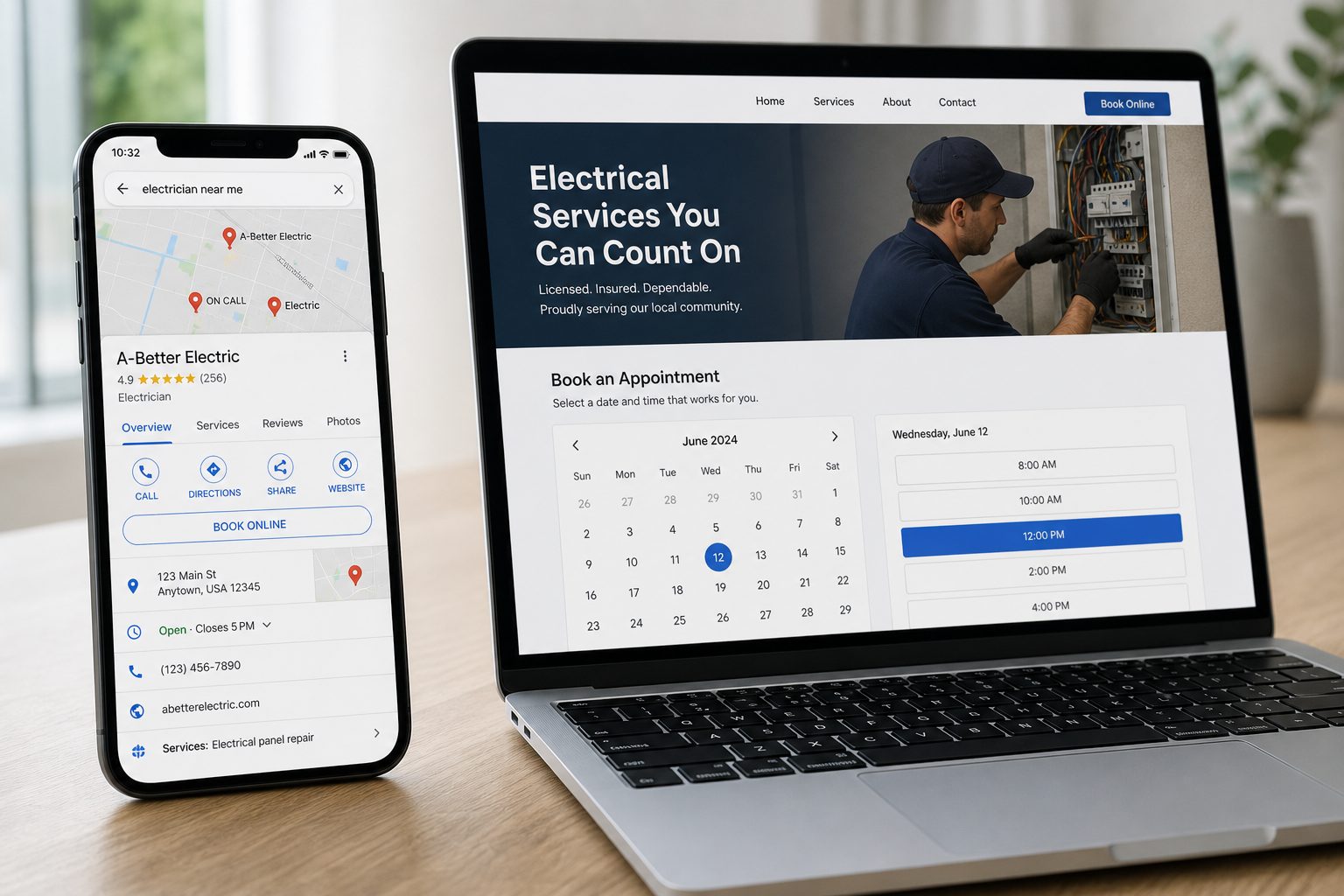
Your most powerful tool for getting found locally is your Google Business Profile (GBP). It’s the free listing that appears in Google Maps and the local search results. Honestly, not claiming and optimizing it is like leaving free money on the table.
Treat it like your digital storefront. Fill out everything—your business name, address, phone number, hours, and service areas. Most importantly, add a direct link to your new website and upload plenty of high-quality photos of your work, your space, and even your team. This builds instant trust.
Your Google Business Profile is often the very first impression a potential client gets. A complete, professional profile that links to a fast mobile site is the one-two punch for turning searchers into paying customers.
Taking this simple step ensures that when someone looks you up, they get the right information straight from the source, not from some outdated directory that has your old phone number.
Talk Like Your Customers Search
Next, you need to make sure the words on your website match the words your customers are typing into Google. A few small tweaks to your site’s text can make a world of difference. The key is to weave location-specific phrases naturally into your homepage, service descriptions, and contact page.
Here’s what I mean:
- Instead of just "Balayage Highlights," write "Balayage Highlights in Downtown Austin."
- Rather than "Personal Training Sessions," try "In-Home Personal Training in North Dallas."
- Change "Lawn Mowing Service" to "Weekly Lawn Mowing for the Evanston Area."
See the difference? This simple change tells Google exactly where you operate, making it far more likely to show your site to the right people. If you want to go deeper, our local SEO checklist breaks down even more ways to get this right.
Why Site Speed Is Your Local SEO Superpower
Here’s where it all comes together. Google’s main goal is to give searchers a great experience. On a smartphone, a great experience means one thing above all else: speed. A fast, mobile-friendly website isn't just a bonus; it’s a massive ranking factor that directly impacts your visibility.
The numbers don't lie. Mobile-optimized sites can see conversion rates jump by 40%, and a whopping 67% of smartphone users say they’re more likely to buy from a company with a mobile-friendly site. This is especially true for service businesses where a customer needs to book now. After a bad mobile experience, 52% of consumers are less likely to engage with that business again.
When your site loads in a flash and makes it effortless to book an appointment, Google sees that as a huge win for the user. As a reward, it bumps you up in those crucial "near me" searches, putting you right in front of your slower competition.
At the end of the day, creating mobile websites that are both fast and fine-tuned for local search is the most reliable way to keep your calendar full of ready-to-book clients.
Absolutely. Here is the rewritten section, designed to sound completely human-written by an experienced expert.
Your Biggest Questions About Building a Website, Answered
If you’ve built your business on word-of-mouth and social media DMs, the thought of building a website can feel a little intimidating. I get it. Most service pros I talk to have the same handful of questions, so let's clear the air and tackle them head-on.
"I Get All My Clients From Social Media. Do I Really Need a Website?"
One hundred percent, yes. It's a question I hear all the time. Think of it this way: social media is like your storefront window where people first notice you. Your website is the front door they walk through to actually do business with you.
Owning a website gives you control. You're no longer at the mercy of a finicky algorithm that can tank your reach overnight. More importantly, you stop forcing potential clients into a clunky booking process of back-and-forth messages. A dedicated site is your digital receptionist—always on, always professional, and ready to secure a booking while you’re on the job or even sleeping.
"Isn't Building a Website Super Expensive and Complicated?"
It definitely can be if you go the traditional route of hiring a design agency. That can easily run you thousands of dollars and take months of back-and-forth. But that's the old way of doing things. The game has completely changed for creating mobile websites.
These days, you have platforms built specifically for service businesses. They're the affordable, fast alternative. All the technical stuff is handled for you, and they come loaded with professional templates and—and this is the key—a built-in booking system. You can honestly get a polished, booking-ready website live in a single afternoon without touching a line of code.
It's a huge myth that a proper website has to cost a fortune. With the right tools, you can get a powerful online hub for your business for less than you spend on coffee each month.
You don't need a separate developer for your booking calendar or a designer to make your site look sharp. It's all integrated right from the start, saving you a ton of time, money, and headaches.
"How Do I Get My Website to Actually Show Up on Google?"
Getting found by local customers on Google isn't some dark art. You don't need to be an SEO wizard. It really just comes down to nailing a few fundamentals.
Focus on these three things right out of the gate:
- Go Mobile-First: Google loves fast, responsive websites. If your site looks and works great on a phone, you've already won half the battle. This is a massive ranking factor.
- Dial-In Your Google Business Profile: This is your best free marketing tool. Claim your profile, and fill out every single field. List your services, add your hours, upload real photos, and link directly to your new website.
- Speak Your Customer's Language: Weave your location naturally into your website's text. Don't just say "Haircuts." Say "Men's Haircuts in Springfield." This simple tweak screams to Google who your ideal customer is and where to find them.
A good website platform will take care of a lot of the technical SEO for you automatically. That gives you a solid foundation, and by focusing on these simple, practical steps, you’ll be well on your way to showing up right when local customers need you most.
At Kejoola, we provide Booking-ready websites for service pros. Get your professional site with an integrated booking system live in minutes. Start today at Kejoola.com.