Service Invoice Template: 7 Free Formats for Home-Service Pros
Seven copy-paste service invoice templates for time-and-materials calls, flat-rate jobs, maintenance visits, emergencies, deposit jobs, the invoice email, and a past-due reminder.
Josh · Nov 4, 2026 · 16 min read
- service invoice template
- service invoice
- invoice template for contractors
- home service invoice
- trade business
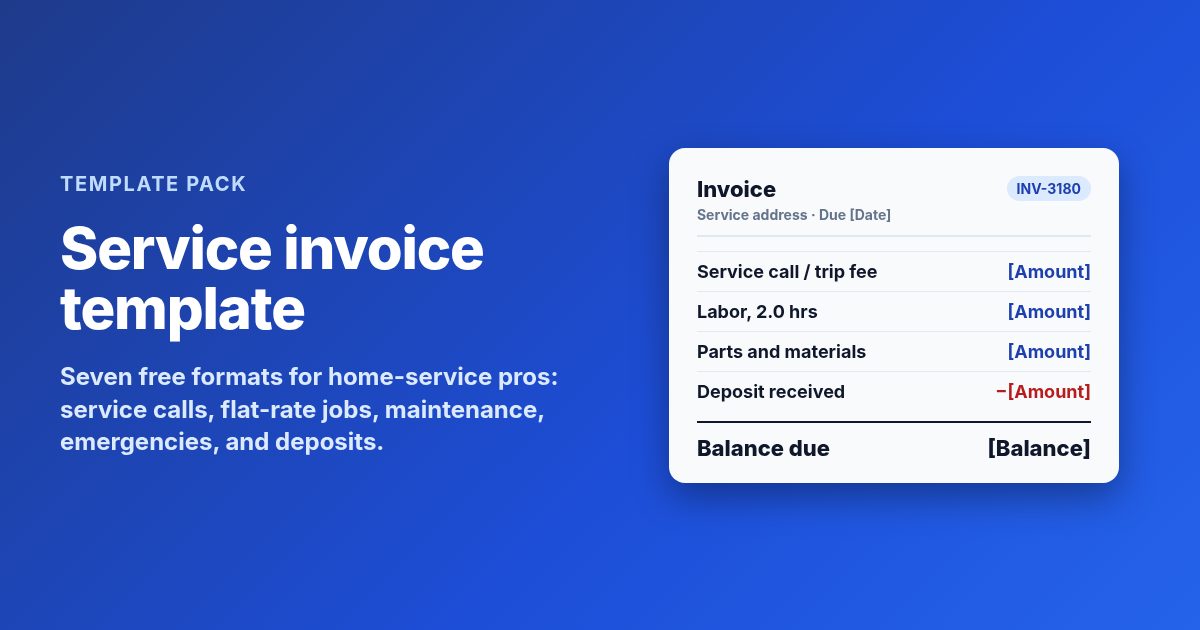
A service invoice template is the bill you hand over or email after the job. It lists where you worked, what you found, the labor and materials, any fees, tax, deposits already paid, and the balance due. The 7 templates below cover a time-and-materials service call, a flat-rate job, a recurring maintenance visit, an after-hours emergency, a bigger job with a deposit, the email that carries the invoice, and a past-due reminder.
The rule that matters most is to write down the work while you are still on site. An invoice that says what failed and what you fixed gets paid faster than one that only shows a total.
What every service invoice needs
An invoice is the customer's record of the job and your record of the sale. The IRS lists invoices among the documents that support your gross receipts, next to bank deposit slips and receipt books. So write each one for two readers: the customer who pays it and you at tax time.
| Part | What to write | Example line |
|---|---|---|
| Header | Business name, phone, email, license if you have one, invoice number, date | "Lic. #[Number] · INV-3180" |
| Bill to and job address | Customer name, billing address, and the address where you worked | "Job at: 412 Oak St, unit B" |
| Work summary | The problem reported, what you found, what you did | "Found failed capacitor. Replaced." |
| Labor and materials | Hours or flat price, then each part with quantity and price | "Run capacitor · 1 · [Price]" |
| Fees and totals | Trip or after-hours fee, permit fee, tax if required, deposit, balance | "Deposit received: -[Amount]" |
| Terms | Due date, payment methods, warranty on labor and parts | "Due on completion. Labor: [X] days." |
Put your license number on the header when your trade requires one. Some states also require it on contracts, bids, or advertising. In California, for example, contractors must include the license number on construction contracts, bids, and advertising. Check your state board's rules for what applies to you.
Number invoices in order and never reuse one. "INV-" plus a running count is enough. When a customer calls about a charge three months later, the number takes you straight to the job.
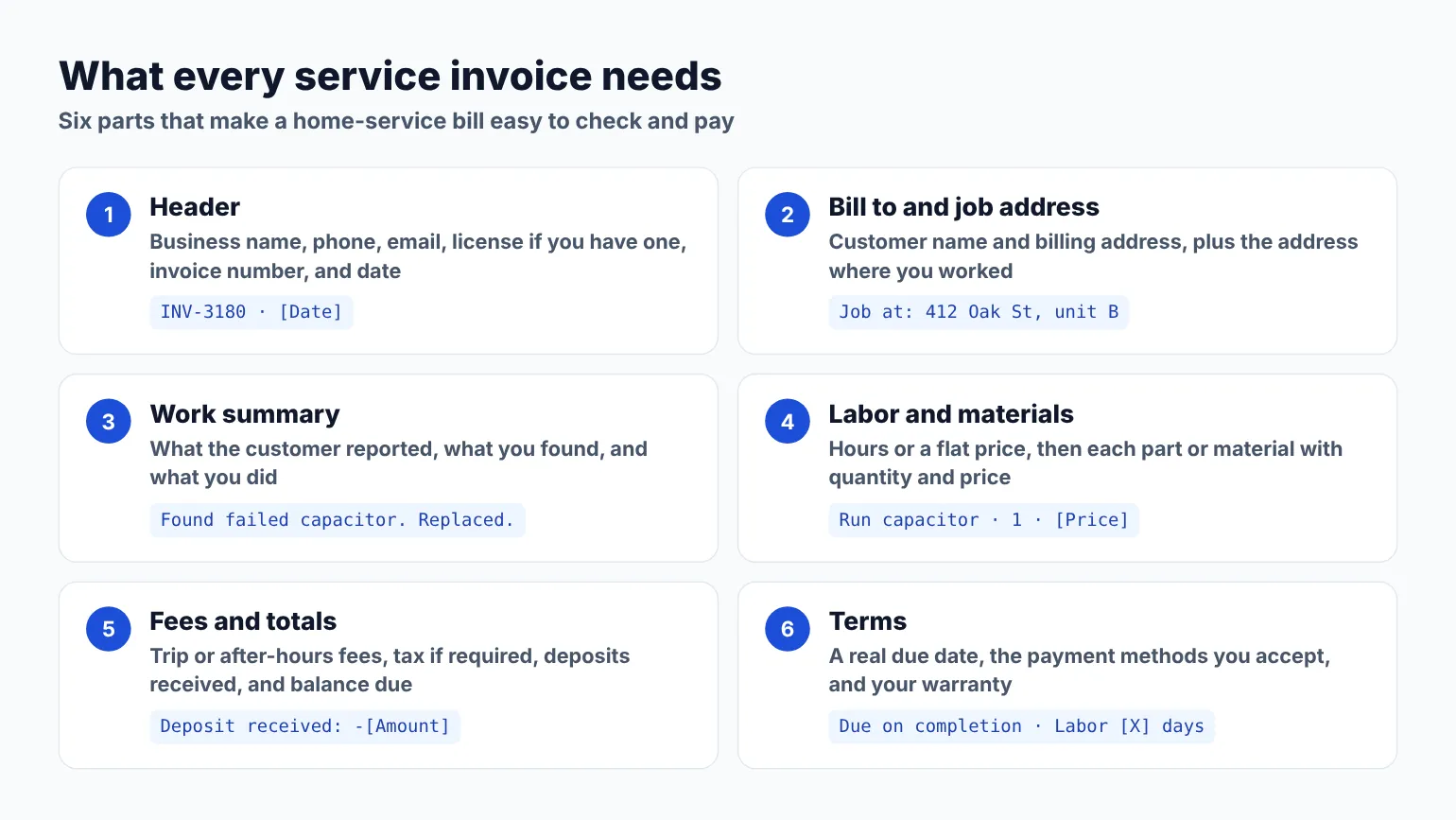
The six parts that belong on every service invoice before it goes out. Diagram only.
Labor, materials, and sales tax on a service invoice
How you split the bill changes more than how it looks. In some states it decides who pays tax on the materials.
Time and materials. You bill labor by the hour, often with a one-hour minimum, and list each part. Customers see exactly what went into the job. It suits diagnosis-heavy calls where you do not know the fix until you open the panel, the wall, or the unit.
Flat rate. You quote one price for a defined task, like "replace a run capacitor" or "install a ceiling fan." The customer approves the price before you start. Many shops put the flat price on the invoice as one line and list the main parts under it with no separate price.
Sales tax. The rules differ by state, by the type of property, and sometimes by the trade. In Texas, the Comptroller says labor to repair residential real property is not taxable. The same page explains two ways to bill. Under a lump-sum contract, you pay tax on materials when you buy them and do not charge the customer tax. Under a separated contract, you buy incorporated materials with a resale certificate and collect tax on the materials charge only. Repair work on nonresidential property, like an office or a restaurant, is taxable on the total charge. Other states handle this differently, so ask your state revenue department how to set up your invoices.
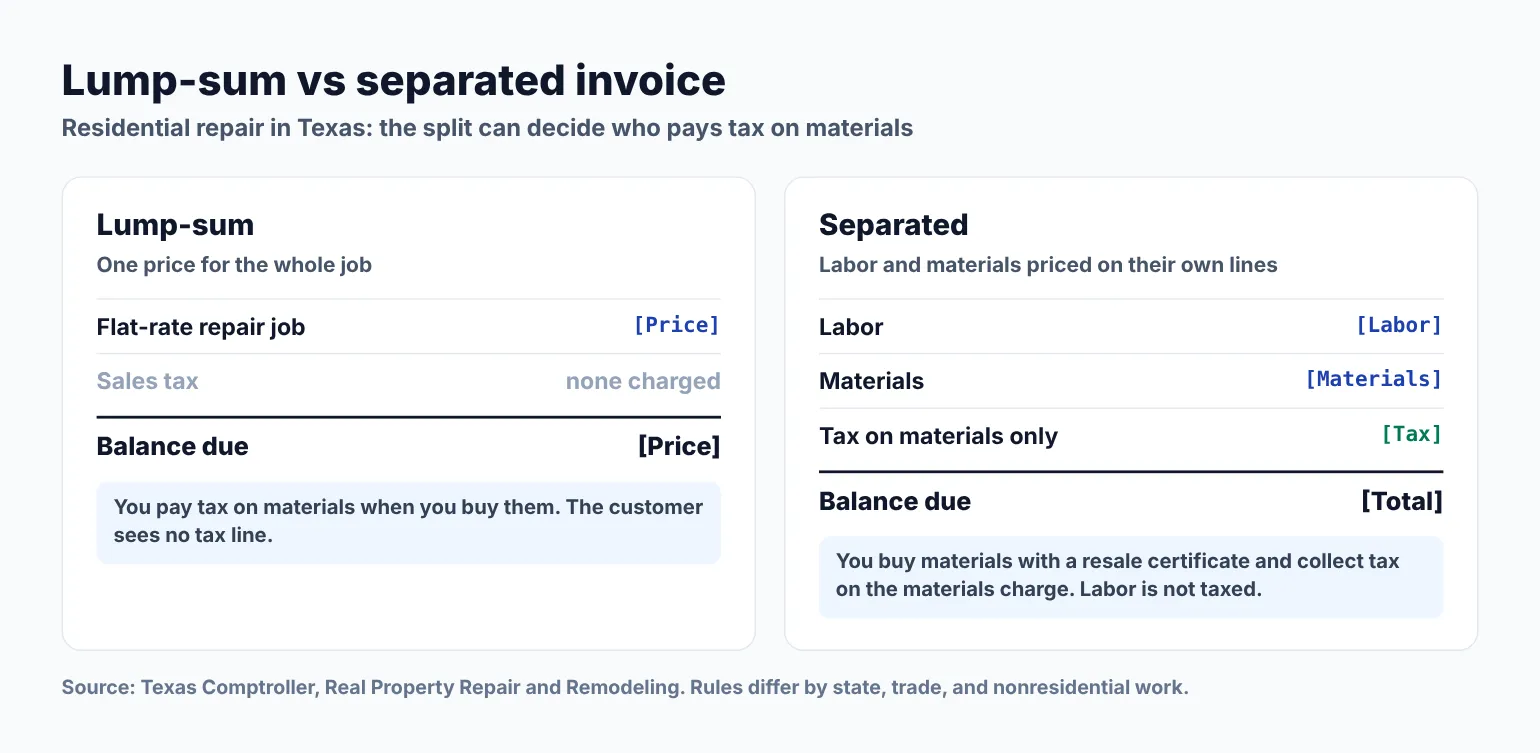
How the bottom of the bill changes between a lump-sum and a separated invoice under Texas residential repair rules. Amounts are placeholders. Diagram only.
Whatever method you use, keep it consistent with the estimate. If you quoted flat rate, do not switch to hourly on the invoice because the job ran long. If the scope changed, write the change and the time the customer approved it. For the quote that comes before the bill, start with a landscaping estimate template or a trade-specific estimate format and reuse the same service names on the invoice.
When to send each invoice
| Situation | Send when | Channel |
|---|---|---|
| Service call or small repair | Before you leave the driveway | Printed copy or email from your phone |
| Flat-rate job | When the work is tested and done | Email, with a printed copy if asked |
| Recurring maintenance visit | Same day, or on the monthly cycle you set | |
| After-hours emergency | Same visit, or first thing next morning | |
| Job with a deposit | Deposit invoice at booking, final invoice at completion | |
| Past due | The day after the due date, then 7 days later | Email first, then a call |
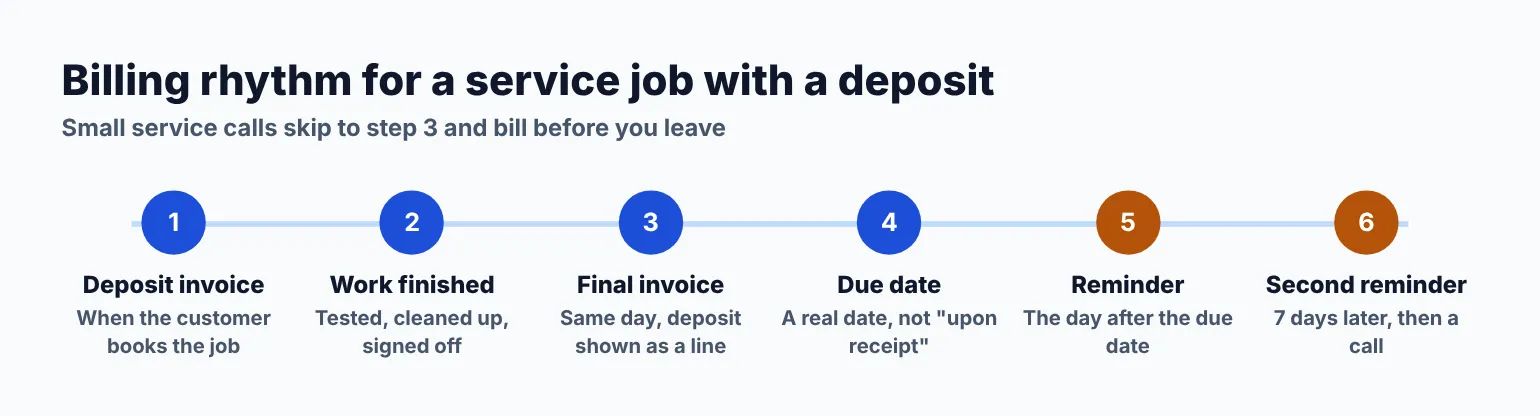
A simple billing rhythm for a service job with a deposit. Small calls skip straight to the final invoice. Diagram only.
1. Time-and-materials service call invoice
When to use it: For a standard repair billed by the hour, like a leaking shutoff, a tripped HVAC capacitor, a dead outlet, or a stuck garbage disposal. This is the invoice most home-service techs write every day.
INVOICE
[Business name] · [Phone] · [Email]
License #: [Number, if required]
Invoice #: INV-[Number]    Date: [Date]
Due date: [Date or "Due on completion"]

BILL TO
[Customer first name] [Last name]
[Billing address]

JOB ADDRESS
[Address, unit, gate code if any]

WORK SUMMARY
Reported: [What the customer told you]
Found: [What you saw, e.g. "Failed run
capacitor on outdoor unit."]
Done: [What you did, e.g. "Replaced capacitor,
tested cooling cycle, no faults."]

LABOR
Tech: [Name]   Arrived: [Time]   Done: [Time]
Qty  Description               Rate      Amount
1    Service call / trip fee   [Rate]    [Amount]
[X]  Labor, per hour           [Rate]    [Amount]

MATERIALS
Qty  Description               Price     Amount
1    [Part, size, brand]       [Price]   [Amount]
1    [Part, size, brand]       [Price]   [Amount]

Subtotal:                                [Amount]
Sales tax (if required):                 [Amount]
BALANCE DUE:                             [Amount]

PAYMENT
Accepted: [Cash / check / card / Zelle]
Checks payable to: [Business name]

WARRANTY
Labor: [X] days. Parts: per manufacturer.

Thank you for calling [Business name].
How to customize it:
- Write arrival and finish times. Customers question hours far less when the clock times are on the bill.
- Name each part the way the supply house does, with size or rating. "45/5 MFD dual run capacitor" answers questions that "capacitor" does not.
- If you waive the trip fee when the customer approves the repair, show the fee and a matching credit line, so the customer sees what they saved.
2. Flat-rate job invoice
When to use it: For priced tasks from your flat-rate book, such as a water heater swap, a ceiling fan install, a furnace tune-up package, or a toilet rebuild. The customer approved the price before you started.
INVOICE
[Business name] · [Phone] · [Email]
License #: [Number, if required]
Invoice #: INV-[Number]    Date: [Date]
Due date: [Date]

BILL TO
[Customer first name] [Last name]
[Billing address]
Job address: [Address]

APPROVED JOB
Task code: [Code from your price book]
Description: [e.g. "Replace 40-gal gas
water heater" or "Install ceiling fan"]
Approved by: [Customer name] at [Time]

Flat-rate price:                         [Amount]

Includes:
- [Main equipment or fixture]
- [Key parts and hardware]
- [Haul-away or disposal, if included]
- [Permit, if required in your area]

ADDITIONAL WORK (approved on site)
[Description]                            [Amount]

Subtotal:                                [Amount]
Sales tax (if required):                 [Amount]
BALANCE DUE:                             [Amount]

PAYMENT
Accepted: [Methods]

WARRANTY
Labor: [X] year. Parts: per manufacturer,
registered under [Customer name] on [Date].
How to customize it:
- Keep the task description word for word from your price book. The customer saw that wording when they said yes.
- List what the flat price includes, without prices for each item. It shows the value and heads off "why so much for one part?"
- Anything added on site goes under its own heading with a separate amount and the time it was approved.
3. Recurring maintenance visit invoice
When to use it: For seasonal HVAC tune-ups, monthly lawn visits, quarterly gutter cleaning, or any plan you bill on a set cycle. One invoice can cover a single visit or several visits in a month.
INVOICE
[Business name] · [Phone] · [Email]
Invoice #: INV-[Number]    Date: [Date]
Due date: [Date]
Plan: [e.g. "Seasonal HVAC tune-up" or
"Monthly lawn care · Zone A"]

BILL TO
[Customer first name] [Last name]
[Billing address]
Service address: [Address]

VISIT DATE(S)
[Date] · [Tech name]
[Date] · [Tech name]   (if billed monthly)

LINE ITEMS
Qty  Description                  Rate      Amount
1    [Plan visit / tune-up]       [Rate]    [Amount]
1    [Add-on, e.g. filter change] [Rate]    [Amount]
1    [Travel fee, if any]         [Rate]    [Amount]

Subtotal:                                   [Amount]
Sales tax (if required):                    [Amount]
BALANCE DUE:                                [Amount]

CHECKLIST COMPLETED
- [e.g. "Checked refrigerant pressures"]
- [e.g. "Replaced 16x25x1 filter"]
- [e.g. "Mowed, edged, blown hardscape"]

PAYMENT
Accepted: [Methods]
Next scheduled visit: [Date]

NOTES
[Anything the customer should know, e.g.
"Recommend condensate line flush next visit."]
How to customize it:
- Put the plan name and the visit date on every invoice so the customer can match the bill to the work without calling you.
- List the checklist items you completed. Maintenance work is hard to see, and a short list proves the visit happened.
- If you bill monthly for several visits, list each date. Property managers and office managers check calendars against invoices.
4. Emergency / after-hours invoice
When to use it: For nights, weekends, and holidays, like a burst supply line at 11 p.m., no-heat on a Sunday, or a tripped main breaker after a storm. The extra rate needs to be clear, because the customer agreed to it in a stressful moment.
EMERGENCY SERVICE INVOICE
[Business name] · [Phone] · [Email]
License #: [Number, if required]
Invoice #: INV-[Number]    Date: [Date]
Due date: [Date]

BILL TO
[Customer first name] [Last name]
[Billing address]
Job address: [Address]

CALL DETAILS
Call received: [Date, time]
Arrived: [Time]   Secured: [Time]
Completed: [Time]
After-hours rate agreed by phone: [Yes, time]

WORK SUMMARY
Found: [e.g. "Split 3/4 in. supply line in
garage ceiling, water at drywall."]
Done: [e.g. "Shut off main, cut out damaged
section, installed two couplings, restored
water. Tested 15 minutes, no leaks."]

CHARGES
Emergency dispatch fee               [Amount]
After-hours labor, [X] hrs @ [Rate]  [Amount]
Parts: [List]                        [Amount]

Subtotal:                            [Amount]
Sales tax (if required):             [Amount]
BALANCE DUE:                         [Amount]

FOLLOW-UP RECOMMENDED
[e.g. "Drywall repair by others. Check other
PEX runs in unheated garage before winter."]

PAYMENT
Accepted: [Methods]
How to customize it:
- Note the time the customer agreed to the after-hours rate on the phone. It is the line that ends most disputes about the bill.
- Keep the secured or water-off / power-off time. Customers often pass emergency invoices to an insurer, and the timeline helps.
- Put follow-up work you did not do under its own heading, so nobody thinks it was included.
5. Deposit + final invoice (bigger job)
When to use it: For bigger jobs where you collect money up front, like a repipe, a full panel upgrade, a deck rebuild, or a multi-day landscaping install. Send the deposit invoice when the customer books, then this final invoice when the work is done.
FINAL INVOICE
[Business name] · [Phone] · [Email]
License #: [Number, if required]
Invoice #: INV-[Number]    Date: [Date]
Estimate #: EST-[Number], approved [Date]
Due date: [Date]

BILL TO
[Customer first name] [Last name]
[Billing address]
Job address: [Address]

SCOPE COMPLETED
[e.g. "Replaced galvanized supply with PEX,
main shutoff to all fixtures. Pressure tested
at [X] psi. Final inspection passed [Date]."]

CHARGES
Labor                                [Amount]
Materials                            [Amount]
Permit fee (paid on your behalf)     [Amount]
Change order #1, approved [Date]     [Amount]

Subtotal:                            [Amount]
Sales tax (if required):             [Amount]
Deposit received [Date]:            -[Amount]
BALANCE DUE:                         [Amount]

PAYMENT
Accepted: [Methods]
Due by: [Date]

WARRANTY
Labor: [X] year from [Date].
Materials: per manufacturer.
How to customize it:
- Show the full job price, then subtract the deposit on its own line with the date. Never fold a deposit into a smaller total.
- Reference the estimate number and approval date. If the customer checks, both documents tell the same story.
- List the permit fee on its own line and say you paid it for the customer, so it does not read as markup. Attach a copy of the permit or the passed inspection if you have it.
For the paperwork that tracks the work itself between booking and the final bill, see what a work order covers.
6. Invoice email that carries the PDF
When to use it: Every time you send an invoice by email. A short, plain note gets the attachment opened and paid. Send it from your business email so replies reach you.
Subject: Invoice INV-[Number] for [job] at
[street name]

Hi [Customer first name],

Thanks for having us out on [Date]. Your invoice
for [short job description] is attached.

Amount due: [Amount]
Due date: [Date]

You can pay by [method 1] or [method 2]. If you
pay by check, please make it out to
[Business name].

Your [labor warranty] runs through [Date]. If
anything acts up before then, call me directly
at [Phone].

Thanks again,
[Your name]
[Business name] · [Phone]
How to customize it:
- Put the invoice number and the street in the subject line. Landlords and property managers search their inbox by address.
- Mention the warranty date in the email as well as on the invoice. It is the line customers look for when something fails a month later.
- For a text version, keep it under 160 characters: "Hi [Name], your invoice for today's job is in your email. [Amount] due [Date]. Thanks, [Business name]."
7. Past-due reminder (first + second)
When to use it: The day after the due date passes with no payment. Keep the first one friendly. Send the second a week later, firmer, then call.
Subject: Reminder: invoice INV-[Number] was due
[Date]

Hi [Customer first name],

A quick reminder that invoice INV-[Number] for
the [job] at [street name] was due on [Date].
I have attached it again here.

Amount due: [Amount]

If you have already paid, thank you, and please
reply with the date so I can match it. If
something about the work or the bill is holding
it up, let me know and we can sort it out.

You can pay by [method 1] or [method 2].

Thanks,
[Your name]
[Business name] · [Phone]

--- SECOND REMINDER (7 days later) ---

Subject: Second reminder: INV-[Number], [Amount]
past due

Hi [Customer first name],

Invoice INV-[Number] is now [#] days past due.
Please send payment by [Date]. Per the terms on
your estimate, [late fee policy, if any] applies
after that date.

Please reply or call me at [Phone].

[Your name]
How to customize it:
- Mention a late fee only if it was on the estimate or work order the customer signed.
- Invite the customer to raise a problem with the work. A slow payer is sometimes a customer with an issue they have not reported.
- Keep threats out of writing. Lien and collection rules differ by state, so check your state's rules before you take the next step.
Which invoice to send
| Template | Send when | Channel |
|---|---|---|
| 1. Time-and-materials service call | Before you leave the job | Printed or email |
| 2. Flat-rate job | When the work is tested and done | |
| 3. Recurring maintenance visit | Same day or on your monthly cycle | |
| 4. Emergency / after-hours | Same visit or next morning | |
| 5. Deposit + final | Final invoice at completion | |
| 6. Invoice email | With every emailed invoice | |
| 7. Past-due reminder | Day after due date, then 7 days later | Email, then a call |
Mistakes that slow down service payments
- A total with no work summary. "Service call: [Amount]" invites a call. Three lines on what you found and fixed answer it first.
- Parts with no names or sizes. Customers compare prices online. A clear part name looks honest, and "misc. parts" looks padded.
- Switching billing methods mid-job. If you quoted flat rate, bill flat rate. Write any added work as its own approved line.
- No due date. "Due on receipt" is easy to put off. A real date gets paid.
- Losing the paper trail. The IRS says to keep records for 3 years in most cases, longer in some situations. Save every invoice, photo, and payment record in one folder per year.
If you need a trade-specific pack, see the plumbing invoice template or the cleaning invoice template. And when a job is paid and the customer is happy, that is the right moment to ask for a Google review.
Questions home-service pros ask about invoices
What should a service invoice include?
Your business name, contact details, and license number if your trade requires one. Then an invoice number and date, the customer's name and billing address, the job address, a short summary of what you found and did, labor and materials with prices, any trip or permit fees, tax if your state requires it, deposits received, the balance due, the due date, how to pay, and your warranty on labor and parts.
Should I list labor and materials separately on a service invoice?
Usually, yes. Customers trust a bill they can check, and separate lines head off "why so much" calls. It can also change your sales tax. In Texas, a separated residential repair bill means tax is collected on materials only, and labor is not taxed. Flat-rate shops can still show one price and list the main parts without prices. Check your state's rules before you choose.
Do home-service businesses charge sales tax on invoices?
It depends on your state, the property, and sometimes the trade. Texas, for example, does not tax labor to repair residential property but taxes the full charge for repairing nonresidential property like offices and restaurants. Whether you charge tax on materials depends on whether you bill lump-sum or separated. Other states have their own rules, so confirm with your state revenue department.
When should I send the invoice?
Before you leave the job, if you can. For service calls and small repairs, print it or email it from your phone while the customer can still see the work. For bigger jobs, send the final invoice the day the work passes testing or inspection. Commercial customers may set billing dates in their agreement, so follow those.
How do I handle a customer who disputes a service invoice?
Start by asking what part of the bill they question, then answer with what is written on it: arrival and finish times, the parts used, and the approval time for any added work. That is why the work summary matters. If the work itself has a problem, schedule a warranty visit before you discuss money. Check your state's rules before any lien or collection step.
Get the next job booked
A clear invoice closes out one job. The next step is making the following one easy to book. If you want a site where customers can see your services and book a visit, you can get a website with online booking from Kejoola. Customers can describe the problem, the address, or a gate code in the booking notes box. Already have a Google Business listing? Paste your listing link and get a website with online booking, so customers book themselves.
14-day free trial, no card needed. Online booking starts on the Starter plan.