What Is a Work Order? A Plain Guide for Home-Service Pros
A work order is the written record of one job: who it's for, where it is, what the tech will do, what it should cost, and what was actually done, signed off when the work is finished.
Josh · Oct 29, 2026 · 11 min read

- what is a work order
- work order
- work order vs invoice
- change order
- field service
- small business
A work order is the written record of one job. It says who the customer is, where the work happens, what the tech will do, which parts and price terms apply, and what was actually done, with a sign-off at the end. For a plumber, it might be "replace the 40-gallon water heater at 18 Elm St., haul away the old tank."
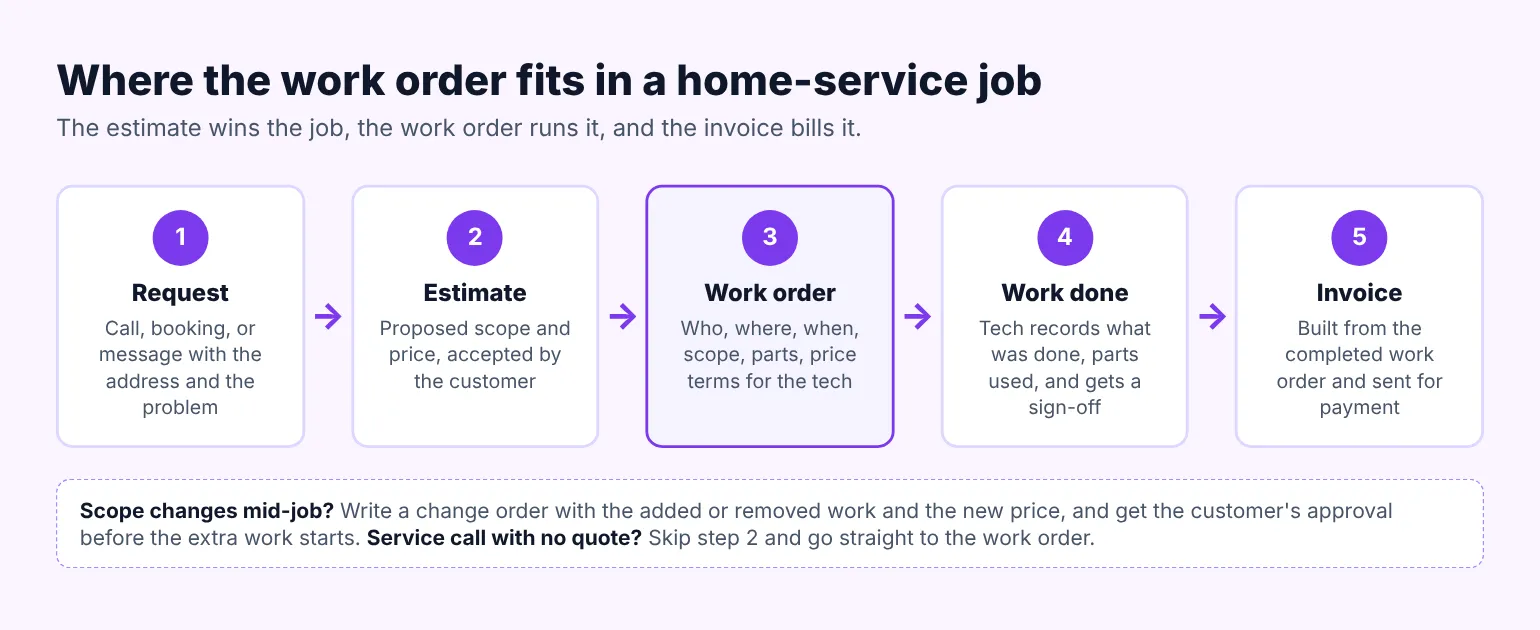
In a home-service business, the work order sits between the estimate and the invoice. The estimate wins the job, the work order runs it, and the invoice bills it. The sections below cover what goes on one, the common types, and how to run them at your size.
What a work order is, and what it isn't
Owners often use "work order", "estimate", and "invoice" as if they mean the same thing. They are separate papers with separate jobs. Mixing them up is how a tech shows up without the gate code or a customer disputes a bill for work they never approved.
| Document | When you make it | What it does | Who usually signs |
|---|---|---|---|
| Estimate or quote | Before the customer says yes | Proposes the work and the price | Customer, to accept |
| Work order | After the yes, before the visit | Tells the tech what to do, where, and when | Tech and customer, at completion |
| Change order | When the scope changes mid-job | Records added or removed work and the new price | Customer and owner, before the change |
| Invoice | After the work is done | Asks for payment for the finished work | Nobody, it's a bill |
A service call with no estimate still gets a work order. The customer called about a tripping breaker, you booked a visit, and the work order is where the tech records the diagnosis, the repair, and the parts used. The tech still needs the same basics: the customer, the address, the problem, and a place to write what was done.
Why work orders matter for a home-service business
A one-person shop can run on memory for a while. It stops working the first week you have six jobs, two of them callbacks, and one customer who swears you said the disposal was included. The work order is the paper that settles those questions.
It saves drive time. When the address, the gate code, the dog, and the shutoff location are written down, the tech doesn't call the office from the driveway. It also protects the price. A written scope means "replace the wax ring" doesn't quietly become "replace the toilet" without a new approval.
It also feeds everything after the job. The invoice is built from the parts and labor on the completed work order, not from what the tech remembers on Friday. When the same customer calls in two years about the same water heater, you can see the model, the install date, and the warranty notes in a minute.
For a crew, it's how work gets handed off. The owner who sold the job is often not the person who shows up. A clear work order is the only way the person in the truck knows what the person on the phone promised.
What goes on a work order
Most work orders in the trades carry the same six blocks. A paper pad, a PDF, and a field-service app all hold these same parts. Only the way you fill them in changes.
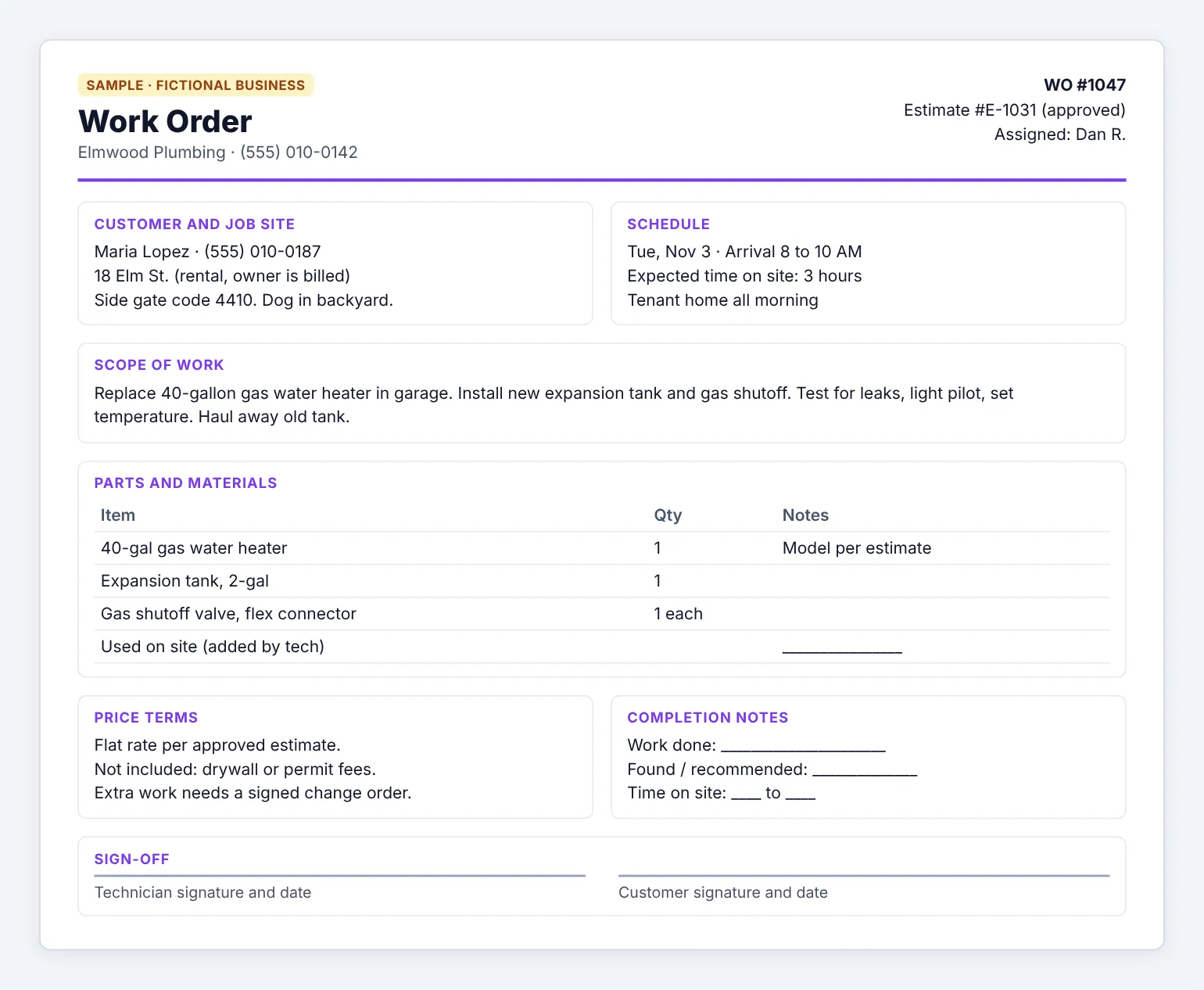
Sample work order for the fictional Elmwood Plumbing. Illustrative mock only.
Customer and job site
Name, phone, email, and the service address, which may not be the billing address for a rental or a property manager. Add access notes: gate code, which door to use, pets, parking, and whether a tenant or the owner will be home. A landscaper adds the side of the house and any irrigation heads to flag. A cleaner adds the alarm code instructions and the rooms that are off limits.
Scope of work
Write what you will do in plain words, as specifically as the job allows. "Repair leak" is too loose. "Replace the shutoff valve under the kitchen sink and test for leaks" is a scope a tech can finish and a customer can check. California's contractor board tells homeowners to expect this kind of detail in contracts: the products, the model numbers, who does which part, and cleanup and debris removal, according to the CSLB guide to home improvement contracts.
Parts and materials
List the parts you expect to use, with quantities and model numbers where they matter. Leave space for parts used on site, since a service call often turns up a second problem. An HVAC tech lists the capacitor size. An electrician lists the breaker type and amperage. A junk removal crew notes the load size and any items with disposal fees, like mattresses or tires.
Schedule and assigned tech
Record the date, the arrival window the customer was given, and who is assigned. Add the expected duration so the next job on the route isn't booked too tight. If a job needs two visits, such as a rough-in and a finish, give each visit its own line or its own work order.
Price terms and approval
Copy the approved price from the estimate, or state how the job will be billed: flat rate, hourly with a minimum, or time and materials. Note what is not included. Then get the customer's approval before any extra work starts. That's the job of a change order, covered below.
Completion notes and sign-off
When the work is done, the tech writes what was actually done, what was found, and any recommendations, such as "anode rod worn, suggest replacing within a year." Add before-and-after photos if your system holds them, and the time on and off site. The customer signs or initials that the work was completed. That sign-off is what you point to if a bill is questioned later.
Types of work orders trades use
You don't need a separate form for each type. You need to know which kind of job you're writing, because each one gets different notes.
| Type | Typical trade example | What to note |
|---|---|---|
| Service call | Clogged drain, tripping breaker, AC not cooling | Customer's description of the problem, diagnosis, repair made |
| Quoted job | Water heater swap, panel upgrade, sod install | Estimate number, approved price, exact scope |
| Emergency | Burst pipe, no heat in January | Time of call, after-hours rate if any, what was made safe |
| Maintenance visit | Spring AC tune-up, gutter clean, deep clean | Checklist items done, readings, next visit due |
| Change order | Second leak found, extra room added | Added or removed work, new price, customer approval |
| Callback or warranty | Return visit for the same issue | Original work order number, cause, whether it's billable |
Callbacks deserve their own label. When a callback links back to the original work order, you can see whether it was a bad part, a missed step, or a new problem. That's how you decide who pays for it.
Work order rules that can apply to your paperwork
A work order is mostly an internal document. Some rules still touch it once it carries a price and a customer signature. These are examples, not legal advice, so check your own state's contractor board and a local attorney for your situation.
Written contracts and change orders
Some states require a written contract above a dollar amount. In California, a written contract is required for home improvement projects over $500, and any change to the price or scope must be made with a written change order signed by both the customer and the contractor before the change, according to the CSLB guide to home improvement contracts. The same page caps the down payment at $1,000 or 10 percent of the contract price, whichever is less. If you work in a state like this, your work order may need to sit alongside a proper contract.
Sales made in the customer's home
The federal Cooling-Off Rule gives buyers three business days to cancel certain sales of $25 or more made at their home. Under the Cooling-Off Rule (16 CFR Part 429), a visit the customer asked for to repair or maintain their property is excluded. Extra goods or services you sell during that visit, beyond the parts the repair needs, are not. So if a tech is called to fix a furnace and sells a new humidifier at the kitchen table, write that sale up separately and check whether the cancellation notice applies.
How long to keep completed work orders
Completed work orders back up the income on your tax return. The IRS says to keep records for 3 years in most cases, and employment tax records for at least 4 years, according to How long should I keep records? (IRS). Painters and handymen working in pre-1978 homes may have extra paperwork. The EPA's lead-safe rule requires renovation firms to keep records for each job for three years, as listed on the EPA RRP work practices page.
How to decide how you run work orders
There are three common ways to handle work orders. The right one depends on how many trucks you run and how often a job is handed from one person to another.
| Option | Best for | Trade-off |
|---|---|---|
| Carbon-copy pad | Solo owners, rural areas with weak signal | Hard to read, easy to lose, retyped for every invoice |
| Fillable PDF or doc template | Solo to 2 techs who already invoice from a laptop | Still manual, no live status, photos stored elsewhere |
| Field-service app | 2 or more techs, dispatch, many callbacks | Monthly cost per user, setup time, a learning curve for the crew |
Use these four questions to pick:
- How many people touch a job between the first call and the invoice?
- Do techs need to see the job on their phone before they reach the house?
- How often do you have to look up past work for a callback or a warranty claim?
- Do your invoices get built from the work order today, or retyped from memory?
Solo owner
A clean template is usually enough. Fill it in when you book the job, finish it on site, and turn it into the invoice that evening. Keep the same numbering for estimates, work orders, and invoices so you can match them later. If you already send written quotes, the format in the cleaning estimate template or the landscaping estimate template carries over to a work order with a few added blocks.
2 to 5 techs
This is where paper starts to cost you. Jobs get handed off, the office needs to know who is where, and parts used on site have to reach the invoice. Many field-service apps turn a booked job into a work order, send it to the tech's phone, and build the invoice from it. The roundups of plumbing software and HVAC software compare those apps for small shops.
Seasonal business
Landscapers, pool cleaners, and gutter crews often run a short, busy season with temporary help. Keep the work order simple enough that a new hire can fill it in on day one. A short checklist per service type, with space for notes and photos, beats a long form nobody finishes.
Where a bookable site fits
The work order starts with a request, and that request is easier to write up when it arrives in writing. A Kejoola site, for example, is four pages (Home, Services, Blog, Contact) where customers can book a visit. The customer gives a name, email, and phone, then types the address and the problem in the notes box, and the booking lands in your bookings. You still write the work order in whatever template or app you use, but you start with the customer's own words instead of a scribbled voicemail. The guide to booking a plumber online shows what customers expect from that step.
Questions owners ask about work orders
Is a work order the same as an invoice?
No. A work order tells your tech what to do and records what was done. An invoice asks the customer to pay for the finished work. Most shops build the invoice from the completed work order, so the parts and labor on the bill match what the tech actually recorded on site.
Is a work order a legally binding contract?
Sometimes it can be, depending on what it says and what the customer signed. A work order with a price, a scope, and a customer signature may act like an agreement. Some states, like California, require a separate written contract above a dollar amount. Check your state's contractor board for the rules that apply to your trade.
Who fills out a work order?
Usually two people. The office or the owner starts it when the job is booked: customer, address, scope, schedule, and price terms. The tech finishes it on site with what was done, parts used, time, photos, and the customer's sign-off. A solo owner does both halves, often in the same day.
What is the difference between a work order and a change order?
A work order covers the job as approved. A change order records a change to that job after work begins, such as a second leak found behind the wall. It lists the added or removed work and the new price, and the customer approves it before the extra work starts.
Do small home-service businesses need work order software?
Not at first. A solo owner can run well on a clear template and the same numbering for estimates, work orders, and invoices. Software starts paying for itself once two or more techs share jobs, the office dispatches from a board, or callbacks mean you look up past work every week.
Give customers an easy way to request the job
If you want a site where customers can see your services and book a time, you can get a site customers can book from with Kejoola. Already have a Google Business listing? Paste your listing link to get a first draft of your site, then finish it with your own services, towns, and photos.
14-day free trial, no card needed. Online booking starts on the Starter plan.