Sprinkler System Website: Pages, Booking, and Google Setup
A sprinkler system website needs a home page, one service entry per irrigation job, a contact page, and online booking your Google Business Profile can link to, so a search ends in a booked visit.
Josh · Oct 1, 2026 · 12 min read
- sprinkler system website
- irrigation website
- book sprinkler repair online
- sprinkler install
- google business profile
- home services
A sprinkler system website is a small site that shows homeowners which irrigation jobs you do, which towns you cover, and how to book a visit. For most crews, that means a home page, a services page with one entry per job, a contact page, and online booking that your Google Business Profile can link to.
Homeowners search for the job they need. They type "sprinkler blowout" in October and "sprinkler head broken" in July. Each part of the site has one job: get that person from the search to a booked visit without a round of phone tag.
What a sprinkler system website is
Your sprinkler system website is the place your Google listing, your truck lettering, and your door hangers all point to. It has to answer three questions fast. Do you fix my problem? Do you come to my town? When can you be here?
You have a few ways to get there, and they are not equal.
| Option | What the homeowner gets | Fits | Trade-off |
|---|---|---|---|
| Google Business Profile only | Reviews, hours, a call button | A new crew still testing demand | No page of your own for the Booking button to open |
| Facebook page | Posts, reviews, Messenger | Seasonal posts for past customers | Google doesn't accept social media or messaging links as booking links |
| One-page brochure site | Name, phone, a contact form | Owners who quote every job by phone | Every request turns into a callback |
| Small bookable site (about four pages) | Services, service towns, and a time to book | Most small irrigation crews | You still write the service copy and keep hours current |
| Custom agency build | Town pages, custom design, ongoing SEO work | Multi-crew outfits covering many towns | Costs more and takes longer to build and change |
For most residential irrigation crews, the small bookable site is the right size. It covers every job you do, gives Google a page that completes a booking, and stays small enough that you'll keep it current.
Why it matters for a sprinkler business
Sprinkler work comes in waves. Spring startups run as the ground thaws and controllers come back on. Summer brings dry zones, broken heads, and valves that won't close. Fall is a race to blow out lines before the first hard freeze. Each wave is a different search, and often a different customer.
A homeowner standing next to a geyser where a head used to be isn't reading your About page. They want to see "sprinkler repair," their town, and an open time. If your site makes them call and leave a voicemail, they'll call the next listing too. Whoever answers or books first usually gets the job.
The site also sorts the work for you. A request that reads "winter blowout, front and back zones, gate code in notes" tells you the truck, the compressor, and the time it needs. A voicemail that says "call me about the sprinklers" tells you nothing until you call back.
Google needs a real page as well. A Business Profile's booking link has to go to a page where the customer can finish the booking. Google's business links policies also rule out social media sites, messaging links, app store links, and link shorteners. Without a site of your own, the Booking button has nowhere to point.
The parts of a sprinkler system website
Each part should answer a homeowner's question or save your crew a callback. The mock shows how the pieces fit on one small site.
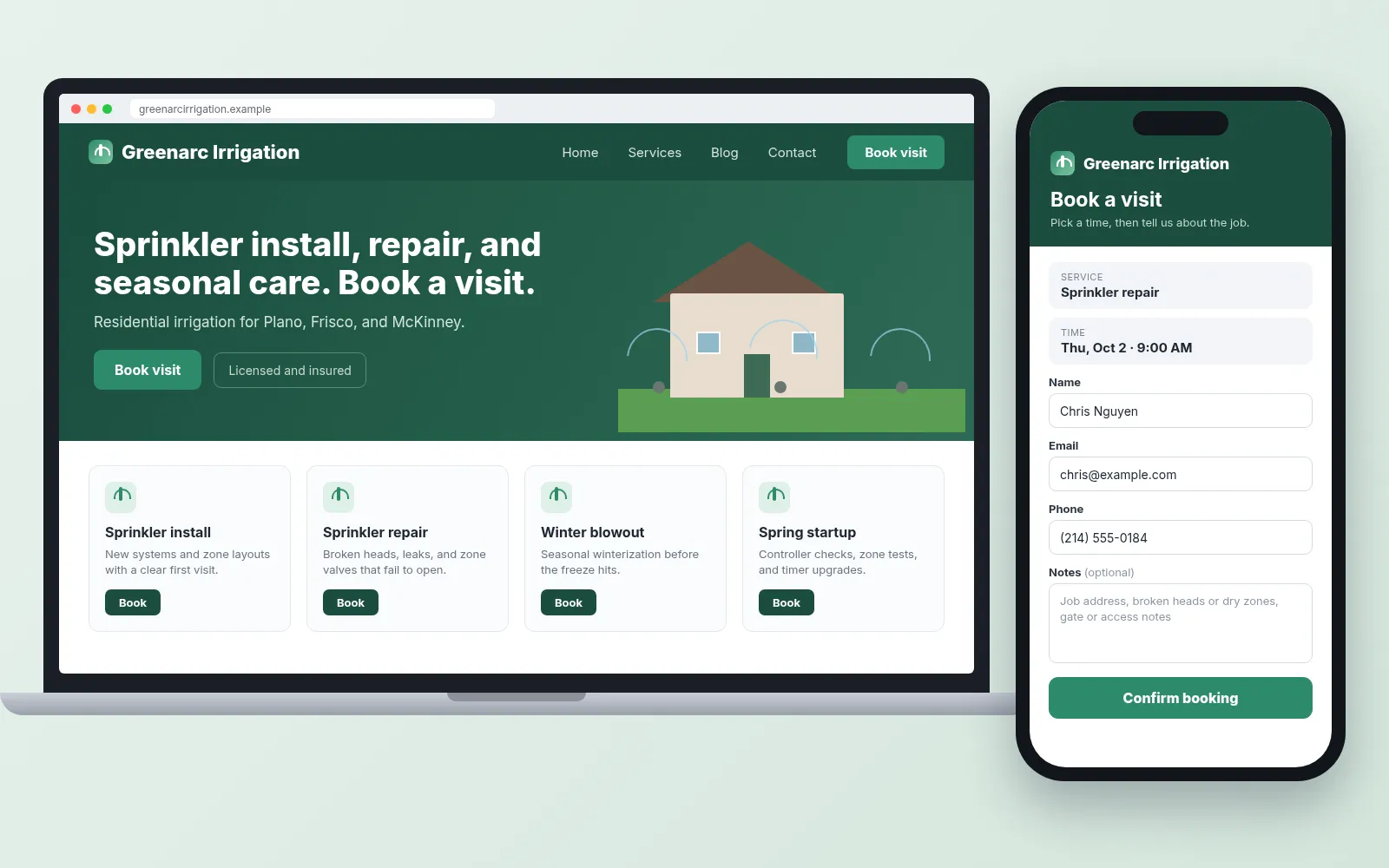
Sample bookable irrigation site for the fictional Greenarc Irrigation. Illustrative mock only.
Home page: who you are and where you drive
The home page proves you're a real local irrigation company. Put your business name at the top exactly as it appears on your truck and your Google listing. Google's guidelines for representing your business ask for your real-world name. Taglines, service words, and city names stuffed into the name can get a profile suspended, so keep "Best Sprinkler Repair Plano" off both.
List the towns you serve by name, not "the greater metro area." A homeowner in a suburb wants to see their suburb. If you work from home and visit customers, Google treats you as a service-area business. Its service area help page lets you set up to 20 service areas by city, postal code, or other area. You can't set a radius, and the whole area shouldn't stretch past about 2 hours of driving from your base. If customers never come to your address, remove it from the profile. The steps are in how to hide your address on Google Business Profile.
Then give the page one clear action. Put a Book button near the top with your phone number next to it. If your state licenses irrigation contractors, add your license number in the footer.
Services page: one entry per job people search for
Homeowners search for the job itself, like "sprinkler repair" or "winter blowout." Give each job its own entry, written in their words:
- Sprinkler repair: broken heads, leaks, zones that won't turn on, valves that won't shut off.
- Spring startup: turning the system back on, checking each zone, adjusting heads, and setting the controller.
- Winterization or blowout: clearing water from the lines before freezing weather. Use both words, since homeowners search both.
- New sprinkler system install: design, trenching, and a first season of adjustments.
- Controller upgrade: swapping an old timer for a smart controller.
- Drip irrigation: beds, gardens, and shrubs where spray heads waste water.
- Backflow testing: only if you hold the certification your state or water utility requires.
Under each entry, say three things. What the job covers. Whether it's a short visit or a multi-day project. What the homeowner should write in the booking notes before you arrive.
The controller entry is a good place for one sourced fact. The EPA says replacing a standard clock-based controller with a WaterSense labeled one can save an average home up to 15,000 gallons of water a year. If you install WaterSense labeled models, say so. Ask your local water utility whether it offers a controller rebate, and mention it on the page if it does.
If you also mow or install landscapes, keep that work in its own entries so a repair customer isn't scrolling past sod quotes. The landscaping website and lawn care website guides cover those services.
Booking: a service, a time, and the job notes
Sprinkler work happens in the yard, so the booking flow should end with a truck in the driveway. Keep it to four steps:
- The customer picks the service, such as sprinkler repair or winter blowout.
- They pick an open time.
- They enter name, email, and phone.
- They use the notes box for the street address and the job details.
The notes box is where the useful detail goes. Prompt it with what your tech needs to know: the street address, which zones are dry or flooding, any broken heads, the controller brand if they know it, and the gate code or dog situation. With that, the tech shows up with the right parts and the right key.
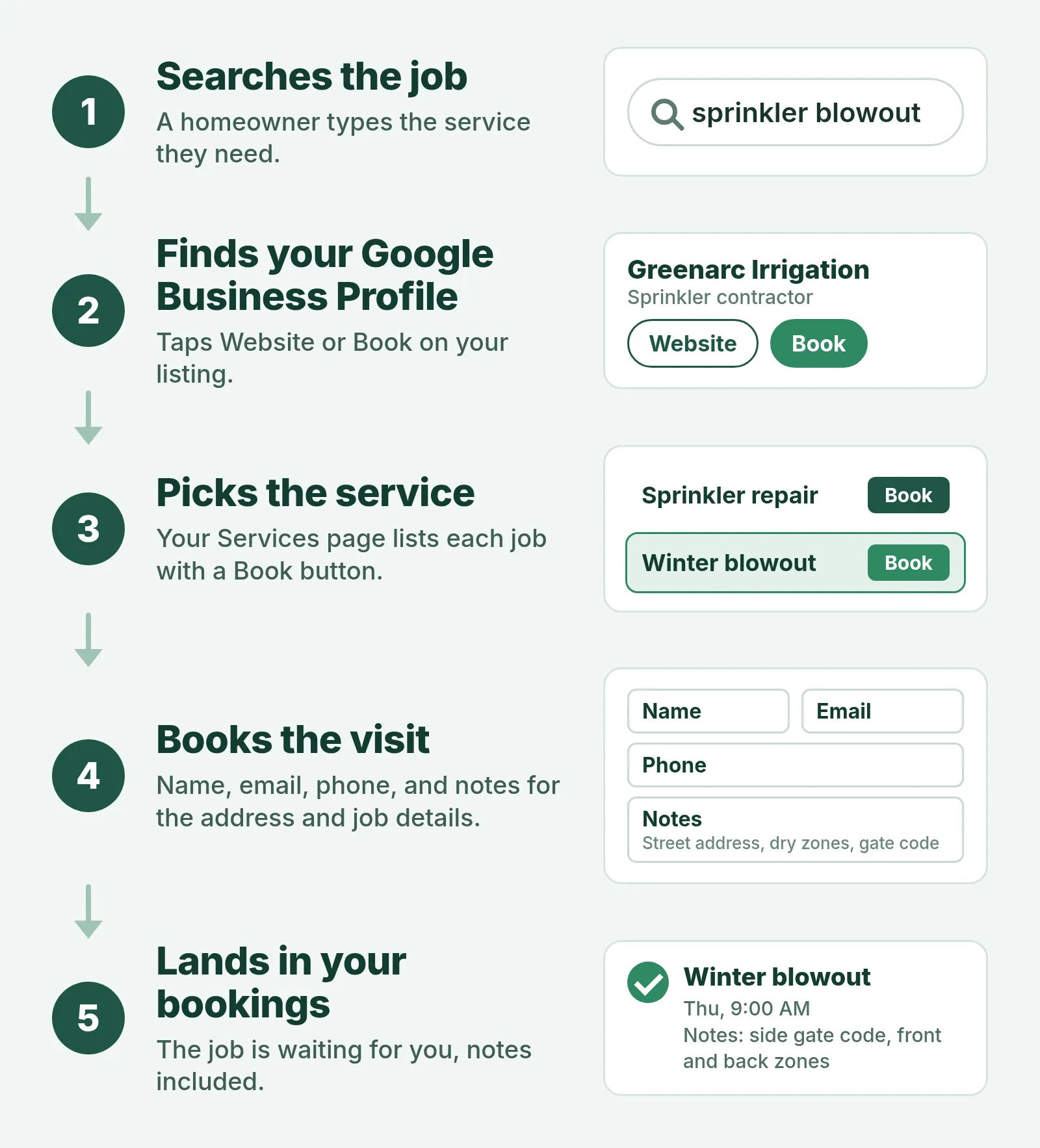
How a blowout search becomes a booked visit, shown with the fictional Greenarc Irrigation.
Be honest about what can be booked. A blowout or a single-head repair is a fixed visit, so open it for direct booking. A new install starts with an estimate visit where you walk the yard, so book the estimate, not the install. Close times you can't staff, and leave drive time between towns when you set your open hours.
Plan for the fall rush. Open blowout times early and close them when the crew is full, so nobody books a slot you can't reach before the freeze. After each booking, send a short confirmation from your own email or phone that the homeowner can forward to a spouse, landlord, or HOA. For more on the booking side, see what a booking website for home services needs.
Contact page: the backup path
Some people will always call, and some jobs can't wait for a slot. The contact page gives them a direct line. List your phone, email, hours, and service towns again.
Add one line on urgent leaks. Tell homeowners to turn the system off at the controller and close the irrigation shutoff valve, then call. If you don't take after-hours calls, say that too. A clear "we'll call back first thing in the morning" beats silence.
Blog: optional, but useful in spring and fall
You don't need a blog to take bookings. A few short seasonal posts can still help. "When to schedule a sprinkler blowout in [your area]" or "How to find your controller brand" answer questions your customers already ask. Link each post to the matching service entry so a reader can book from it.
Google Business Profile links: Website and Booking
Your Business Profile can show two kinds of links. The Website link goes to your home page. The Booking link goes to the page where a customer finishes a booking. Google's Manage your local business links page lists the steps:
- On Google Search, open your Business Profile and select Booking. On Google Maps, select Edit profile, then the Booking transaction type.
- Select Add link.
- Paste the URL of your booking page.
- Select Save.
Your profile must be verified before you can add a link. Google also checks links regularly and can remove ones its crawler can't reach. So don't put the booking page behind a login or a CAPTCHA, and make sure it loads without errors.
If you need a clean URL to paste into the Booking field, a free Booking Link Generator can help. For more on the Website and Booking fields, see how to add a booking link to Google Business Profile. If your listing still points at Facebook, start with turning your Google Business listing into a bookable website.
While you're in the profile, check your categories. Google asks you to use as few as possible and to pick ones that finish the sentence "This business IS a…" rather than listing every service.
How to decide what your site needs
Start with four questions:
- How do you take jobs today? If most come from Google, the Booking link matters most.
- Which jobs are fixed visits? Blowouts, startups, and simple repairs can be booked directly. Installs need an estimate visit first.
- How seasonal is your year? The busier your spring and fall peaks, the more you gain from open booking during them.
- How many towns do you cover? A long list of towns belongs on the home page and in your Google service areas.
Solo owner with one truck
Keep it to the home page, services, contact, and booking. Every booking you take online is a call you don't have to return from a trench. Open only the visit types you can do alone, and close days you're on a big install.
A crew of two to five techs
Split your services more finely so the right tech gets the right job. A controller upgrade and a mainline repair need different skills and parts. Ask for more detail in the notes prompt, such as the controller brand and system age, and check notes each morning before routing trucks.
Seasonal business where startups and blowouts are most of the year
Your site's busiest weeks are predictable, so prepare for them. Put the seasonal service at the top of the home page a few weeks before each peak. Open the times early. Post a short note on the blog when slots are filling up.
Irrigation plus lawn care or landscaping
Lead with whatever you want more of. If irrigation is the profitable side, put sprinkler services first and keep mowing on its own entry. A homeowner with a flooded zone shouldn't have to read about weekly mowing plans to find the Book button.
Where a bookable site fits
If you'd rather not assemble this from a general website builder, Kejoola builds a 4-page site (Home, Services, Blog, Contact) with online booking for home-service crews, irrigation included. The booking form asks for name, email, and phone, plus a notes box where homeowners type the street address and what's wrong with the system. Bookings land in your bookings. A starter site built from your Google listing is a first draft, and you finish it with your own services and towns.
Questions sprinkler business owners ask about their website
Do I need a website if I already have a Google Business Profile?
Yes, if you want people to book from Google. The profile can show a Booking button, but that link has to open a page where the customer finishes the booking. Google won't accept a Facebook page, a Messenger link, or a shortened link there. The profile gets you found. The website gives that search somewhere to land, with your services and towns spelled out.
How many pages does a sprinkler system website need?
Four is enough for most crews: Home, Services, Contact, and an optional Blog, with booking built in. Add more only when you have something real to say, such as a separate page for new installs. A short site you keep current does more for you than a long one with last year's hours and a service you stopped offering.
Should homeowners book a new install online?
Book the estimate visit online, not the install. A new system depends on the yard, the water supply, and the zones the homeowner wants, so the first visit is where you walk the property and write the quote. Fixed visits like blowouts, spring startups, and single-head repairs are the jobs to open for direct booking.
What should the booking form ask for?
As little as possible: name, email, phone, and a notes box. Use the notes prompt to ask for the street address, which zones are dry or flooding, the controller brand if they know it, and any gate code or dog. Every extra required step gives a homeowner on a phone one more reason to give up and call someone else.
Should I put prices on my sprinkler website?
Only for fixed visits, and only if you'll honor them. Blowouts and startups are the best candidates because the work is similar from yard to yard, though zone count and access still change the time. Installs and repairs vary too much, so describe what the first visit covers instead. Never list trip fees or warranties you can't keep.
Get a sprinkler site customers can book from
If you want a site where homeowners can see your irrigation services and book a visit, you can get a sprinkler site customers can book from with Kejoola. Already have a Google Business listing? Paste your listing link to get a first draft of your site, then finish it with your own services and towns.
14-day free trial, no card needed. Online booking starts on the Starter plan.
Sources
- Manage your local business links (Google Business Profile Help)
- Business links policies & guidelines (Google Business Profile Help)
- Guidelines for representing your business on Google (Google Business Profile Help)
- Manage your service areas for service-area & hybrid businesses (Google Business Profile Help)
- WaterSense labeled controllers (US EPA)